
Ecommerce website design in Malta
Shopify, WooCommerce or custom, payments, delivery to Malta and Gozo, VAT and EU rules, and how to get the first sales.
Websites · Online payments
A payment gateway is the service that takes the card, Apple Pay or Google Pay payment on your website and pays the money into your bank account. For most small businesses in Malta the practical choice is between Stripe, PayPal, Shopify Payments if your shop runs on Shopify, Revolut Business, or a gateway from a Maltese bank such as BOV SmartPay. All of them handle the bank check that EU card payments need. The right one depends on your platform, your customers and your fees per sale, not on which logo looks best, and you can always add PayPal next to a card gateway.

Secure checkout
Total €48.00
Apple Pay · Google Pay · CardConfirm in your banking appPay nowMost Malta websites take card payments through Stripe, PayPal, Shopify Payments on Shopify stores, Revolut Business or a Maltese bank gateway such as BOV SmartPay. Pick by your platform and the fee on a normal EU card, then check payout times, refunds and account ownership. Malta Digital builds online stores and connects and tests the gateway that fits.
The short answer
If your shop runs on Shopify, start with Shopify Payments. It is available to businesses in Malta, it is built into the checkout, and using another card gateway on Shopify adds an extra Shopify transaction fee on each order.
If your website runs on WordPress, WooCommerce or a custom build, Stripe is the usual first choice: no setup or monthly fee, clear fees per payment, Apple Pay and Google Pay, and it works with almost every platform. Add PayPal as a second button if many of your buyers are abroad or prefer it.
If you want everything with your bank, a Maltese bank gateway such as BOV SmartPay, or Revolut Business if you already bank with Revolut, keeps payments and your account in one place. Bank gateways are quoted and approved per business, so ask early, because the approval takes longer than signing up to Stripe.
If you only need to send the odd invoice or deposit request, you may not need a gateway on your website at all: a payment link from Stripe, PayPal or your bank, sent on WhatsApp or email, is enough.
The problem
Most problems we see are not about fees. They are about the checkout. A customer reaches the payment page on their phone, the bank app asks them to confirm, the page times out or sends them back to an empty cart, and the sale is gone. Or the store only offers bank transfer, and the customer, who can pay with one tap everywhere else, leaves to think about it and never comes back.
Other problems show up later. The gateway was set up under a staff member’s or a freelancer’s email, and nobody can log in. Refunds are done by bank transfer because nobody knows how to refund in the dashboard. Payouts arrive as one lump sum that the accountant cannot match to orders. A dispute arrives and there is no proof of delivery, so the money and a dispute fee are lost.
And some businesses pay more than they need to without noticing: a premium or non-EU card costs more than a standard EU card, a currency conversion adds a margin, and a third-party gateway on Shopify adds a fee on top. None of these are reasons to avoid online payments. They are reasons to choose and set up the gateway properly once.
Compare
The fees below are the standard rates listed on each provider’s Malta pages when we checked them on 28 October 2026, before VAT where it applies. Providers change their prices, can offer custom rates to larger businesses, and charge more for some cards, so check the current page before you decide. What matters most for a small shop is the fee on a normal EU card, because that is what most customers in Malta pay with.
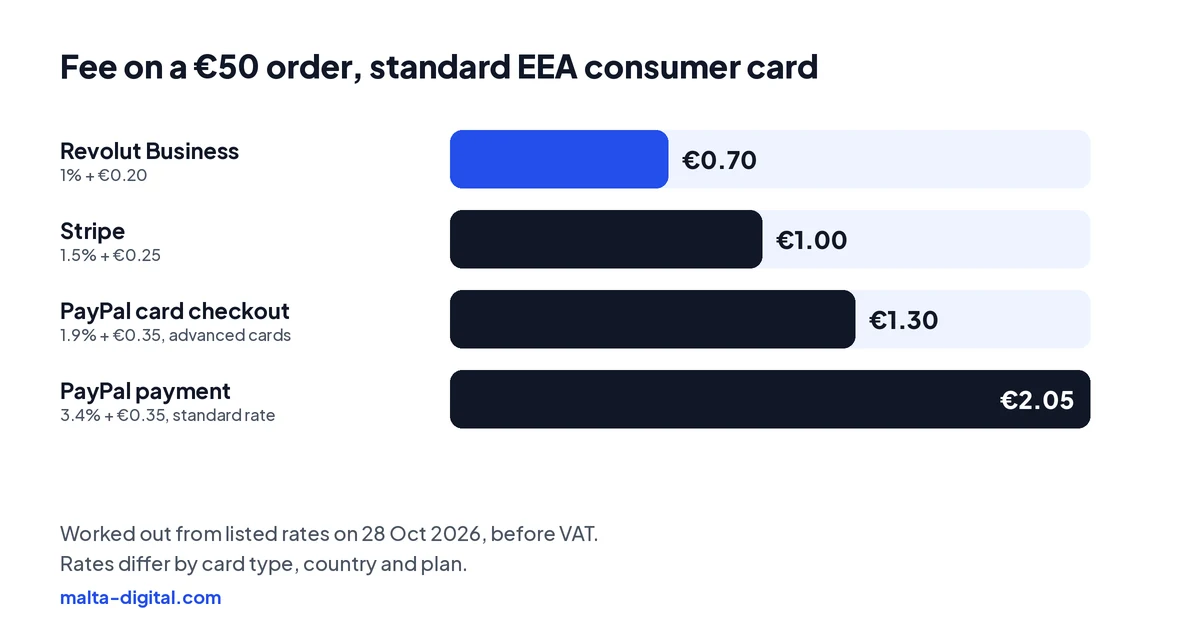
| Stripe | PayPal | Shopify Payments | Revolut Business | Bank gateway (e.g. BOV SmartPay) | |
|---|---|---|---|---|---|
| Best for | Most WordPress, WooCommerce and custom websites | A second payment button, buyers abroad | Shops built on Shopify | Businesses that already bank with Revolut | Businesses that want payments with their Maltese bank |
| Listed fee, standard EEA card | 1.5% + €0.25 (premium EEA cards 2.8% + €0.25) | 3.4% + €0.35 for standard PayPal payments; 1.9% + €0.35 for cards through its advanced card checkout | Depends on your Shopify plan | 1% + €0.20 for EEA consumer cards | Quoted by the bank per business |
| Setup or monthly fee | None | None | Part of your Shopify plan | Check your Revolut Business plan | Ask the bank |
| Watch out for | International cards cost more; €20 dispute fee | Extra fees from senders outside the EEA; dispute and chargeback fees | Shopify adds its own fee if you use a different card gateway | Higher fees for other cards (2.8% + €0.20) | Longer approval; your website must meet the bank’s requirements |
How it works
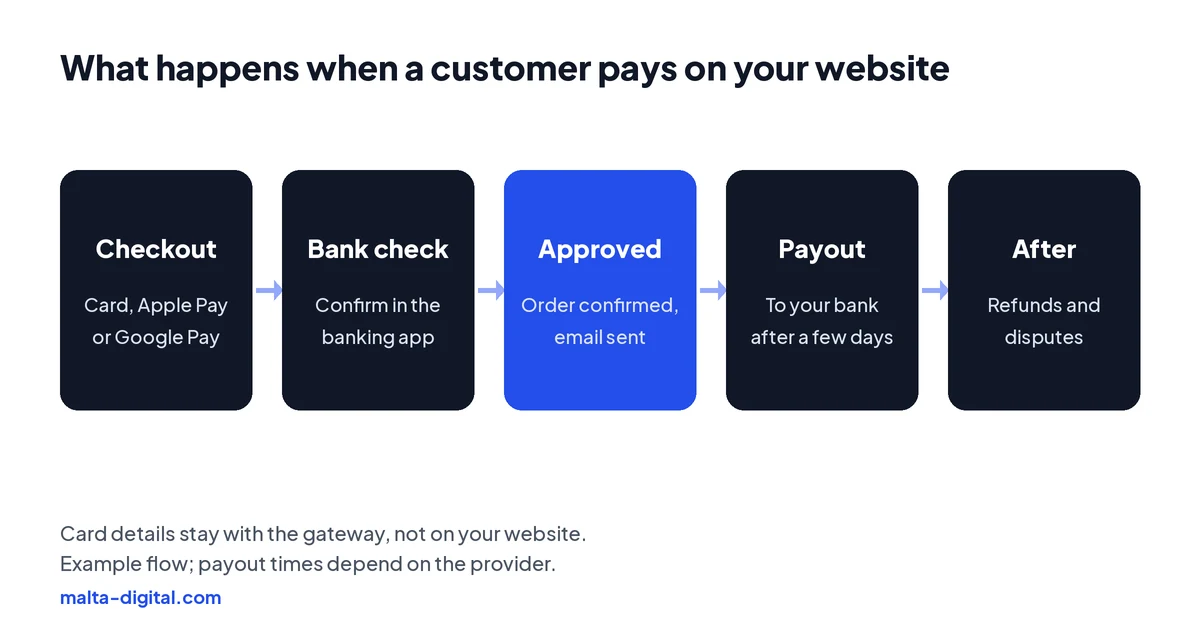
At checkout, the customer chooses how to pay. The gateway shows the card form or the Apple Pay or Google Pay button, so card details never touch your website, which keeps you out of most security paperwork. In the EU, online card payments usually need strong customer authentication, so the customer confirms in their banking app or with their face or fingerprint on the phone. A good gateway handles that step inside the checkout; a bad setup is where many abandoned carts come from.
When the payment is approved, the order is confirmed and the customer gets an email. The money then sits with the gateway for a few days and is paid out to your bank account on a schedule: daily, weekly or next day, depending on the provider and your account. Refunds go back the same way, from the dashboard, and if a customer disputes a payment with their bank, the gateway asks you for proof, such as the order, the delivery confirmation and your terms.
Apply now and tell us what you sell and which platform your website runs on. We’ll tell you which payment setup we’d use and why, or message us on WhatsApp.
What to check
1. Your platform. Make sure the gateway has an official plugin or built-in support for your website platform, including Apple Pay and Google Pay. On Shopify, check the extra fee for third-party gateways on your plan.
2. The fee on a normal EU card. Compare the fee most of your customers will actually pay, then look at premium, business and non-EU cards if you sell to tourists or abroad.
3. Payout time and currency. How many days until the money is in your account, and whether you are paid in euro without a conversion.
4. Refunds and disputes. How refunds work, whether the original fee is returned, and the fee for a dispute. Keep proof of delivery for every order.
5. Who owns the account. Open the account in the business’s name, with an email you control, and add your web designer as a user, never the other way round.
6. What the bank or provider requires on your website. Gateways check your website before approving you. Expect to need clear prices with VAT, delivery and refund policies, terms and conditions, a privacy policy and your business details. Payment links from some banks also have their own rules, such as sending each link only to the intended customer.
7. Accounting. Check that payouts can be matched to orders, or that the gateway connects to your accounting software, so your accountant is not reconciling lump sums by hand.
See it working
A gateway only works if the checkout around it is clear and fast on a phone. This demo shows a boutique store with product pages, brands and bookings, the kind of site we connect to Stripe, PayPal or your bank’s gateway.

Want a store that takes payments without friction? Message us on WhatsApp
How we do it
We start with how you sell: what you sell, the average order, whether customers are in Malta, abroad or both, and whether you need deposits, payment links or a full checkout. Then we recommend the gateway or the pair of gateways that fits, help you open the account in your business’s name, and connect it to the website with Apple Pay and Google Pay, order emails and proper refund handling.
Before launch we test real payments on a phone, including the bank confirmation step, a refund and a failed card, and we make sure the website has the policies the gateway and EU rules ask for. We can also connect the Meta Pixel and Conversions API so you see which ads bring paid orders. Online stores are quoted after a short call; our ready-to-launch websites start from €990, excluding VAT, and do not include a shop or a payment gateway.
A few straight answers
There is no single best one. Shopify Payments suits Shopify stores, Stripe suits most other websites, PayPal is a useful second option, and a bank gateway such as BOV SmartPay suits businesses that want payments with their bank.
Yes. Stripe lists Malta pricing on its website. On 28 October 2026 its standard rate for EEA cards was 1.5% + €0.25 per successful payment, with no setup or monthly fee.
Yes. PayPal has merchant accounts and a fee page for Malta. Its standard rate is higher than a card gateway’s for most payments, so many shops offer it as a second option next to cards.
Yes. Shopify lists Malta as a supported country for Shopify Payments, subject to its verification. If you use a different card gateway on Shopify, Shopify adds its own transaction fee.
No. Stripe, PayPal and banks offer payment links you can send on WhatsApp or email. A website checkout is better once you sell regularly.
The gateway’s own fees are paid to the provider. Connecting payments is part of an online store project, which we quote after a short call; our €990 website does not include a shop.
Keep reading
Shopify, WooCommerce or custom, payments, delivery to Malta and Gozo, VAT and EU rules, and how to get the first sales.

Why Shops say “not available in your region”, and the setup that sells instead: your own store, a Meta catalogue and catalogue ads.

Micro Invest, Digitalise your SME and the smaller schemes, and the rules that catch people out.
A useful first step
We build online stores and connect Stripe, PayPal, Shopify Payments or your bank’s gateway, with Apple Pay, Google Pay, refunds and tracking tested before launch. Quoted after a short call.