
Website legal checklist
Business details, VAT number, prices, privacy notice, cookie consent and terms, checked against the official texts.
Websites · Accessibility
Since 28 June 2025, online shops and other consumer services sold through a website or app in the EU have had to meet accessibility rules under the European Accessibility Act. In Malta the Act is law through Subsidiary Legislation 627.03. Many small businesses are exempt, but not all, and the ones that are covered need more than a widget. This guide explains who the rules apply to, what “accessible” means in practice, what you have to publish and how to check your own site. It follows the Maltese regulations as we read them on 1 November 2026. It is a plain-language guide, not legal advice.
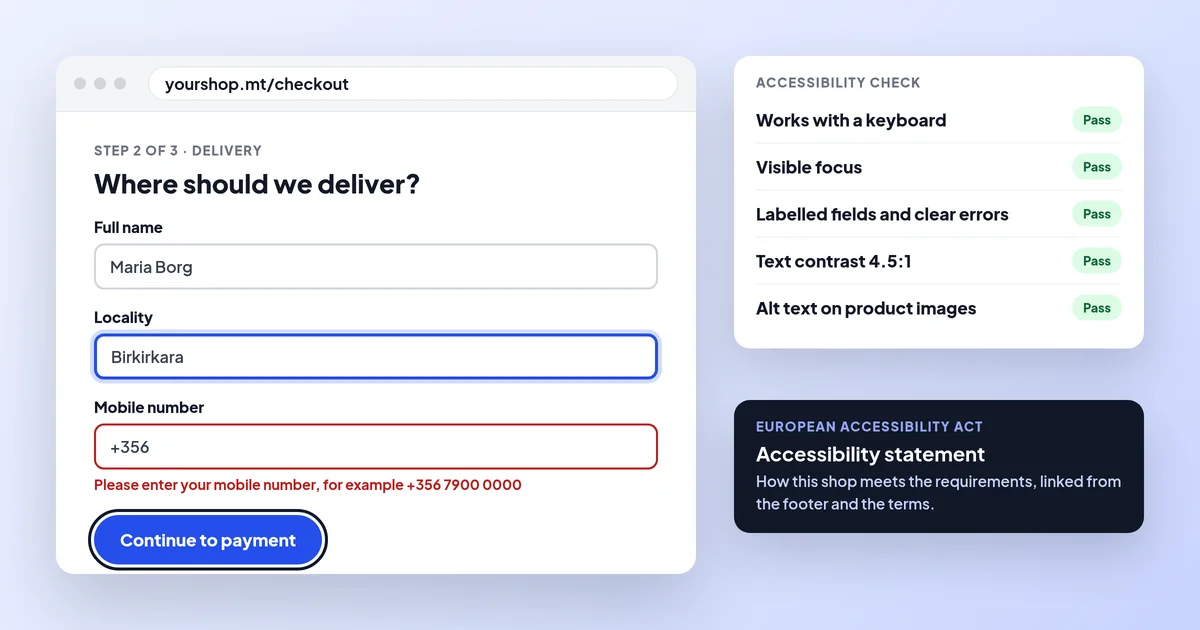
The European Accessibility Act has applied in Malta since 28 June 2025 through S.L. 627.03. It covers online shops and other e-commerce services that sell to consumers, unless the business is a microenterprise with fewer than 10 staff and up to €2 million turnover or balance sheet. Covered sites must be accessible, in practice WCAG 2.1 AA, and publish accessibility information. Malta Digital builds sites with these basics.
The short answer
The European Accessibility Act is an EU directive, Directive (EU) 2019/882, that sets common accessibility requirements for a list of products and services sold to consumers. Malta put it into law with the Accessibility Requirements for Products and Services Regulations, Subsidiary Legislation 627.03, first published as Legal Notice 214 of 2022 and amended in 2026. The rules have applied since 28 June 2025.
For websites, the part that matters most is e-commerce services. The regulations define these as services provided at a distance, through websites and mobile apps, at the request of a consumer, “with a view to concluding a consumer contract”. In plain terms: if consumers can buy from you, or sign up and pay for a service, on your website or app, that is an e-commerce service. The Act also covers consumer banking, e-books, electronic communications, access to audiovisual media and parts of passenger transport such as websites and apps that sell tickets.
The Act is about people with disabilities being able to use the service on equal terms: people who are blind or partially sighted, who cannot use a mouse, who are deaf, or who find complicated pages hard to follow. In practice the fixes also help older customers and anyone using a phone in bright sunlight.
Does it apply to you?
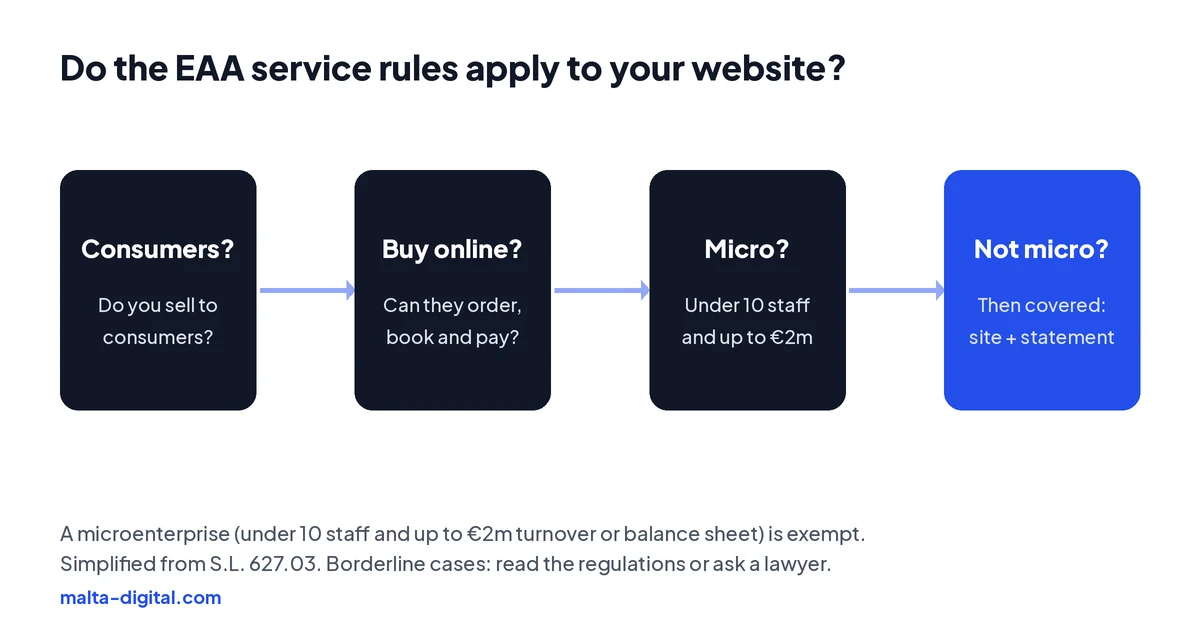
Three questions decide most cases. First, do you sell to consumers? A site that only sells to other businesses is outside the e-commerce definition. Second, can people conclude a contract on the site, by ordering, booking and paying, or signing up? A website that describes your business and has a contact form is generally not an e-commerce service, because no contract is concluded on it. Third, are you a microenterprise?
The Maltese regulations define a microenterprise as one that employs fewer than 10 persons and has an annual turnover, or an annual balance sheet total, of no more than €2 million. Regulation 4(5) says microenterprises providing services are exempt from the accessibility requirements for services. So a small online shop with five staff is exempt from the service rules, while a shop with 12 staff is not. The exemption covers services only: if you make or import products the Act lists, such as payment terminals or e-readers, separate rules apply.
| Your website | Covered by the EAA service rules? |
|---|---|
| Online shop selling to consumers, 10 or more staff | Yes |
| Online shop selling to consumers, under 10 staff and up to €2m turnover or balance sheet | No, exempt as a microenterprise |
| Booking site where customers book and pay online, 10 or more staff | Very likely, as it concludes consumer contracts online |
| Brochure website with a contact form or WhatsApp button | Generally no, as no contract is concluded on the site |
| Shop selling only to other businesses | No, the definition covers consumer contracts |
| Bank, airline, ferry or bus ticketing website or app | Yes, unless a microenterprise, with extra rules for those sectors |
Even if you are exempt, it is worth building an accessible site. It helps every customer, it is easier to do from the start than to fix later, and if you grow past 10 staff the rules will apply to you. Regulation 4(6) also asks the authority to issue guidelines to help microenterprises apply the rules voluntarily.
What “accessible” means
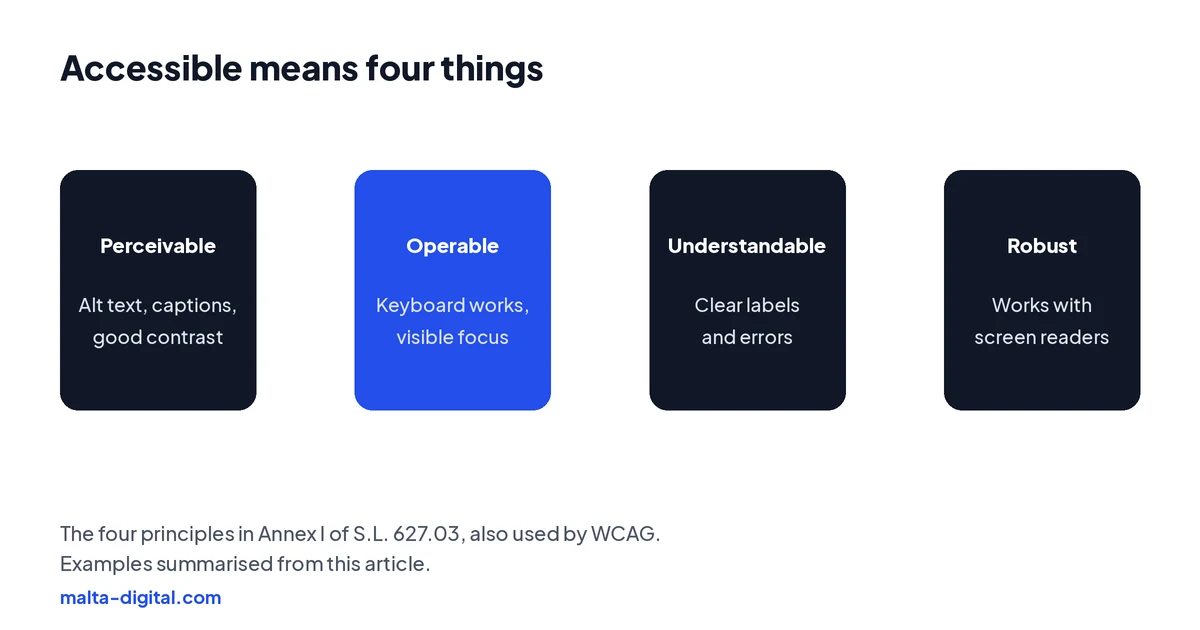
Annex I of the regulations says information about the service, and the website or app itself, must be perceivable, operable, understandable and robust. These are the same four principles behind the Web Content Accessibility Guidelines (WCAG), the standard most of the world uses.
Perceivable means people can take in the content: images have text alternatives, videos have captions, and text has enough contrast with its background. Operable means people can use it without a mouse: every menu, button and form works with a keyboard, focus is visible and nothing flashes. Understandable means clear labels, clear error messages and pages that behave consistently. Robust means the code works properly with screen readers and other assistive tools.
To show that you meet the requirements, the regulations point to harmonised standards: following one gives a “presumption of conformity”. For websites that standard is EN 301 549. According to AccessibleEU, the version currently referenced is v3.2.1, which uses WCAG 2.1 level AA. A newer version, v4.1.1, was published in September 2026 and moves to WCAG 2.2, but when AccessibleEU last reported it had not yet been cited in the EU Official Journal. Building to WCAG 2.2 AA today covers both.
A practical checklist
You do not need to read the whole standard to find the most common problems. These are the checks that catch most issues on small business sites and shops, in the order we usually check them.
| Check | What good looks like | How to test it |
|---|---|---|
| Text contrast | At least 4.5 to 1 for normal text, 3 to 1 for large text | Use a free contrast checker on your brand colours |
| Images | Product and content images have useful alt text; decorative ones are skipped | Look at the alt text in your shop admin for each product |
| Keyboard | Menus, filters, the cart and checkout all work with the Tab and Enter keys | Put the mouse away and try to buy something |
| Visible focus | You can always see which link or field is selected | Tab through the page and watch the outline |
| Forms | Every field has a label; errors say what is wrong and how to fix it | Submit an empty form and read the messages |
| Zoom and phone | Text can be zoomed to 200%, and on a narrow screen the page fits without side scrolling | Zoom in on desktop; check on a small phone |
| Video | Captions on videos with speech; no autoplay with sound | Watch with the sound off |
| Structure | One H1, headings in order, links that say where they go | Run a free automated checker, then check by hand |
| Touch targets | Buttons big enough to tap; at least 24 by 24 pixels in WCAG 2.2 | Use the site on a phone with one thumb |
Automated checkers are a useful start, but they only find part of the problems. A keyboard test and a few minutes with the screen reader built into your phone, VoiceOver on iPhone or TalkBack on Android, will show you what a customer who relies on them experiences. Checkout is the page that matters most: if someone cannot finish an order, nothing else on the site helps.
Proof
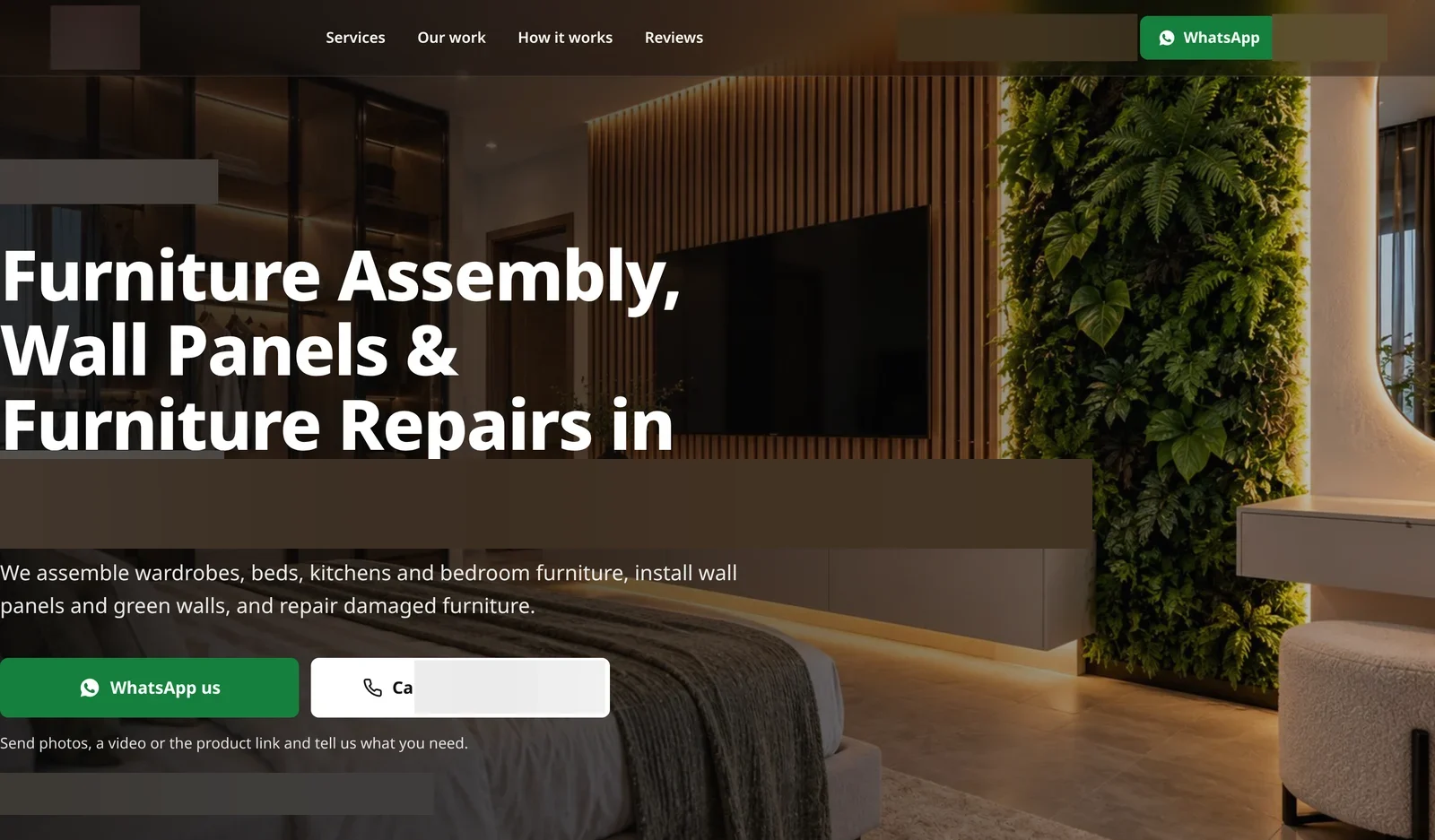
A furniture assembly and installation business came to us with no website, a Facebook page with an empty intro and 858 views in the previous 28 days. We built a mobile website made for quotes on WhatsApp, rebuilt their Facebook and Instagram, and ran Meta ads that open a WhatsApp chat or a phone call.
In the first 28 days, Facebook views went to 154.1K, and €346.75 of ad spend brought 395 WhatsApp taps, 10 phone calls and 1,158 page visits. The website was the place every one of those people landed, so it had to load fast on a phone and make the next step obvious.
Want a website built with these basics from the start? Message us on WhatsApp
Apply now and send us your website address. We’ll tell you whether the EAA is likely to apply and what we’d fix first, or message us on WhatsApp.
What you must publish
Covered service providers have to explain how their service meets the requirements. Regulation 13 and Annex V say this information goes in your general terms and conditions or an equivalent document, and must include a general description of the service in accessible formats, the explanations needed to understand how it works, and a description of how it meets the accessibility requirements. It has to be available to the public in written and oral form, in an accessible way, and kept for as long as the service is offered.
Most shops do this with an accessibility statement page, linked from the footer and from the terms. A good one is short and honest: which standard you aim for, what you have tested, any known problems and when you plan to fix them, and how a customer can contact you if something does not work, by email and by phone.
If making the service fully accessible would be a disproportionate burden or would fundamentally change it, regulation 14 lets a business say so, but only after a documented assessment that must be kept for 5 years, renewed when the service changes, and given to the authority. That route is not available if you received funding to improve accessibility. It is meant for real exceptions, not as a way to skip the work.
Widgets and overlays
Many sites add an accessibility widget, a button that opens a toolbar for bigger text or different colours. In our view, a widget alone does not make a site meet the Act. The requirements apply to the service itself: a toolbar cannot add a missing label to a checkout field, make a menu work with a keyboard or write alt text for your products.
Most of the people the rules protect already have the settings they need on their own phone or computer, such as screen readers, zoom and high contrast. What they need is a site that works with those tools. Fixing the code, the content and the checkout does that; a widget on top of a broken page does not.
Enforcement in Malta
In Malta, the Commission for the Rights of Persons with Disability (CRPD) is the market surveillance authority for these rules. It can check services, ask for the accessibility information and require a business to fix problems. The CRPD and the MCCAA have signed a memorandum of understanding, so the MCCAA’s technical regulations team can support this work.
Penalties are set under the Equal Opportunities (Persons with Disability) Act, Chapter 413, and take into account how serious a failure is and how many people it affects. The regulations also let consumers, and organisations that represent them, take action to make sure the rules are followed. The sensible approach for a covered business is simple: fix what you can now, publish honest information, and keep a record of what you tested.
How we do it
Readable text, good contrast, labelled form fields, buttons that work with a keyboard and proper headings are part of how we build every website anyway, because they help every visitor and they help Google understand the page. For an online shop that the Act covers, we can check the shop against WCAG 2.1 AA before launch, fix what we find and help you write the accessibility statement for you to approve. If you have an existing site, we can review it and tell you plainly whether a fix or a rebuild makes more sense.
Our websites start from €990 for a Professional Website, €2,490 for a Business Website and €4,900 for a Growth Website, excluding VAT. Online shops are quoted separately after a short call.
A few straight answers
Not to the smallest. Microenterprises providing services, with fewer than 10 staff and up to €2 million turnover or balance sheet, are exempt from the service rules. Bigger businesses that sell to consumers online are covered.
The requirements have applied since 28 June 2025, under Subsidiary Legislation 627.03.
Generally no. The rules cover e-commerce services, where a consumer contract is concluded through the site. A brochure site with a contact form usually is not one, but it is still good practice to make it accessible.
The harmonised standard EN 301 549 v3.2.1 uses WCAG 2.1 level AA. A newer version based on WCAG 2.2 was published in September 2026 and is waiting to be cited, so building to WCAG 2.2 AA covers both.
If the Act covers your service, yes in practice: you must publish information on how the service meets the requirements, in your terms or an equivalent document. Most shops use an accessibility statement page linked from the footer.
In our view, no. A widget cannot fix missing labels, keyboard problems or missing alt text. The site itself has to work with the tools disabled people already use.
The Commission for the Rights of Persons with Disability (CRPD) is the market surveillance authority, with technical support from the MCCAA. Penalties are set under Chapter 413.
Keep reading
Business details, VAT number, prices, privacy notice, cookie consent and terms, checked against the official texts.

Shopify, WooCommerce or custom, payments, delivery to Malta and Gozo, VAT and EU rules, and how to get the first sales.

When your site needs a redesign, what to keep, how redirects protect your Google rankings, and what it costs.
A useful first step
Labelled forms, keyboard-friendly menus, good contrast and alt text as standard, and help writing your accessibility statement. Websites from €990, excluding VAT; shops quoted separately.