
Facebook Ad Library for Malta businesses
How to search competitors’ ads, what EU ads reveal about targeting and reach, and what the Library cannot show.
Facebook & Instagram ads · Account help
When Meta restricts or disables a Facebook ad account, your ads stop and Ads Manager shows a warning. Do not open a new account to get around it. Go to Account Quality, which lists the restrictions on your profile, Pages, business portfolio and ad accounts, read the reason, fix the cause, and request a review once with a clear explanation. Most restrictions come from three things: an ad that broke a policy, a payment problem, or signs that the account was hacked. Each one has a different fix.

The short answer
“Restricted” and “disabled” are used loosely, but they describe a few different situations. Your ad account can be disabled, so no ads in it can run. Your personal profile can have advertising restricted, so you cannot run ads anywhere, even in an account you manage for someone else. Your business portfolio can be restricted, which affects everything inside it. And sometimes only an individual ad is rejected while the account is fine.
The first job is to find out which one you are dealing with, because the fix is different for each. A rejected ad is an everyday event and is usually fixed by editing the ad. A disabled account or a restricted profile is more serious and needs a review.
For a Malta business that relies on Facebook and Instagram for bookings, even a few days without ads hurts. That is why it pays to handle it calmly and in the right order rather than trying several things at once.
Find the reason
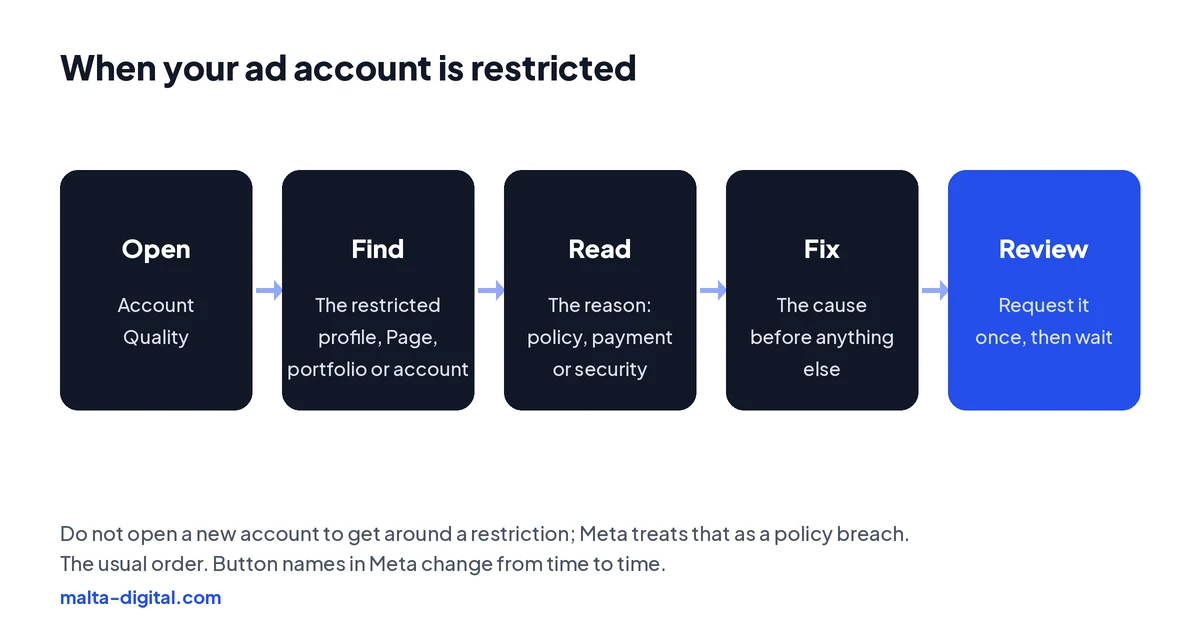
Meta’s Account Quality page, which you reach from Business Settings, Ads Manager or facebook.com/accountquality, lists the restrictions on everything you manage: your profile, your Pages, your business portfolio and each ad account. Click the restricted item and Meta shows the reason it gives, such as a policy, a payment issue or suspicious activity, and whether a review is available.
Read it carefully before you do anything else. The reason is often short and general, but it tells you which path you are on. Take a screenshot of it with the date, because you may need it later and the wording on the page can change.
Check your email and the notifications in Meta Business Suite as well. Meta often sends the details there, sometimes including which ad triggered the problem.
Policy reasons
Ads get rejected, and accounts restricted, when Meta decides an ad breaks its Advertising Standards. Common triggers for small businesses are claims that sound too good to be true, before-and-after images for treatments, wording that points at personal attributes such as “Are you overweight?”, health or weight-loss promises, financial claims, and landing pages that do not match the ad. Ads for property, jobs and credit must also be marked as special ad categories, which in the EU removes age, gender and postcode targeting.
For a single rejected ad, edit it to remove the problem and resubmit, or request a review if you believe Meta got it wrong. For an account restricted because of repeated policy issues, look through every rejected ad, delete or fix the ones that break the rules, and only then request a review of the account.
Clinics, aesthetics businesses and anyone selling supplements or financial products in Malta should be especially careful, because these are the areas where Meta’s automated checks are strictest. Plain, factual wording and real photos are the safest choice.
Payment reasons
If Meta cannot charge your card, your ads stop and the account shows an unpaid balance. If the balance stays unpaid, the account can be disabled. Common causes are an expired card, a card limit, a bank blocking the payment, or a card shared across several ad accounts.
Go to Billing and payments in Ads Manager, check the balance and pay it, either with the same card after talking to your bank or with a new payment method. Once the balance is settled, the ads usually restart on their own. If the account was disabled for payment reasons, settling the balance is normally the first thing to do before asking for a review.
Keep a backup payment method on the account and an eye on your card’s expiry date. It is a boring fix, but it prevents a surprisingly common way of losing a week of ads.
Security reasons
Meta also restricts accounts when it sees signs of a takeover: a login from an unusual place, a new admin added suddenly, a change of payment method followed by large spending, or ads that have nothing to do with your business. Sometimes the account really was hacked; sometimes a legitimate change simply looked suspicious.
If you see ads, admins or charges you do not recognise, act fast. Secure your Facebook login with a new password and two-factor authentication, remove unknown people from your business portfolio and ad account, remove unknown payment methods, and tell your bank about any unauthorised charges. Then follow the steps Meta shows in Account Quality to confirm your identity, which may include an ID check or a video selfie.
Prevent it next time by giving every person who works on your ads their own login with the lowest access they need, rather than sharing one password, and by turning on two-factor authentication for everyone with admin access.
Proof
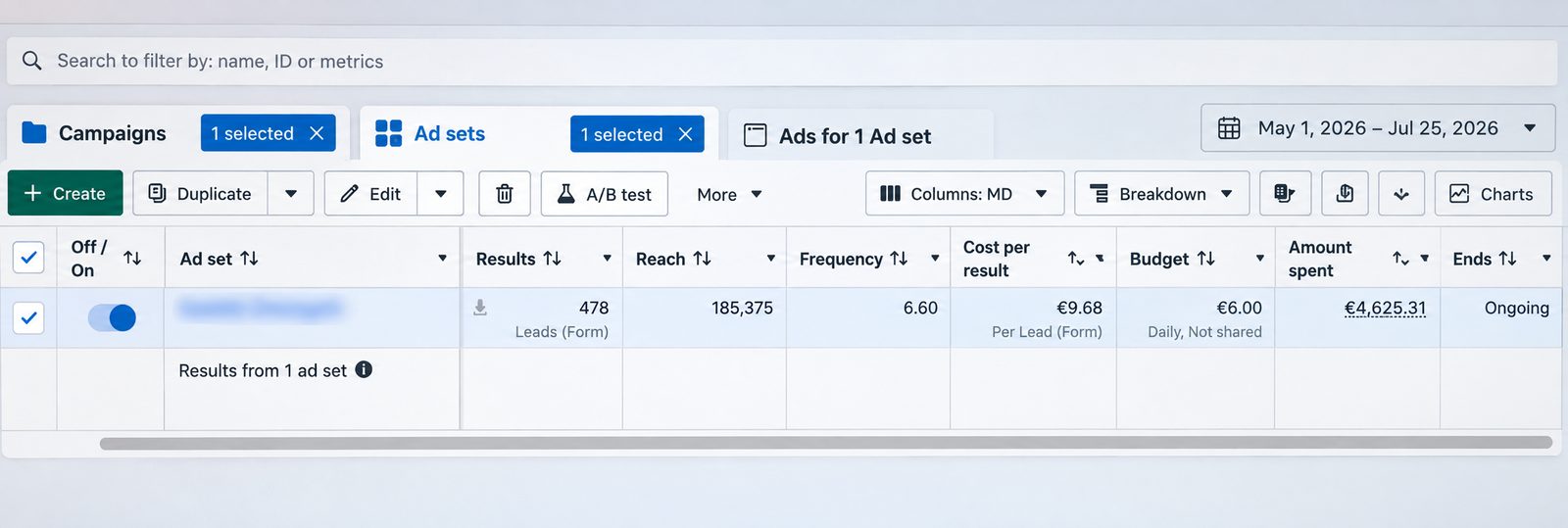
This is a lead generation campaign we ran on Facebook and Instagram from 1 May to 25 July 2026. It brought 478 form leads from €4,625.31 of ad spend, which is €9.68 per lead, on a €6.00 daily ad set budget. The screenshot is straight from Meta Ads Manager, with the ad set name blurred.
Want ads that run steadily and bring enquiries like this? Message us on WhatsApp
Send us a screenshot of Account Quality on WhatsApp. We’ll tell you what the reason means and the order we’d fix it in. Free, no obligation.
Requesting a review
Request the review from Account Quality, on the restricted item. Write a short, factual explanation: what your business does, that you have read the policy, what you changed and that you will follow the rules. If the restriction followed a hack, say what happened and what you have done to secure the account. Attach documents if Meta asks for them, such as a business registration or ID.
Request it once and then wait. Sending many requests does not speed things up, and Meta may only allow one review per decision. Reviews can take anything from a day to a few weeks. Keep your screenshots and the date of the request in case you need to contact Meta support later.
If the review is rejected, Meta’s decision may be final for that asset. At that point the right step depends on the reason and on what Meta allows, so it is worth getting advice before doing anything else.
What not to do
It is tempting to open a new ad account, a new business portfolio or a new profile and carry on. Meta treats that as circumventing its systems, which is itself a policy breach, and it often leads to the new assets, and sometimes the people linked to them, being restricted too. The same applies to buying or borrowing someone else’s ad account.
Do not run the same rejected ad again with small changes either. Meta’s systems look at the claim and the landing page, not just the wording, and repeated rejections make an account-level restriction more likely.
The patient route is slower in the short term and much faster overall: fix the cause, request one review and keep the account clean afterwards.
Preventing it
Most restrictions are avoidable. Keep the ad account, Page and Instagram account in a business portfolio owned by your business, not by a freelancer’s personal profile. Verify your business in Meta’s settings when you are asked. Keep payment details up to date, with a backup card. Give people their own access instead of sharing logins. And read the special ad category rules before advertising property, jobs or credit.
Write ads the way you would explain your service to a customer face to face: what you do, what it costs or how to get a price, and how to book. Avoid promises you could not back up in writing. The ads that stay out of trouble are usually the same ones that build trust with customers.
How we do it
When a client comes to us with a restricted account, we start in Account Quality, find the exact reason, and fix the cause before anything else: the ads, the landing page, the payment method or the access settings. Then we write and submit one review request with the client and, while it is pending, prepare compliant creative so the campaigns can restart as soon as the account is cleared.
For the accounts we run day to day, prevention is part of the job: clean access, factual ads, the right special ad categories and regular checks. Our Meta ads management starts from €1,249 a month plus ad spend, excluding VAT, and the ad account stays in your name.
A few straight answers
Usually for one of three reasons: an ad Meta says broke its Advertising Standards, a failed or unpaid payment, or activity that looked like a hacked account. Account Quality shows the reason.
In Account Quality, which you can reach from Business Settings, Ads Manager or facebook.com/accountquality. Click the restricted item to see the reason and the review option.
Fix the cause first, then request a review once from Account Quality with a short, factual explanation. Pay any outstanding balance if the issue was payment.
Often a day or two, sometimes a few weeks. Send one request and wait; repeated requests do not speed it up.
No. Meta treats it as circumventing its systems, which can get the new account and the people linked to it restricted as well.
Keep assets in your own business portfolio, verify your business, keep payment details current, give each person their own access with two-factor authentication, and write factual ads.
Ours starts from €1,249 a month plus ad spend, excluding VAT.
Keep reading
How to search competitors’ ads, what EU ads reveal about targeting and reach, and what the Library cannot show.

Advantage+ audience, placements and campaign budget, sales and leads campaigns, and when to take control.

Setup, the first message, cost and the free 7-day window, examples and measuring chats that become sales.
A useful first step
We find the reason, fix the cause, handle the review and keep the account healthy, from €1,249 a month plus ad spend, excluding VAT.