Facebook Ad Library for Malta businesses
How to search competitors’ ads, what EU ads reveal about targeting and reach, and what the Library cannot show.
Facebook & Instagram ads · WhatsApp
Click-to-WhatsApp ads are Facebook and Instagram ads with a button that opens a WhatsApp chat with your business, often with a ready-written first message. They suit Malta well, because so many people here already ask for prices, book and order on WhatsApp. You pay Meta for the ad, not for the chat it starts. The results come from what happens next: a reply within minutes, a clear answer and a simple way to book or buy, and a count of how many chats turned into customers.
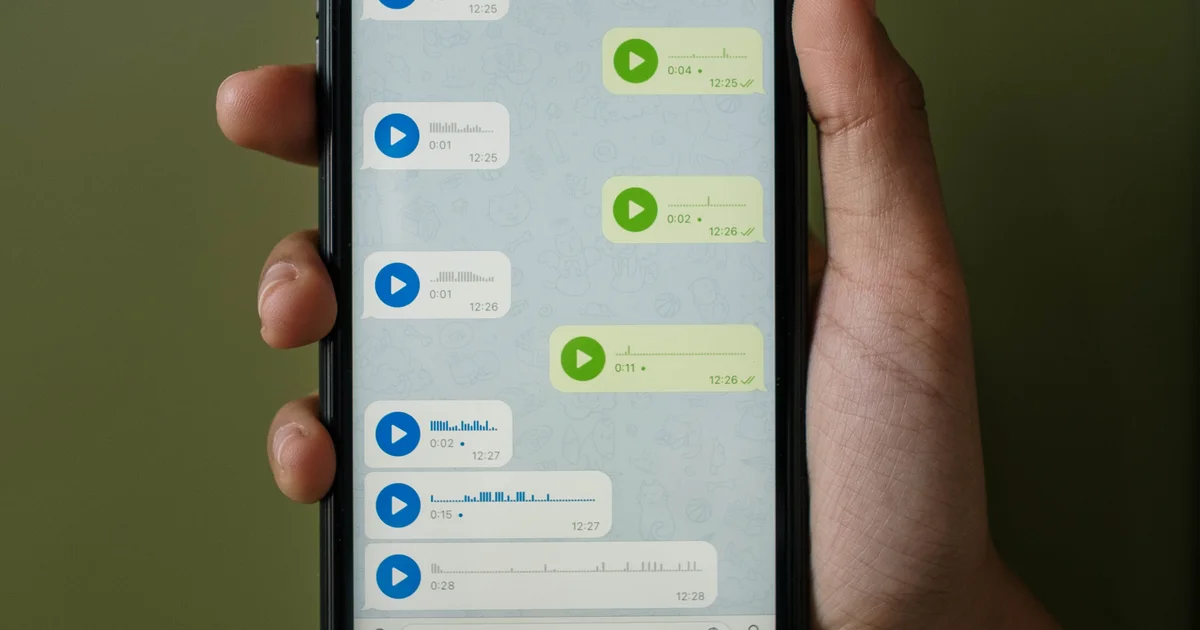
Hi, can I get a price for a deep clean in Birkirkara?
Of course! Is Thursday at 9:00 or Saturday at 14:00 better for you?
The short answer
A click-to-WhatsApp ad looks like any other ad in the Facebook or Instagram feed, in Stories or in Reels. The difference is the button. Instead of opening a website or a form, “Send WhatsApp message” opens WhatsApp on the person’s phone, already in a chat with your business, with a first message such as “Hi, I’d like a quote for a new kitchen” ready to send. One tap, and the conversation has started.
For many Malta businesses this is the most natural ad there is. People here message a plumber, a salon, a restaurant or a car hire company on WhatsApp without thinking twice, and many would rather do that than fill in a form or call during working hours. The ad simply removes the step of finding your number.
The ad does not close the sale for you. It starts conversations, and you or your team still need to answer them well. A click-to-WhatsApp campaign is only as good as the person, or the system, holding the phone.
Who they suit
Click-to-WhatsApp ads work best when customers have a question before they buy and the answer is quick: what does it cost, are you free on Saturday, do you deliver to Gozo, can you see a photo of the problem. Trades, salons, restaurants, tour and boat-trip operators, car hire, cleaning services, tutors and many small shops close most of their sales this way already.
A lead form is often better when you need a few details before you can help, such as a budget, a date or a property type, and when your team calls people back rather than chatting. A website is better when people can buy straight away, as in an online shop, or when the decision needs more reading, as with a large renovation or a course of treatment.
The mistake is choosing WhatsApp because it is fashionable and then not answering it. If nobody can reply until the evening, a form that collects a phone number may lose fewer customers than a chat left waiting.
| Click-to-WhatsApp ad | Instant form (lead ad) | Website | |
|---|---|---|---|
| Best when | Customers have a quick question before buying | You need a few details before you can help | People can buy or book straight away |
| What the customer does | Sends a ready-written WhatsApp message | Sends a form with pre-filled details | Visits your site and buys or enquires |
| What your team must do | Reply within minutes, ideally | Call or message back the same day | Keep the site fast and checkout simple |
| Examples from this article | Trades, salons, restaurants, tours, car hire, small shops | Budgets, dates or property types to collect | Online shops; larger, considered purchases |
Setup
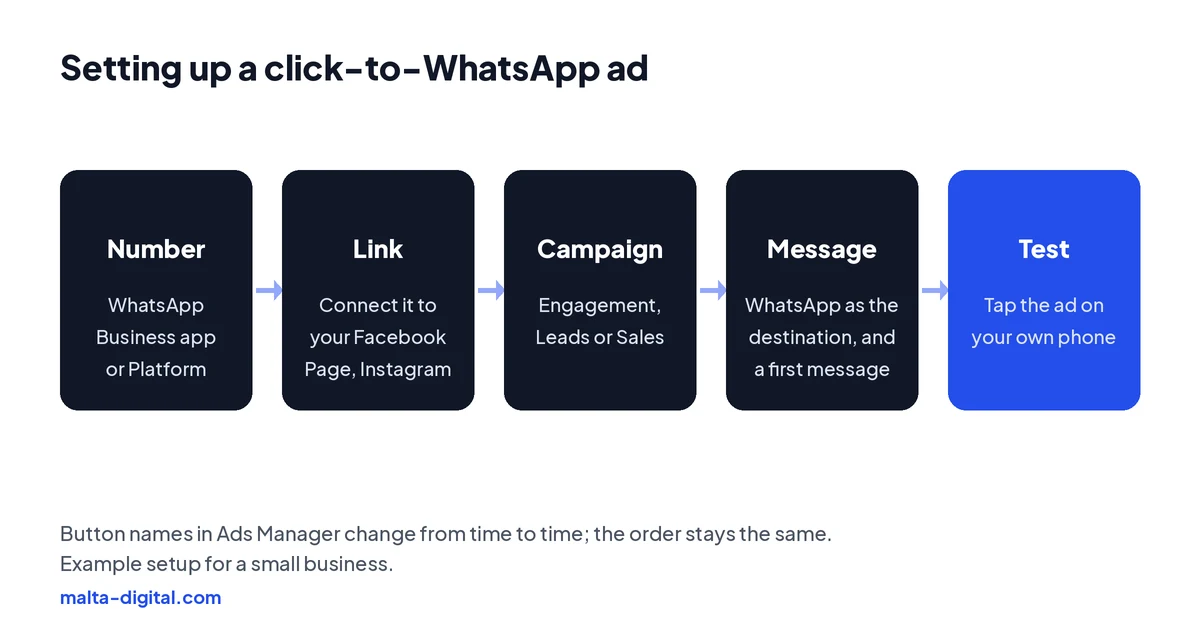
You need three things in place first: a WhatsApp Business number, either in the free WhatsApp Business app or on the WhatsApp Business Platform, a Facebook Page for your business, and, if you want the ads on Instagram too, your Instagram account connected to the same business. Link the WhatsApp number to your Facebook Page in the Page’s linked accounts settings, where WhatsApp sends a code to confirm the number is yours.
In Ads Manager, choose the goal that matches what you want from the chats, usually Engagement for conversations, Leads when the chat is an enquiry or Sales when people buy in the chat. Then set the conversion location to a messaging app and pick WhatsApp. You can also start a simple ad from the WhatsApp Business app itself, under its business tools, which suits a sole trader who wants something quick. Ads Manager gives you far more control over audiences, creative and measurement.
Last, write the first message and test it. In the ad’s message settings you can set the pre-filled text people send and, in some setups, a greeting and a few ready-made questions they can tap. Then preview the ad on your own phone, tap the button and check that the chat opens with the right number and the right text.
The first message
The pre-filled message decides how good the first minute of the chat is. A vague “Hello” gives you nothing to work with. “Hi, I’d like to book a table for Saturday” or “Hi, can I get a price for an air conditioner service in Mosta?” tells you exactly what the person wants, so your reply can be useful straight away. Match the message to the ad: one ad, one offer, one first message.
Then prepare your replies before the ad goes live. In the WhatsApp Business app, set a greeting message for new chats, an away message for outside your hours with the times you will be back, and quick replies for your common answers, such as prices, opening hours, delivery areas and how to book. Labels help you sort chats into new, quoted, booked and paid, which you will need later when you measure the results.
The tone matters too. Write like a helpful person in your shop, not a call centre script. Answer the question that was asked, give a price or a clear price range if you can, and end with one simple next step, such as two times to choose from or a link to pay a deposit.
Cost
The main cost is the ad itself. Meta charges for the ads you run, based on your budget and on how many people see them, and there is no extra charge from Meta for each chat the ad starts. In Malta, a small local business can test click-to-WhatsApp ads with a modest daily budget; what matters is running them long enough to see how many chats turn into customers.
The messages themselves are free in the WhatsApp Business app. Larger businesses that use the WhatsApp Business Platform, usually through a provider or a custom system so several people can answer one number, pay Meta per message for some message types. Chats that start from a click-to-WhatsApp ad get a special deal: if the person messages you from the WhatsApp app on their phone and you reply within 24 hours, your reply opens a free entry point window. Since late September 2026 that window can stay open for up to 7 days, and during it Meta does not charge for your marketing, utility, authentication or service messages. Replies written by Meta’s own AI business agent are still charged.
After the window closes, the normal platform rules apply again, including the rule that you can only send a free-form reply within 24 hours of the customer’s last message; after that you need an approved template. Check Meta’s current pricing page before you plan a large campaign, because the details change from time to time.
The journey
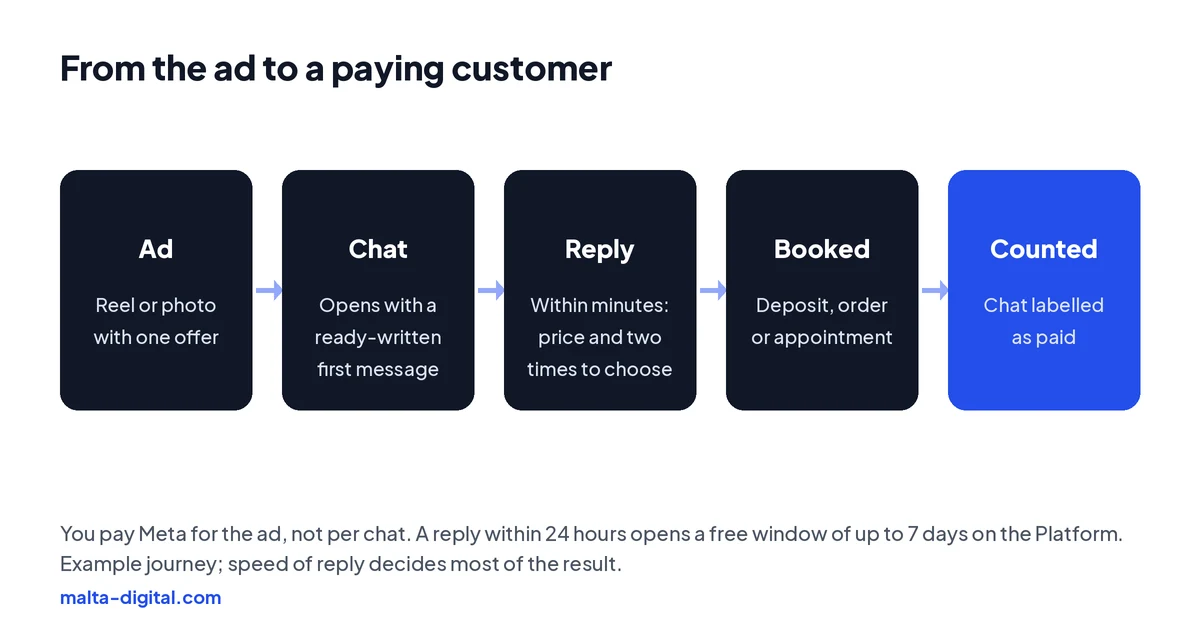
Follow one customer through the whole journey. A woman in Birkirkara sees a Reel of a deep-clean service on Sunday evening, taps the button and sends “Hi, how much for a deep clean of a three-bedroom flat?” If she gets a friendly answer with a price and two dates within ten minutes, she very likely books. If the answer comes on Monday afternoon, she has already messaged two other companies from their ads.
Speed is the single biggest factor in whether these ads pay. Decide who answers the chats and when, keep the phone or shared inbox in sight during the hours the ads run, and schedule the ads for the hours you can reply. It is better to run ads only from 9am to 8pm and answer every chat quickly than to run them all night and answer in the morning.
When the volume grows beyond one phone, move to a shared inbox on the WhatsApp Business Platform so several people can answer from the same number, with automatic confirmations and reminders once a booking is made.
Send us your Facebook page or Instagram on WhatsApp. We’ll show you the ad, the first message and the replies we’d set up. Free, no obligation.
Proof
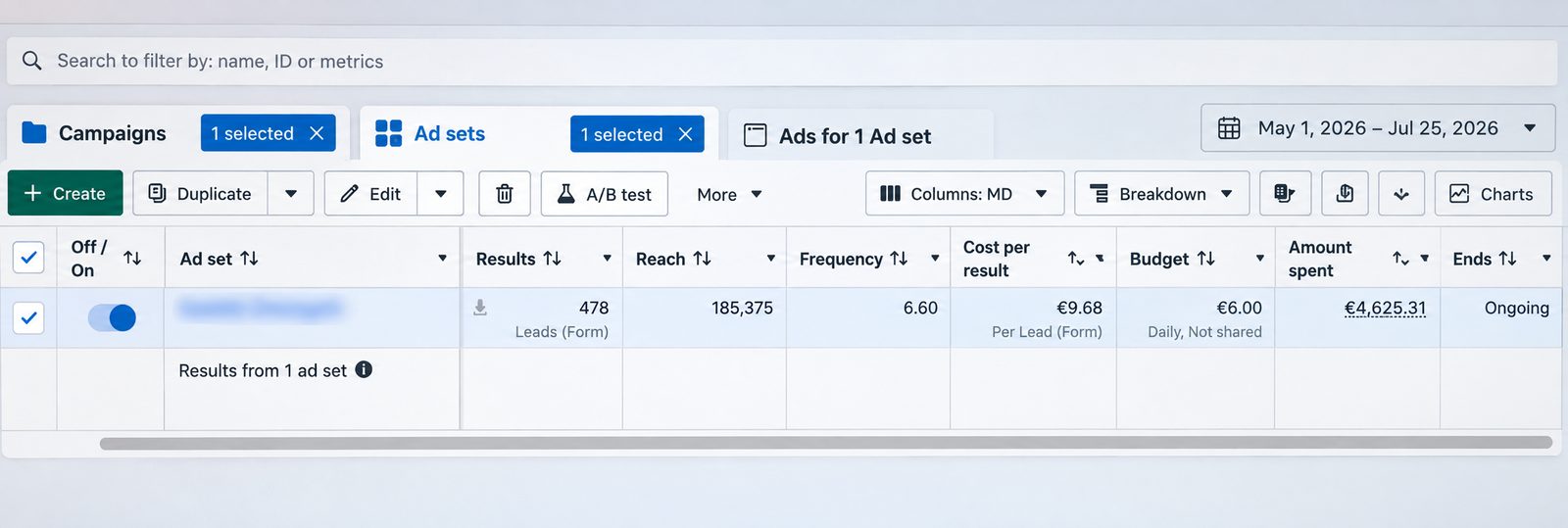
This is a lead generation campaign we ran on Facebook and Instagram from 1 May to 25 July 2026. It brought 478 form leads from €4,625.31 of ad spend, which is €9.68 per lead, on a €6.00 daily ad set budget. The screenshot is straight from Meta Ads Manager, with the ad set name blurred.
Want enquiries like this coming into your WhatsApp? Message us on WhatsApp
Examples
A restaurant in St Julian’s shows a short video of a busy Friday terrace with the first message “Hi, I’d like to book a table for this weekend”, and replies with available times and the number of guests. A trades business shows a finished bathroom in Żabbar with “Hi, can I send you photos for a quote?”, so the customer sends pictures and the quote can be rough-priced in the chat.
A tour or boat-trip operator runs English ads for tourists already on the island, showing the boat and the Comino route, with “Hi, do you have places tomorrow?” as the first message. A shop shows three bestsellers with prices and “Hi, is this available for delivery to Gozo?”, then sends a payment link in the chat. A salon promotes one service and offers two slots in the first reply.
In each case the ad shows one thing, the first message asks one clear question and the reply moves the customer one step closer to paying. That pattern matters far more than the industry.
Measuring
Ads Manager reports “messaging conversations started”, which is useful but is not a result. A hundred conversations that end with “too expensive, thanks” are worth less than twenty that end in bookings. The number that matters is the cost of each customer, so you need to know which chats bought.
With the free app, use labels: mark each chat from the ads as new, quoted, booked or paid, and count them each week. It takes a few minutes and tells you more than any report. With the WhatsApp Business Platform, a CRM or booking system can record the outcome automatically and send it back to Meta through the Conversions API, so Meta can learn which kinds of people actually buy and find more of them.
Compare like with like. Judge a click-to-WhatsApp campaign against a lead form or website campaign on cost per customer, not on cost per chat or per lead, and over a few weeks rather than a few days.
How we do it
We start with your offer and the questions customers ask you on WhatsApp today. Then we plan the ads, write the pre-filled messages and suggested replies, set up the campaigns with the right goal and schedule, and test every ad on a real phone before it goes live. Where it helps, we connect WhatsApp to your CRM or booking system so the chats and their outcomes are recorded automatically.
Each week we report conversations, bookings or sales and the cost of each, and change the ads or the first messages that are not working. Our Meta ads management starts from €1,249 a month plus ad spend, excluding VAT, and the ad account and WhatsApp number stay in your name.
Common mistakes
Running the ads when nobody can reply. Using a personal WhatsApp number that only one person can see. A vague pre-filled message. Replies that ask five questions before giving any answer. No price, not even a range, so every chat starts with a negotiation. Ads that promote everything at once, so the chat has no focus. And judging the campaign on the number of chats instead of the number of customers.
The costliest mistake is forgetting the people who did not book straight away. Someone who asked for a price and went quiet is still interested. A polite follow-up a day or two later, within WhatsApp’s rules, often wins back a share of them at no extra ad cost.
A few straight answers
Facebook and Instagram ads with a button that opens a WhatsApp chat with your business, usually with a ready-written first message the customer can send in one tap.
You pay Meta for the ads, based on your budget. Meta does not charge per chat started. Messages are free in the WhatsApp Business app; on the Business Platform some messages are charged, but chats from these ads get a free window.
On the WhatsApp Business Platform, if someone messages you from a click-to-WhatsApp ad on their phone and you reply within 24 hours, Meta does not charge for your messages to them for up to 7 days. Meta AI agent replies are still charged.
No. The free WhatsApp Business app works with click-to-WhatsApp ads. The Business Platform (API) helps when several people need to answer one number or you want automation.
Yes. The same campaign can show the ads on Facebook and Instagram once your WhatsApp number and Instagram account are connected to your business.
Label each chat as new, quoted, booked or paid and count them weekly, or record outcomes in a CRM and send them back to Meta through the Conversions API.
Ours starts from €1,249 a month plus ad spend, excluding VAT.
Keep reading
How to search competitors’ ads, what EU ads reveal about targeting and reach, and what the Library cannot show.

Find the reason in Account Quality, fix policy, payment or security issues, and request a review that works.
Advantage+ audience, placements and campaign budget, sales and leads campaigns, and when to take control.
A useful first step
We plan the ads, write the first messages and replies, and track which chats buy, from €1,249 a month plus ad spend, excluding VAT.