
Facebook Ad Library for Malta businesses
How to search competitors’ ads, what EU ads reveal about targeting and reach, and what the Library cannot show.
Facebook & Instagram ads · Retargeting
Retargeting ads show your Facebook and Instagram ads to people who already know you: website visitors, people who watched your videos or messaged your page, and past customers. Most people in Malta look at a shop, a clinic or a quote more than once before they buy, so retargeting is often the cheapest way to turn that interest into sales. It works best as a small, well-planned part of your ads, with a different message for each step.

The short answer
Someone looks at a sofa on your website on Tuesday evening, gets distracted and closes the tab. On Thursday, while scrolling Instagram, they see that same sofa again, with a line about free delivery across Malta and Gozo. That is retargeting. Meta calls the groups of people you can show ads to again custom audiences, and you build them from your website, your Facebook Page, your Instagram account, your videos, your lead forms and your customer list.
It works because very few people buy on their first visit. A family in Naxxar comparing kitchen quotes, a couple planning a boat trip around Comino weeks before they fly in, a shopper in Sliema waiting for payday: they all leave and come back. Retargeting makes sure that when they are ready, your business is the one in front of them, not the competitor they found next.
What retargeting cannot do is create interest from nothing. It only works when enough new people are already visiting your site or engaging with your content. That is why it is one part of a Meta ads plan, alongside the campaigns that find new customers, and never the whole plan.
The audiences
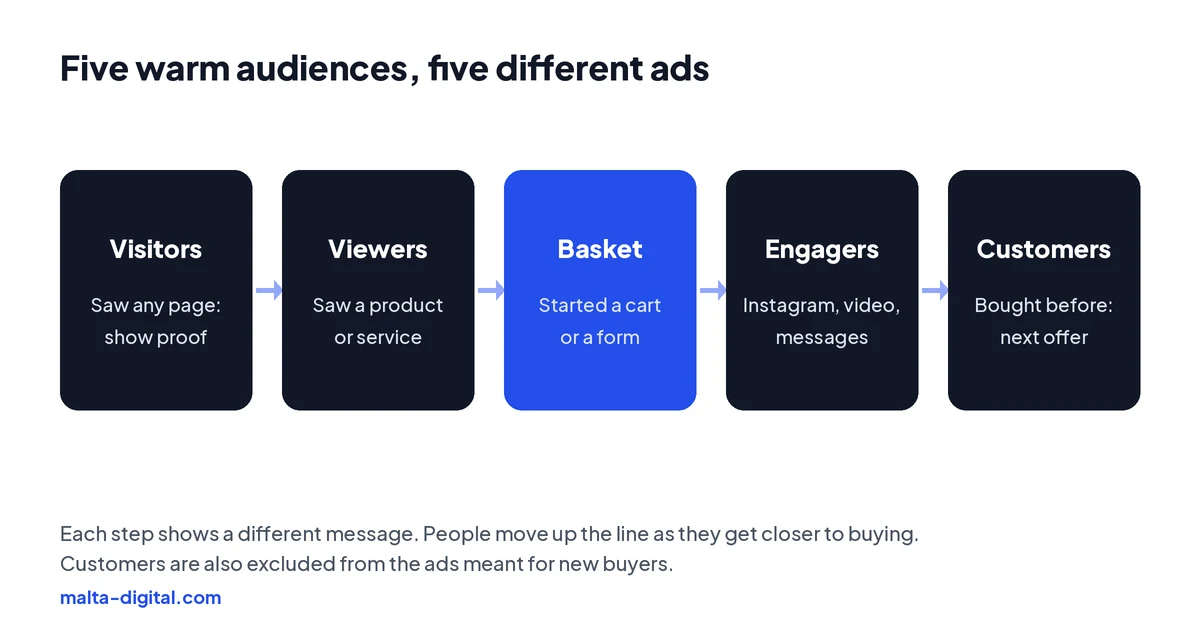
Website audiences come from the Meta Pixel and the Conversions API. You can include everyone who visited, people who viewed a particular product or service page, or people who added to cart or started a form, and keep them for up to 180 days. Engagement audiences come from activity inside Meta’s apps: people who engaged with your Facebook Page or Instagram account, watched a share of your videos, opened your lead form or sent you a message. These can be kept for up to 365 days.
Customer lists are uploaded from your own records, such as past buyers or members, and Meta matches them to accounts. You can use them to offer something new to existing customers, or to exclude them from ads meant for first-time buyers. A list has no rolling window: it stays as uploaded until you replace it. Only upload people whose data you are allowed to use this way, and say so in your privacy policy.
For many small businesses in Malta, the engagement audiences are the hidden gold. A café, a salon or a gym often has far more people watching its Reels than visiting its website, and those people already know the place. Building audiences from Instagram engagement gives you a warm group large enough to retarget, even when your website traffic is modest.
| Audience | Built from | Keep for up to | Ad that suits it |
|---|---|---|---|
| Website visitors | Meta Pixel and Conversions API | 180 days | Proof, reviews and why choose you |
| Product or service viewers | Page or product view events | 180 days | Catalogue ads with the items they viewed |
| Basket or form started | Add-to-cart or form events | 180 days | An answer to the reason they left |
| Engagers | Facebook Page, Instagram, video, lead form or messages | 365 days | Short video, proof and a WhatsApp button |
| Past customers | Your customer list or purchase events | List: until replaced | The next service or product, or exclude them |
Timing
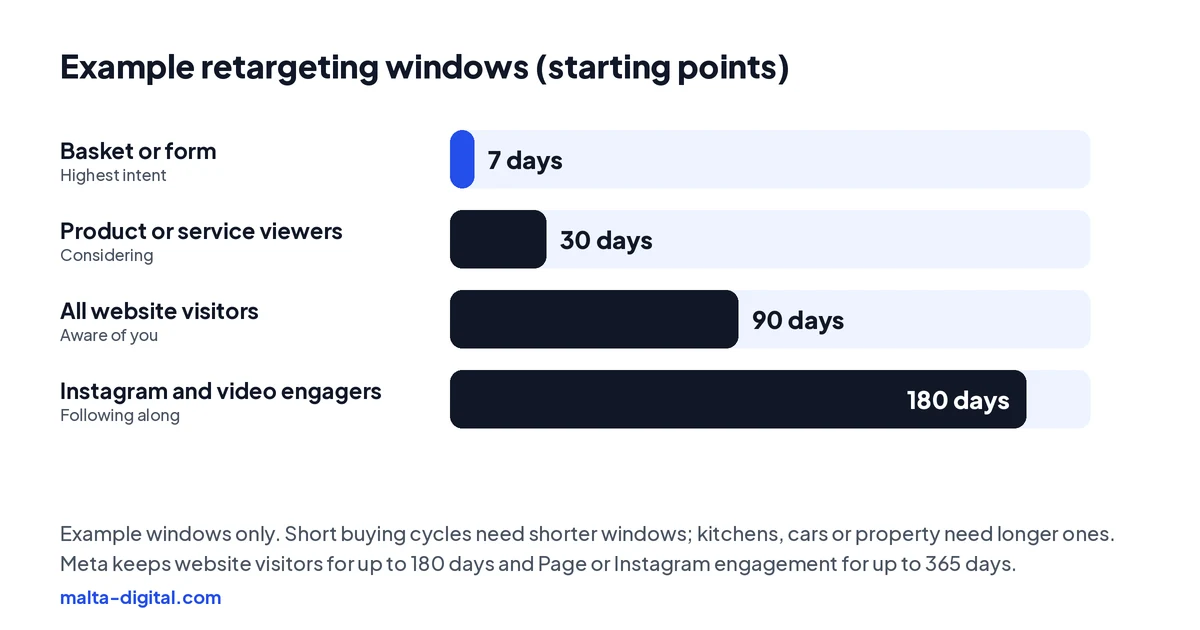
The closer someone came to buying, the shorter the window should be. A person who added a dress to the basket yesterday is worth reminding this week; three months later, the moment has passed. A person who read your services page has a longer, slower decision, so a 30 to 90 day window fits. Custom audiences update every day: people join when they take the action and drop out when it falls outside the window, so you set them once and they stay current.
Match the windows to your buying cycle. A restaurant or a takeaway decides in hours, so short windows make sense. Kitchens, cars, property, weddings and private healthcare take weeks or months, so longer windows are worth it. The common mistake is one big “all visitors, 180 days” audience with one ad, which mixes people who bought last week with people who barely remember you.
The ads
Match the message to the step. People who only visited need a reason to trust you: reviews, real photos of your work, a short video of your team or your shop, and an answer to the question they probably had. People who looked at a specific product respond to catalogue ads (Meta’s Advantage+ catalogue ads, once called dynamic product ads), which show each person the exact items they viewed with the current price.
People who started a basket or a form usually left for a reason. Answer it in the ad: delivery times to Gozo, pick-up options, payment methods, returns, what happens after they enquire. A discount is one option, not the default; if every abandoned basket earns a code, some customers learn to wait for it. Past customers are a different conversation altogether: the next service, a refill, the new season’s range or a reason to come back.
For service businesses, the best retargeting ad is often proof plus an easy next step. A kitchen fitter shows a finished job in Mosta and a WhatsApp button. A clinic explains what happens at a first consultation. A tour operator shows the boat, the crew and the sea on the actual route. Short vertical video works well for all of them, because it feels like a second look rather than a sales pitch.
Proof
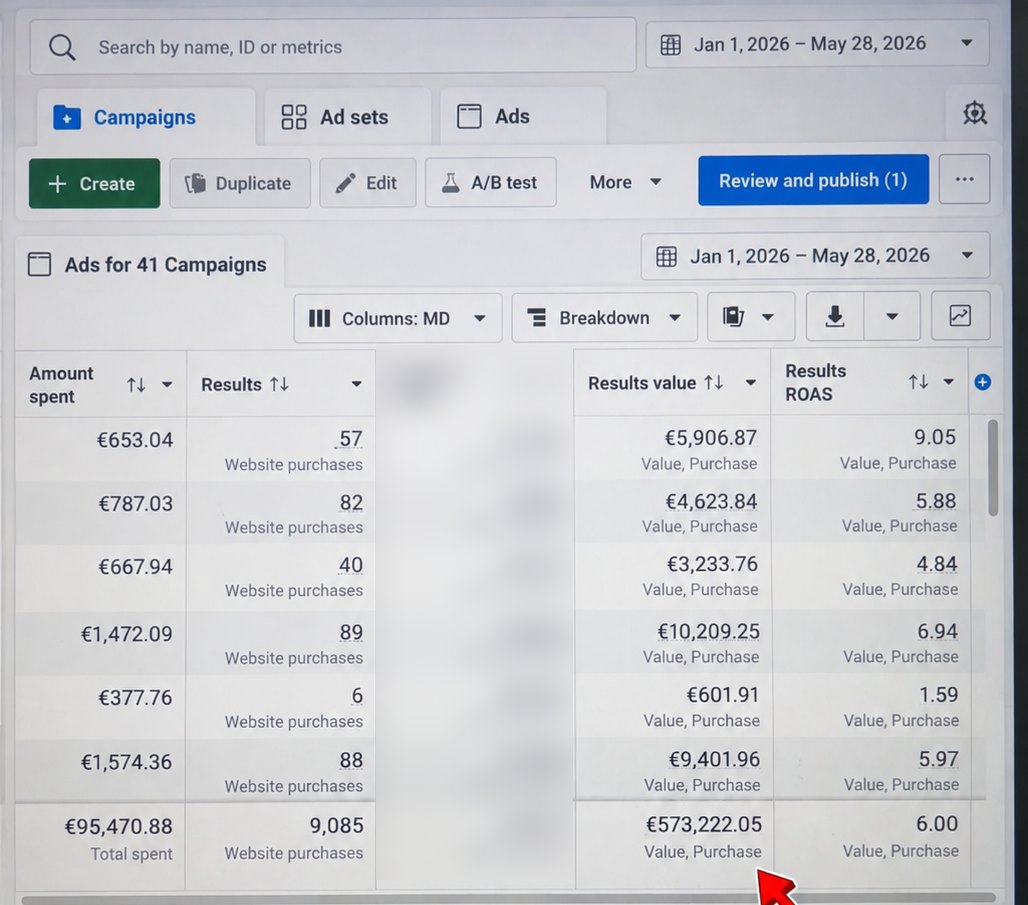
From 1 January to 28 May 2026, an online store we ran ads for spent €95,470.88 on Facebook and Instagram. Meta Ads Manager tracked 9,085 website purchases worth €573,222.05, an average ROAS of 6.00.
Want more of your website visitors to come back and buy? Contact us
Setting it up
Start with tracking. Install the Meta Pixel and the Conversions API, and make sure the key events fire: product or service views, add to cart or form started, lead and purchase. Then open Audiences in Ads Manager and create a custom audience for each step, choosing the source, the event and the window. Use a Sales campaign for an online shop and a Leads campaign for enquiries.
In Malta and the rest of the EU, the Pixel should only run after a visitor accepts marketing cookies, so your audiences will always be smaller than your visitor numbers. That is normal. The Conversions API helps you send the events Meta is allowed to receive more reliably. Meta also advises waiting until a website audience has several hundred people before using it; a small Malta site may need to combine website visitors with Instagram engagers to get there.
One setting catches many people out. With Advantage+ audience switched on, Meta treats your custom audience as a suggestion and may show the ad to people outside it. If you want an ad shown only to warm people, switch that ad set to the original audience options. Exclusions are different: when you exclude past buyers, Meta respects that in both modes.
Send us your website or ad account on WhatsApp. We’ll check your Pixel, your audiences and what your retargeting shows. Free, no obligation.
Budget
Warm audiences are small, so they need small budgets. If you put too much money behind a few thousand people in Malta, the same people see the same ad again and again, frequency climbs, results fall and some people get annoyed. As an example starting point, many accounts keep a small share of the budget, often somewhere between a tenth and a fifth, for retargeting, and spend the rest finding new people who will become tomorrow’s warm audience.
Watch the frequency column in Ads Manager. When the same people see an ad many times a week and results drop, refresh the creative or shorten the window. Meta’s Advantage+ sales campaigns mix new and existing customers automatically and no longer have the old budget cap for existing customers, so if you want firm control over how much goes to warm audiences, run them as their own ad set or campaign and exclude them elsewhere.
Services too
Retargeting is not only for online shops. A business that sells through enquiries has warm audiences too: people who opened your lead form but did not send it, watched most of a video, messaged your page or visited your pricing page. Meta lets you build an audience of people who opened a lead form without submitting it, which is one of the most valuable groups an enquiry-led business has.
For these businesses the follow-up ad should make the next step easier, not louder. Show a short answer to a common question, a real result, or a simpler way to get in touch, such as a WhatsApp button instead of a long form. Then make sure someone replies quickly, because a warm lead who finally sends a message and waits a day for an answer is back to cold.
How we do it
We start by checking the tracking and the cookie consent, because a retargeting audience is only as good as the data behind it. Then we build audiences for each step of your customer’s decision, write a different ad for each one, exclude recent buyers and set sensible windows for your buying cycle. Every week we check frequency, refresh tired creative and look at total sales or enquiries, not just the retargeting campaign’s own numbers.
Retargeting is part of every Meta ads plan we run, alongside the campaigns that find new customers. Our Meta ads management starts from €1,249 a month plus ad spend, excluding VAT, and the ad account stays in your name.
Common mistakes
Showing ads to people who already bought, because nobody excluded them. One ad for every audience, so a returning customer and a first-time visitor see the same message. Windows that are far too long for a fast decision. Starting retargeting before the site has enough visitors, then deciding “it does not work” after a week. And forgetting that warm audiences are small on an island, so the same ad burns out quickly.
The subtle one is judging retargeting by its ROAS alone. Warm audiences always look good in Ads Manager, partly because some of those people would have bought anyway. Look at your total sales and enquiries when you change the retargeting budget, not just the campaign’s own figures.
A few straight answers
Ads shown to people who already know your business, such as website visitors, video viewers, people who messaged your page and past customers.
Install the Meta Pixel and the Conversions API, create a website custom audience in Ads Manager, and use it in a Sales or Leads campaign.
Website custom audiences can keep people for up to 180 days. Facebook Page and Instagram engagement audiences can keep them for up to 365 days.
Yes, when enough people visit your site or engage with your content. Smaller businesses often combine website visitors with Instagram engagers to build a usable audience.
Yes, with consent. In Malta and the rest of the EU, the Pixel should only run after a visitor accepts marketing cookies, and your privacy policy should explain how you use the data.
Ours starts from €1,249 a month plus ad spend, excluding VAT.
Keep reading
How to search competitors’ ads, what EU ads reveal about targeting and reach, and what the Library cannot show.

Find the reason in Account Quality, fix policy, payment or security issues, and request a review that works.

Advantage+ audience, placements and campaign budget, sales and leads campaigns, and when to take control.
A useful first step
We set up the tracking, the audiences and a different ad for each step, then run them, from €1,249 a month plus ad spend, excluding VAT.