
Facebook Ad Library for Malta businesses
How to search competitors’ ads, what EU ads reveal about targeting and reach, and what the Library cannot show.
Facebook & Instagram ads · Advantage+
Meta Advantage+ is the name for the automation inside Ads Manager. When you create a Sales, Leads or App campaign today, Advantage+ is switched on by default: Meta chooses who sees your ads, where they appear and how the budget is split, within the limits you set. For most businesses in Malta it works well, because the island is a small market where broad audiences make sense. It works best when you give it the right goal, honest tracking and strong creative, and keep a few controls such as location, minimum age and exclusions firmly in your own hands.

The short answer
For years, running Facebook ads meant making dozens of small decisions yourself: which interests to target, which age range, whether to show the ad on Instagram Stories or the Facebook feed, and how much to spend on each ad set. Advantage+ is Meta’s way of taking most of those decisions off your hands. You tell Meta what you want, such as purchases on your website, leads from a form or chats on WhatsApp, and its delivery system decides the rest in real time, using what it knows about who is likely to act.
The name appears in many places, which is why it confuses people. There is Advantage+ audience, Advantage+ placements, Advantage+ campaign budget, Advantage+ creative and Advantage+ catalogue ads, and on top of those there are Advantage+ sales and leads campaigns. They are not separate products you buy. They are settings, and in a new Sales, Leads or App campaign the first three are already on when you start.
The honest view is that Advantage+ is neither magic nor a trap. It is very good at finding buyers when Meta can see who buys. It is poor at guessing what you meant when your tracking is broken, your goal is wrong or your ads are weak. The skill now is less about targeting and more about feeding the system good information.
The three switches
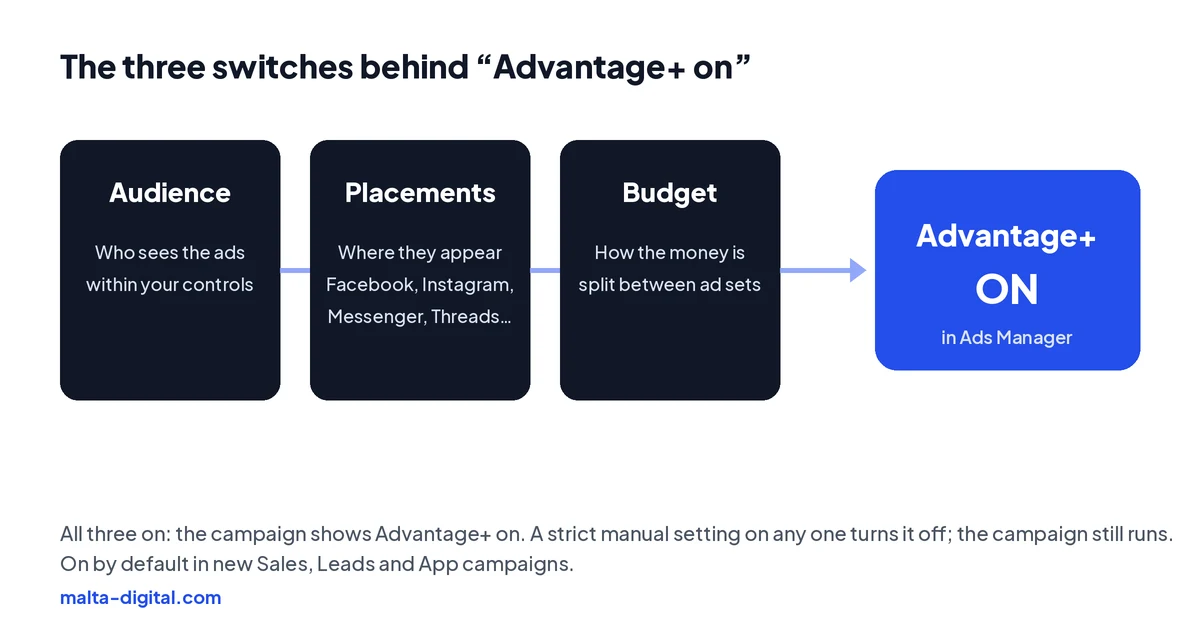
A campaign counts as “Advantage+ on” when three settings are left to Meta. Audience: Meta looks for the people most likely to act, starting from any suggestions you give it. Placements: your ads can appear across Facebook, Instagram, Messenger, Threads and Meta’s Audience Network, wherever results come cheapest. Budget: you set one budget for the whole campaign and Meta moves it between ad sets as results come in.
If you change any of these to a strict manual setting, for example by forcing an age range of 25 to 45 or switching off every placement except the Instagram feed, Ads Manager shows the campaign as Advantage+ off. That is not an error. The campaign still runs, just with more of your own choices and less freedom for Meta to find cheaper results.
The common mistake is treating “off” as safer. On a small budget, every restriction you add makes the ads more expensive to deliver, so take control only where you have a clear reason, and leave the rest to the system.
Audience
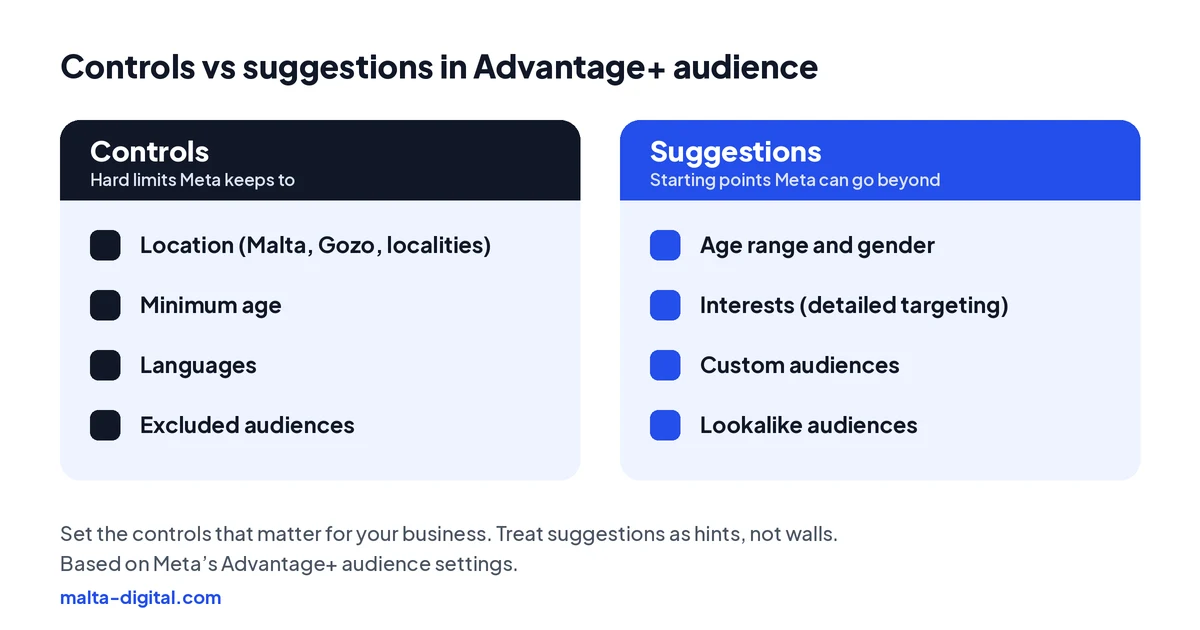
Advantage+ audience splits your choices into two kinds. Controls are hard limits that Meta respects: the location, the minimum age, the languages and any audiences you exclude. Suggestions are hints: an age range, a gender, interests, custom audiences such as website visitors, or lookalikes. Meta starts with the people you suggest and then goes beyond them when it predicts better results elsewhere.
For a Malta business, the controls matter most. Set the location to the area you actually serve: the whole of Malta and Gozo, only Gozo for a business in Victoria that does not travel, or a few localities around your shop. Use the minimum age when the law or Meta’s rules need it. Exclude your existing customers when an offer is only for new clients. These are the settings that keep the budget where it belongs.
Detailed interest targeting matters far less than it used to, especially here. Malta is a market of a little over half a million people, so even “everyone aged 18 and over in Malta” is a small audience by Meta’s standards. Narrow it further with five interests and you mostly pay more to reach the same people. Let the creative do the targeting: an ad for wedding photography in Gozo will find couples planning a wedding far better than an interest list will.
Placements
With Advantage+ placements, one ad can run in the Facebook and Instagram feeds, Stories, Reels, Messenger, Threads, search results and apps in the Audience Network. Meta spreads the budget towards whichever placements bring results at the lowest cost, and those can change from week to week. Your job is to make sure the ad looks right everywhere it might appear: a 4:5 version for feeds and a 9:16 version for Stories and Reels.
Most of the time, leave placements open. The cheapest results often come from places you would not have chosen yourself, and cutting placements reduces the inventory Meta can buy from, which pushes up prices on a small market. If a particular placement keeps bringing low-quality clicks or form fills, you can exclude it, and some exclusions can be set once at ad account level so they apply to every campaign.
The mistake to avoid is judging placements on clicks alone. A placement with cheap clicks and no sales is not a bargain. Look at cost per lead, booking or purchase by placement in the breakdown report before you exclude anything.
Budget
Advantage+ campaign budget, once called campaign budget optimisation or CBO, means you set one daily or lifetime budget for the whole campaign and Meta divides it between the ad sets. It moves money towards the ad set bringing results at the best cost, often within a day or two. For a campaign whose ad sets are similar, such as the same offer shown with different creative angles, keep it on. It saves you from moving money by hand and usually lowers the average cost.
Switch it off, or split the work into separate campaigns, when each ad set must get a fixed share of money. A restaurant with one branch in Sliema and another in Gozo may want both to be advertised every day, even if Sliema is cheaper. A clinic promoting physiotherapy and dental check-ups may want each service to have its own budget. With one shared budget, Meta would happily spend almost all of it on whichever is cheaper. If you want to keep campaign budget on and still protect a smaller ad set, Meta lets you set a minimum and maximum spend for each ad set.
Budget size matters too. If the campaign can only afford a few results a week, Meta has little to learn from, and splitting that money across five ad sets makes it worse. On a modest Malta budget, fewer ad sets with more money each almost always beat many thin ones.
Proof
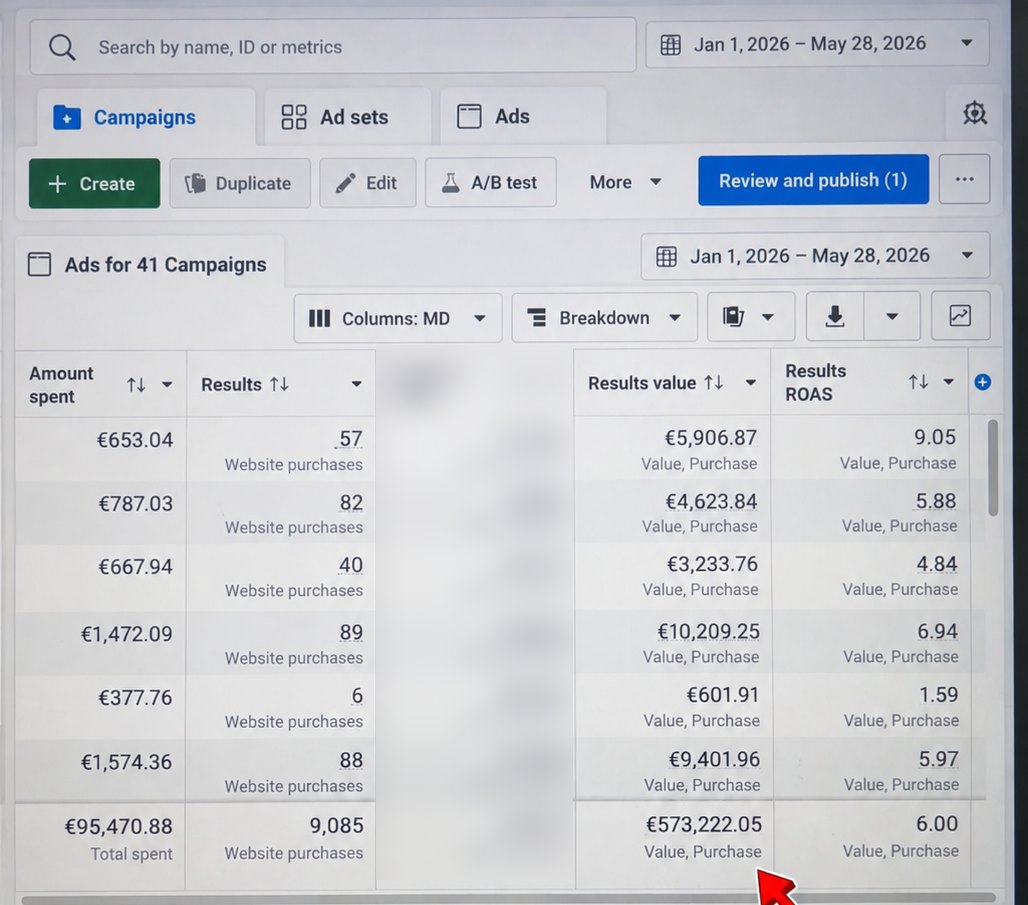
From 1 January to 28 May 2026, an online store we ran ads for spent €95,470.88 on Facebook and Instagram. Meta Ads Manager tracked 9,085 website purchases worth €573,222.05, an average ROAS of 6.00.
Want results like this from your own ad account? Contact us
Sales campaigns
Advantage+ sales campaigns, called Advantage+ shopping campaigns until 2025, are built for selling online. Meta mixes new and existing customers, chooses audiences and placements, and can show catalogue ads that pick the right products from your feed for each person. In 2025 Meta removed the old setting that capped how much of the budget went to existing customers. If you want to limit spend on people who already bought, you now do it with a separate ad set or by excluding a customer list.
These campaigns depend completely on tracking. Meta can only find buyers if it sees purchases, with the right value, through the Meta Pixel and the Conversions API. A shop in Malta with a broken purchase event, or one that only fires on some payment methods, is training Advantage+ on half the truth. Fix the tracking first, then let the campaign learn.
Judge the results on tracked sales and ROAS, and compare them with the orders and margins in your own shop system, because tracked purchase value is not profit. A sales campaign that reports strong ROAS mostly from repeat customers who would have bought anyway is worth less than it looks.
Send us your ad account on WhatsApp. We’ll check your tracking, controls and budget setup and tell you what we’d change. Free, no obligation.
Leads campaigns
For service businesses the goal is usually leads: a form, a chat or a phone call. Advantage+ leads campaigns work the same way, with Meta looking for the people most likely to send an enquiry. The risk is obvious once you think about it: if the goal is the cheapest possible form, Meta will find people who fill in forms easily, and not all of them want to buy.
Protect quality in three ways. Use a higher-intent form with a review screen and one or two questions that sort serious buyers from browsers, such as when they want to start or which area they are in. Use your minimum age and location controls properly. And, where possible, tell Meta which leads became customers by sending lead outcomes back from your CRM, so it can optimise for the people who actually buy rather than the people who simply tap Submit.
In Malta, where many sales still close on WhatsApp or over the phone, a quick reply matters as much as any setting. The best Advantage+ campaign cannot rescue a lead that waited until the next day for an answer.
Creative
Advantage+ creative is a set of automatic changes Meta can make to your ads: adjusting brightness and contrast, cropping images to fit each placement, adding music, showing different versions of your text, or adding product details from your catalogue. Some of these help, especially the ones that fit your image to each placement. Others can change how your brand looks or what your ad says.
Open the creative settings of each ad before you publish and look at the list of enhancements. Keep the ones you are comfortable with and switch off any that you would not approve if a designer suggested them. For regulated businesses such as clinics, or for any ad where the wording matters, be strict: an automatically rewritten line is still your ad.
Remember that creative is now the main way Meta decides who sees an ad. With broad audiences, two genuinely different ideas reach two different groups of people. That matters more than any single automatic tweak.
When to take control
There are good reasons to take some control back. When the law or Meta’s rules restrict who may see an ad, set those limits as controls: a minimum age of 18 for cosmetic treatments, for example. Property, jobs and financial products fall under Meta’s special ad categories, which remove age, gender and postcode targeting for ads reaching people in the EU, whatever Advantage+ is doing.
Take control when you need clean comparisons, too. If you want to know whether residents or tourists bring cheaper bookings, run them as separate ad sets or campaigns with fixed budgets, so Meta cannot pour everything into one side. And keep warm audiences such as past customers apart when you want them to see a different message.
Be careful with the recommendations Ads Manager shows you. Meta gives each ad account an opportunity score from 0 to 100 and suggests changes to raise it, usually by switching on more automation. Many suggestions are sensible; some are not right for your business. Treat them as ideas to test, not instructions.
| Setting | What Meta does with it on | When to take control |
|---|---|---|
| Advantage+ audience | Finds likely buyers, starting from your suggestions and going beyond them | Always set the location, minimum age, languages and exclusions you need as controls |
| Advantage+ placements | Shows ads across Facebook, Instagram, Messenger, Threads and the Audience Network | Exclude a placement only when its leads or sales are clearly worse, not just its clicks |
| Advantage+ campaign budget | Moves one budget towards the ad set with the best results | Use separate budgets when each service, branch or audience must get a fixed share |
| Advantage+ creative | Makes automatic changes such as brightness, cropping, music or text versions | Switch off any change you would not approve, and be strict for regulated businesses |
| Advantage+ sales campaign | Mixes new and existing customers and can show catalogue ads | Use a separate ad set or exclusions to limit spend on existing customers |
How we do it
We start with the goal and the tracking, because everything Advantage+ does depends on them. We check that the Pixel and the Conversions API report the right purchases or leads, choose the campaign objective that matches how you actually make money, and set the controls that matter for your business: the location you serve, the minimum age, the languages and the customers to exclude. Then we keep the structure simple, with few ad sets and enough budget in each for Meta to learn.
Most of our weekly work goes into the creative and the results: new ideas to test, tired ads to retire, and a check of real leads or sales against what Ads Manager reports. Our Meta ads management starts from €1,249 a month plus ad spend, excluding VAT, and the ad account stays in your name.
Common mistakes
Running Advantage+ with broken tracking, so Meta optimises for the wrong thing. Choosing a traffic or engagement goal when you want sales. Splitting a small budget across many ad sets. Adding a long list of interests and calling it targeting. Forgetting to exclude existing customers from a new-customer offer. Leaving every creative enhancement switched on without looking at what it does to the ad.
The quietest mistake is judging Advantage+ after three days. The system needs results to learn from, and on a typical Malta budget that takes a week or two. Change things every day and it never settles. Give each campaign a fair run, judge it on leads, bookings or sales, and then decide.
A few straight answers
Advantage+ is Meta’s name for the automation in Ads Manager. It lets Meta choose the audience, the placements, the budget split and some creative changes, within the limits you set.
Yes. New Sales, Leads and App campaigns start with Advantage+ audience, Advantage+ placements and Advantage+ campaign budget switched on. You can change any of them.
Keep it on when your ad sets are similar and you only care about the best overall cost. Turn it off, or use separate campaigns, when each service, branch or audience needs a fixed budget.
Controls such as location, minimum age, languages and excluded audiences are hard limits. Suggestions such as age range, gender and interests are starting points that Meta can go beyond.
In 2025 Meta renamed them Advantage+ sales campaigns, allowed more than one ad set and removed the cap on spend for existing customers.
Usually yes. Audiences in Malta are small, so broad targeting is often cheaper. Set the location and other controls carefully and let strong creative do the targeting.
Ours starts from €1,249 a month plus ad spend, excluding VAT.
Keep reading
How to search competitors’ ads, what EU ads reveal about targeting and reach, and what the Library cannot show.

Find the reason in Account Quality, fix policy, payment or security issues, and request a review that works.

Setup, the first message, cost and the free 7-day window, examples and measuring chats that become sales.
A useful first step
We set up the tracking, the controls and a simple structure, then feed it strong creative, from €1,249 a month plus ad spend, excluding VAT.