
Facebook ads targeting in Malta
Location, age, interests, custom and lookalike audiences, and why broad usually beats narrow on a small island.
Facebook & Instagram ads · Setup
Meta Business Manager is now called a business portfolio, and you manage it in Meta Business Suite at business.facebook.com. It is the container that holds your Facebook Page, Instagram account, ad accounts, Pixel, catalogue and WhatsApp accounts, and it decides who can work on them. Set it up once, in your business’s name, with two people in full control and two-factor authentication on. Then give staff and agencies only the access they need, and you will never lose your ads, your data or your Page when someone leaves.

The short answer
Meta has renamed its business tools several times, which is why so many owners in Malta are confused about what they have. Business Manager was the old name for the place where a business owns its Facebook and Instagram assets. Today the same thing is called a business portfolio, and you open it through Meta Business Suite at business.facebook.com. The settings that used to be in Business Manager now sit under Settings in Business Suite. Ads Manager is the separate tool where the ads themselves are built.
The portfolio matters because of ownership. A Facebook Page or ad account that lives inside your business portfolio belongs to the business. One that was created years ago from a nephew’s or a freelancer’s personal profile belongs, in practice, to that person. When they move abroad, change job or simply stop answering, you can lose your ad history, your Pixel data and sometimes the Page itself.
So the goal is simple: one portfolio in your business’s name, every asset inside it, and everyone else invited in with the right level of access.
Three tools, three jobs
Meta Business Suite is the app and website you use day to day: posting to Facebook and Instagram, answering messages and comments, seeing insights. The business portfolio is the ownership and permissions layer underneath, managed in Settings: which Pages, Instagram accounts, ad accounts, datasets (the Pixel), catalogues and WhatsApp accounts belong to the business, and which people and partners can use them. Ads Manager is where campaigns, ad sets and ads are created and measured.
Most small businesses only notice the difference when something goes wrong: an agency asks for “access to your Business Manager”, an ad account is restricted, or a new employee cannot see the Page. Knowing which tool does what makes those moments much easier.
| Business portfolio | Meta Business Suite | Ads Manager | |
|---|---|---|---|
| What it is | The ownership and permissions layer (formerly Business Manager) | The app and website you use day to day | The tool where ads are built and measured |
| You use it for | Owning Pages, Instagram, ad accounts, datasets and WhatsApp; adding people and partners | Posting, messages, comments, insights and Settings | Campaigns, ad sets, ads, budgets and results |
| Where | Settings in Business Suite | business. | From Business Suite or adsmanager. |
| Who needs it | The owner and one backup with full control | Owner and staff, with partial access where possible | Whoever runs your ads, including a partner agency |
Setting it up
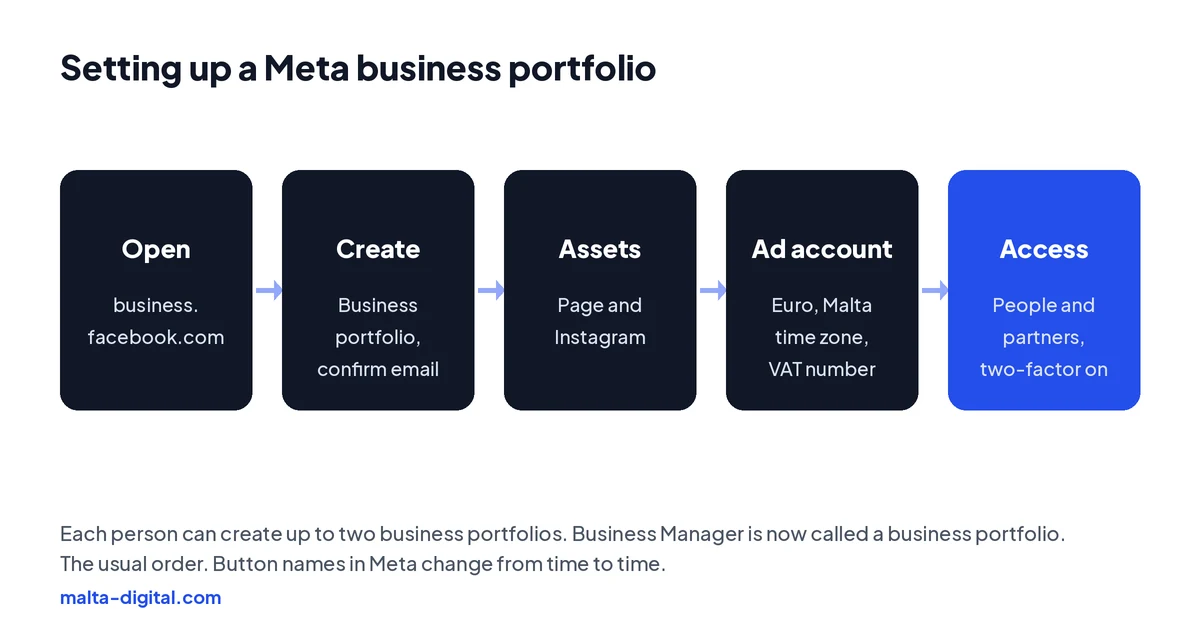
Go to business.facebook.com and log in with your own Facebook profile. Open the menu under Home in the top left and choose Create a business portfolio. Enter the name of your business exactly as customers know it, because it is visible across Meta, then your name and a business email address. Meta sends a confirmation email to that address. Each person can personally create up to two business portfolios, so do not create test portfolios “just to see”.
Next, add your assets. In Settings, add your Facebook Page and connect your Instagram account. If the Page currently belongs to someone else’s portfolio, request access or ask them to transfer it, rather than creating a new Page. Then add your ad account, or create a new one inside the portfolio. When you create an ad account, choose euro as the currency and Malta as the time zone, because changing them later is not straightforward, and add your VAT number in the billing settings if you are VAT-registered.
Finally, add the people and partners who need access, which is the step most businesses get wrong.
Who gets access
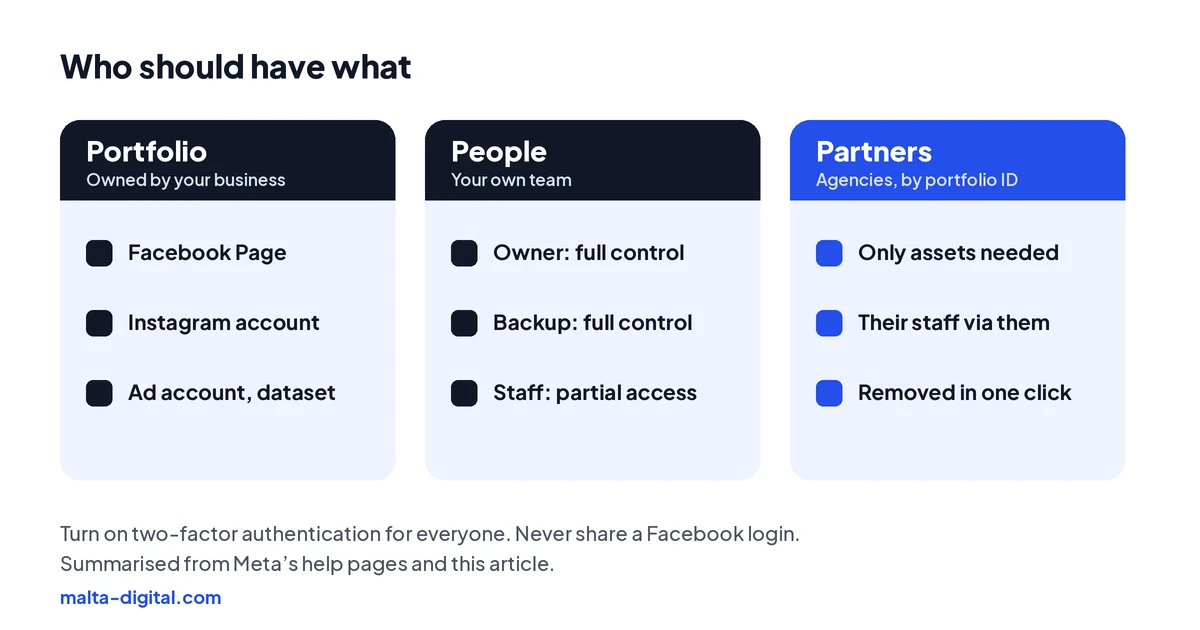
Meta now has two levels of access. Full control can manage everything, including adding and removing people and changing settings. Partial access is limited to the assets and tasks you assign, such as creating content, answering messages or managing ads. Give full control to the owner and one trusted backup person, and partial access to everyone else.
Agencies should be added as partners, not as people. Ask them for their business portfolio ID, then go to Settings, Partners, Add, and give their portfolio access to the specific assets they need, usually the ad account, the Page and the dataset. The agency then assigns its own staff. When the work ends, you remove the partner in one click and everything stays with you, including the ad history.
Never give anyone your Facebook login, and never let an agency create the ad account in their own portfolio “to save time”. It is the most common reason businesses in Malta lose years of data when they change supplier.
Keeping it safe
Turn on two-factor authentication for everyone with access, and make it required in the portfolio’s security settings. Hacked personal profiles are still the main way businesses lose their Pages and ad accounts, and a stolen password alone is not enough when two-factor is on.
Keep at least two people with full control. If the only admin loses their phone or their profile is disabled, recovering a portfolio can take weeks. A family business in Mosta with the owner and one manager in full control is far safer than one where only the owner’s son has access.
Review the People and Partners lists every few months. Remove former employees, freelancers and agencies you no longer work with. If you see people or ads you do not recognise, treat it as a security issue straight away.
Send us a screenshot of your business portfolio settings on WhatsApp. We’ll tell you what to fix first, from ownership to two-factor. Free, no obligation.
Proof
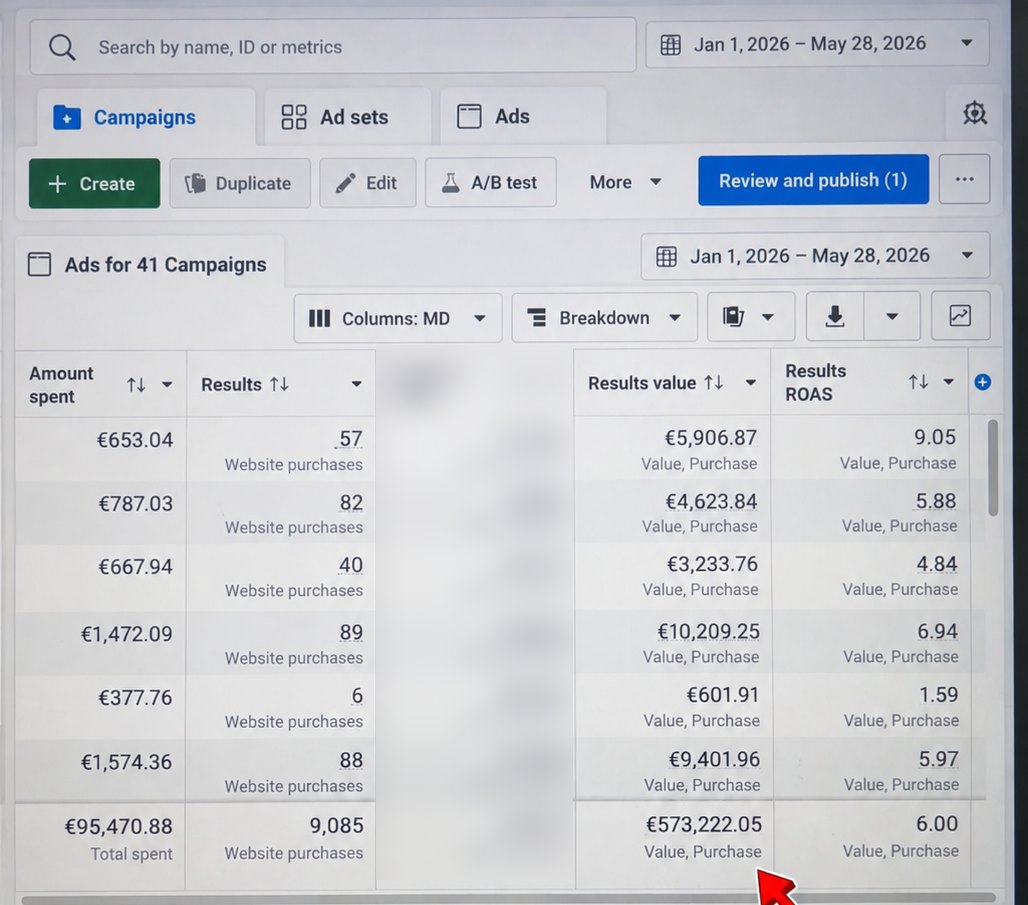
From 1 January to 28 May 2026, an online store we ran ads for spent €95,470.88 on Facebook and Instagram. Meta Ads Manager tracked 9,085 website purchases worth €573,222.05, an average ROAS of 6.00.
Want results like this, tracked in an ad account you own? Contact us
Business verification
Business verification confirms to Meta that your portfolio belongs to a real, registered business. You do not need it to run ordinary ads, but some features ask for it, such as scaling the WhatsApp Business Platform or getting more ad accounts. Start it in the Security Centre in Business Suite and enter your legal business name, address, phone number and website exactly as they appear on official documents. Your website must load and use https.
If Meta cannot find your business in its records, it asks for documents. Accepted types include a certificate of incorporation or business registration, a government-issued business tax document such as a VAT registration certificate, a business bank statement, and a utility bill (which only proves the address and phone number, not the legal name). For a Maltese limited company, the Malta Business Registry certificate is the obvious choice; sole traders usually use their VAT certificate plus a bank statement or utility bill in the business name.
You then confirm the connection by email, phone, text, WhatsApp or domain verification, where you add a meta tag or DNS record to your website. Meta says a decision can take up to 14 working days. If you change your business details afterwards, you have to verify again.
How we do it
Before we run a single ad, we check the client’s portfolio: who owns the Page, the Instagram account and the ad account, who has access, whether two-factor is on, and whether the Pixel and Conversions API are connected to the right ad account. Where something is in a former supplier’s or a relative’s name, we help move it into the client’s own portfolio first.
Then the client adds us as a partner with only the access we need. The ad account, the data and the audiences always stay in your name. Our Meta ads management starts from €1,249 a month plus ad spend, excluding VAT.
Common mistakes
Letting a freelancer or an agency own the ad account. Having a single admin with no backup. Sharing one Facebook login between staff. Creating a second Page because nobody can find the login for the first one. Choosing the wrong currency or time zone for the ad account. Leaving former employees with full control. And skipping two-factor authentication, which turns a simple phishing email into a lost business Page.
A few straight answers
Yes, under a new name. Business Manager is now called a business portfolio, and you manage it in Meta Business Suite at business.facebook.com.
Log in at business.facebook.com, open the menu under Home, choose Create a business portfolio, enter your business name, your name and a business email, then confirm the email.
Add them as a partner using their business portfolio ID, and share only the assets they need, such as the ad account, Page and dataset. Never share your login.
Business Suite is for posts, messages, insights and portfolio settings. Ads Manager is where you build and measure ads.
Each person can personally create up to two. There is no limit on how many portfolios you can be added to.
Not for ordinary ads. Some features, such as scaling the WhatsApp Business Platform, require it. Meta says the review can take up to 14 working days.
Ours starts from €1,249 a month plus ad spend, excluding VAT.
Keep reading
Location, age, interests, custom and lookalike audiences, and why broad usually beats narrow on a small island.

How to search competitors’ ads, what EU ads reveal about targeting and reach, and what the Library cannot show.

Find the reason in Account Quality, fix policy, payment or security issues, and request a review that works.
A useful first step
We check your portfolio, fix ownership and access, connect tracking and then run the ads, from €1,249 a month plus ad spend, excluding VAT.