
CRM vs Excel
When a spreadsheet is enough, the signs it has stopped working, GDPR, and how to move to a CRM without losing data.
Systems & automation · CRM migration
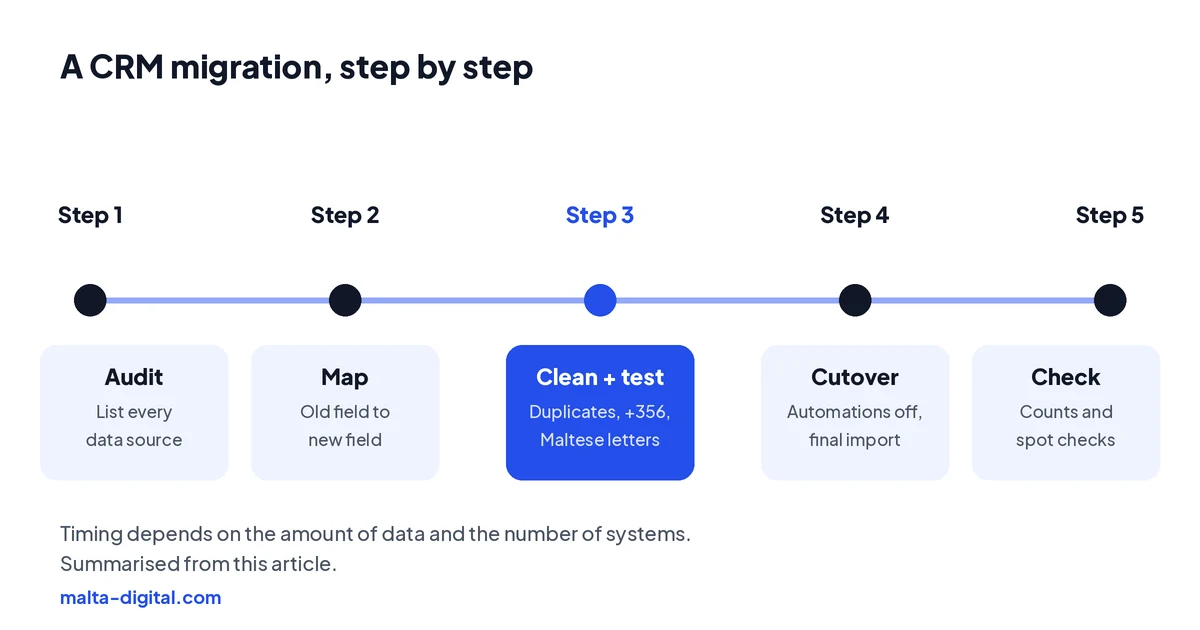
CRM data migration means moving your contacts, companies, deals, activity history, files and consent records from an old CRM or spreadsheets into a new system without losing anything or breaking the links between them. Done well, it follows a fixed order: decide what to move, export everything, map each old field to a new one, clean and de-duplicate, import a test batch, check it against the source, then switch over on a set date with automations off. This guide walks through each step for Malta businesses, including the local details that trip imports up, and when to get help.
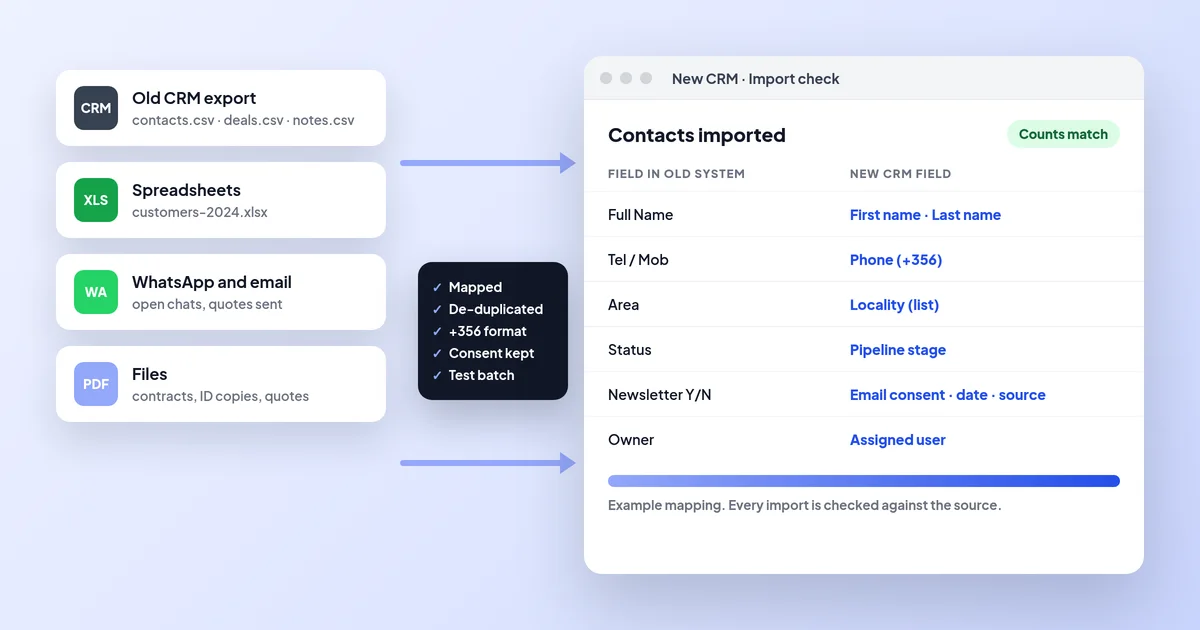
CRM data migration is moving contacts, companies, deals, history, files and consent records from an old CRM or spreadsheets into a new one without breaking the links. The safe order is: decide what moves, export everything with IDs, map each field, clean and de-duplicate, test a small batch, then cut over on a set date with automations off. Malta Digital handles this as part of every custom CRM.
The short answer
A new CRM is only as good as the data in it on day one. If the team logs in and finds duplicate clients, missing phone numbers, deals with no history and notes in the wrong place, they stop trusting it within a week and start keeping their own lists again. A CRM with every feature you asked for can still fail if nobody trusts the data in it.
Moving from an old CRM is harder than moving from a spreadsheet, because the old system holds relationships, not just rows. A contact belongs to a company, a deal belongs to both, and each has calls, emails, notes, tasks and files attached. Exports usually come out as separate files, one per type of record, joined only by internal ID numbers. If those links are not rebuilt in the right order, you end up with a deal that belongs to nobody and a year of notes that point at nothing.
If you are coming from spreadsheets rather than an old CRM, the steps are the same but shorter; our CRM vs Excel guide covers that move in brief. This page goes deeper, for businesses leaving one system for another or merging several.
Decide
Start with a list of every place customer data lives today: the old CRM, the accounting system, spreadsheets, a booking tool, email inboxes, WhatsApp, and the paper diary in reception. For each one, decide whether it moves, stays as an archive, or goes.
The default should be: active customers, open deals and the history people actually use. Ten years of closed leads who never bought are not an asset; under GDPR they are a liability you are expected to delete when you no longer need them. A migration is the best chance you will get to apply your retention rules properly, rather than carrying old data into a new system and dealing with it “later”.
Some records must be kept even if they do not move. In Malta, the VAT Act expects transaction records such as invoices to be kept for at least six years from the end of the year they relate to. If your old CRM holds invoices or credit notes, either make sure your accounting system already has them, or keep a read-only export of the old CRM somewhere safe and access-controlled for that period, with a note of what it contains and when it can be deleted.
Export
Before you cancel anything, export all of it. Most CRMs let administrators export each record type as a CSV file: contacts, companies, deals or opportunities, activities, notes, tasks, products and users. Some keep emails, call logs and attached files separately, and some only export them through their API or as a full account backup. Check this early; a few systems make attachments much harder to get out than contacts.
Make sure each export includes the internal record ID and the IDs of linked records (the company ID on a contact, the contact and company IDs on a deal). Those IDs are how you rebuild the links in the new CRM. Export the list of users too, because records are owned by people, and the owner names in the old system need to match logins in the new one.
Then check the subscription dates. Many CRMs lock or delete data a set time after an account is cancelled. Keep the old system running, read-only if possible, until the new one is live and checked, and never cancel first and export later.
Map
Mapping is a simple table: every field in the old system in one column, the field it goes to in the new CRM in the next, and what happens to it on the way. It is the most important document in the whole migration, and the one most often skipped.
Most fields map directly. The interesting ones do not. A “Full name” field may need splitting into first and last name. A free-text “Status” field with forty different spellings needs to be turned into a short list of pipeline stages. A “Newsletter Y/N” tick box needs to become proper consent fields: the channel, the date the person agreed and the source, because under Malta’s rules on electronic marketing (S.L. 586.01) you need to be able to show that consent. If the old system cannot tell you when and how someone agreed, do not invent it; mark them as unknown and treat them as not subscribed.
Custom fields need a decision each: keep, merge into another field, or drop. If nobody can say what a field was for, it probably goes. The same applies to pipeline stages and dropdown values: agree the new list first, then map each old value to it.
Clean
Clean the data before it goes in, not after. Remove duplicates, which in a merged migration are everywhere: the same client in the old CRM, the accounting system and a spreadsheet, spelt three ways. Match on email and phone first, then on name and locality, and decide which record wins for each field.
Then fix the details that matter locally. Put every phone number in one international format, +356 followed by the eight digits for Maltese numbers, so calls, WhatsApp and SMS all work and duplicates can be spotted. Make sure the files are saved as UTF-8, or Maltese letters such as ċ, ġ, għ, ħ and ż will turn into question marks; “Ħamrun” and “Żebbuġ” are a good test. Turn localities into a fixed list rather than free text, so “St Julians”, “St. Julian’s” and “San Ġiljan” become one place, and choose how you will record Gozo addresses. Check dates too: an export in day-month-year format imported as month-day-year quietly turns 3 April into 4 March.
Finally, look at what should not be there at all. ID card or passport copies in a sales CRM, health details in notes, or old contacts who asked to be removed. Migration is the moment to take them out, or move them to a place with tighter access. Our guide to CRM and GDPR in Malta explains what belongs where.
Test
Never import everything on the first try. Take a small batch, for example fifty contacts with their companies, deals, notes and files, chosen to include the awkward cases: a client with several deals, a company with many contacts, a name with Maltese letters, a record with an attachment. Import it into a test copy or sandbox if the new CRM has one.
Then check it against the source, record by record. Are the links right? Is the owner right? Did the dates survive? Do the notes appear on the right timeline? Are the consent fields correct? Ask one of the people who will use the CRM every day to look as well; they will spot things an outsider will not. Fix the mapping, delete the test batch, and repeat until a batch comes through clean.
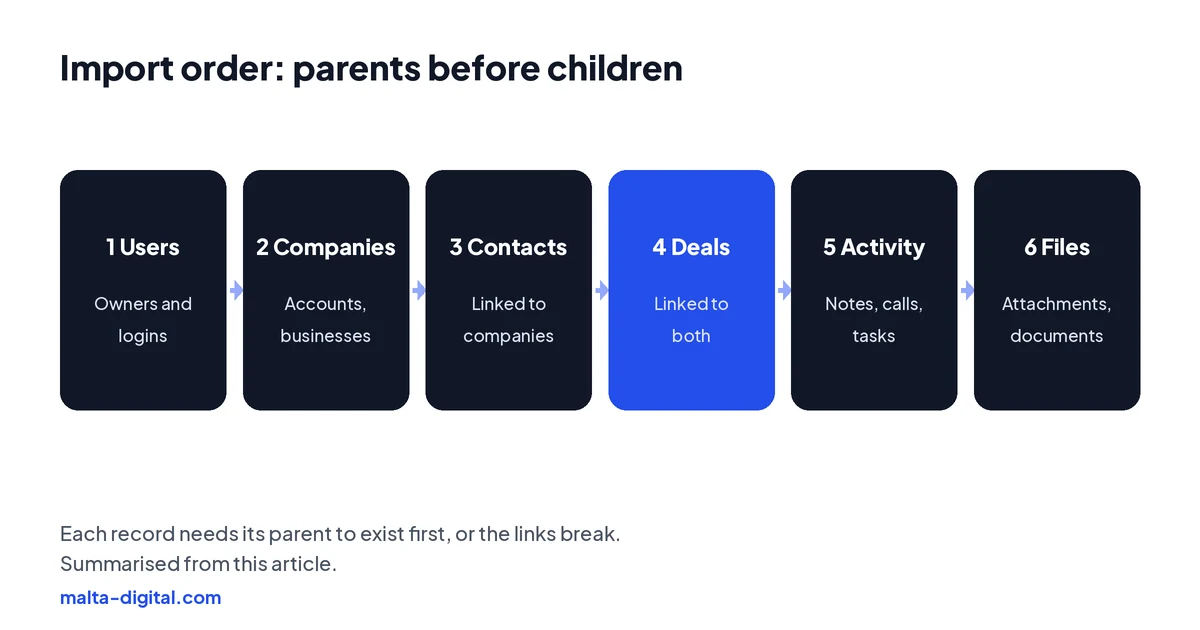
Import in order, parents before children: users, then companies, then contacts linked to companies, then deals linked to both, then activities, notes and tasks, then files. Most CRMs need the parent to exist before a child can point to it.
Apply now and tell us which system or spreadsheets you are moving from and roughly how many records you have. We’ll tell you how we would map, clean and move it, or message us on WhatsApp.
Cutover
Pick a cutover date and tell everyone. The usual pattern is to do the full import a few days before, then a final “delta” import of anything created or changed in the old system since, on the evening before go-live. From the morning of the cutover, the old system is read-only and all new work happens in the new one. Running both in parallel for weeks sounds safe, but it means double entry, and the two quickly disagree.
Turn automations off during the import. A new CRM that sees two thousand “new contacts” arrive may happily send each of them a welcome email or a WhatsApp template, and some may go to people who unsubscribed years ago. Switch workflows, sequences and notifications off, import, check, and only then switch them back on, one at a time.
On the same day, move the connections: website forms, Facebook and Instagram lead ads, the WhatsApp Business number, email syncing, the accounting link and any booking tool. A lead that arrives in the old system after cutover is a lead nobody sees. Test each one with a real submission.
Check
After the final import, compare counts: contacts, companies, open deals and their total value, in the old system and the new. They should match, or you should know exactly why not, such as duplicates merged or old leads deliberately left behind. Then spot-check twenty random records end to end, and ask each user to check their own open deals on the first morning.
Keep the old system or a full export available, read-only, for a few weeks after go-live, so you can look something up if a record turns out to be missing. Write down where the archive is, who can open it and when it will be deleted, so it does not become a forgotten copy of everyone’s data.
Finally, plan the first two weeks. Short training on the things people do every day, a named person to ask, and a list where anyone can note “this looks wrong”. Small problems fixed in week one stop people going back to their spreadsheets.
Proof
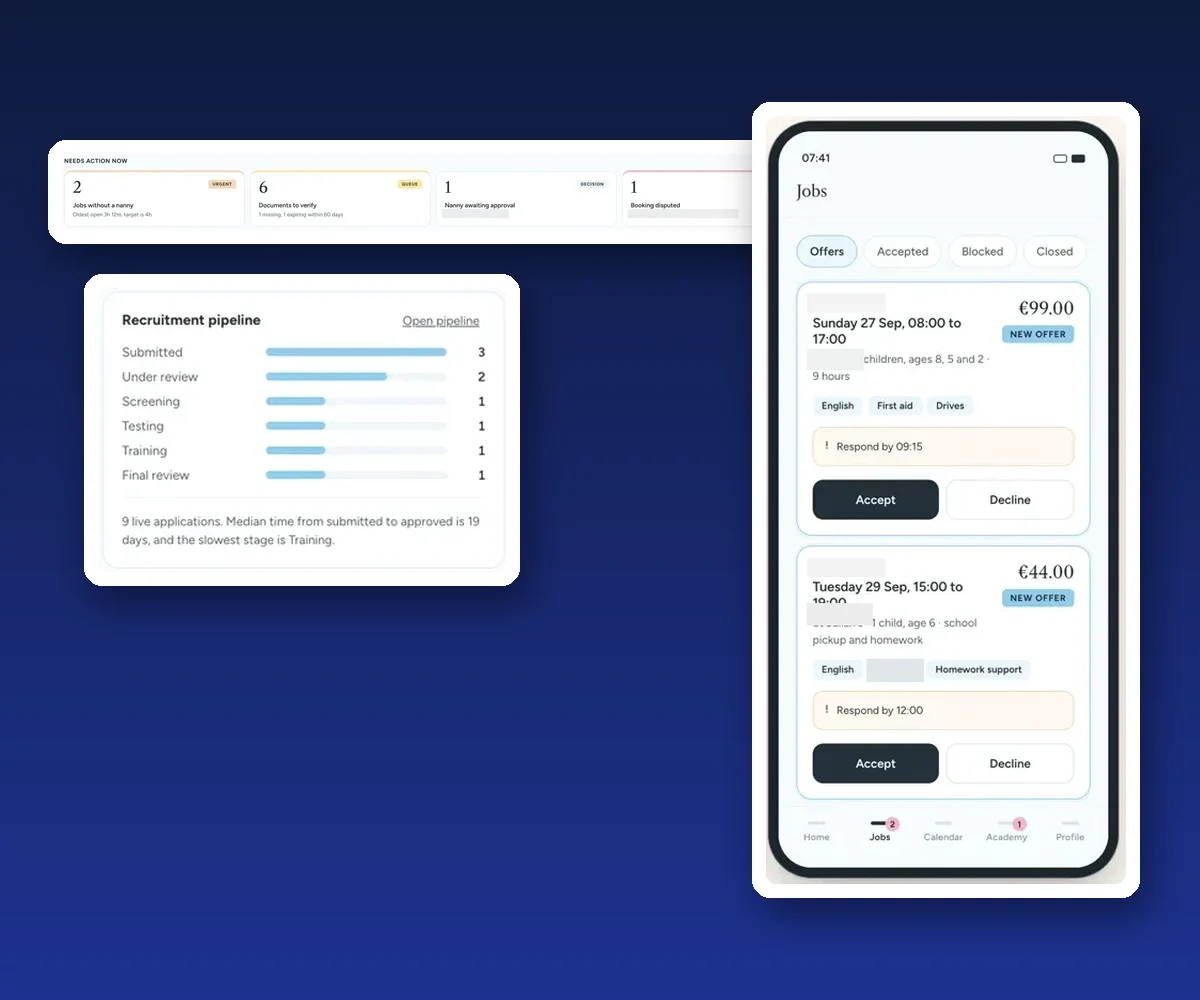
Our clearest example is a custom CRM and booking platform we built for a childcare and nanny agency. Before it, bookings, applications, documents, training, invoices and payouts were spread across messages, spreadsheets and email. The new platform gives every booking, nanny and parent one record, with documents tracked by expiry date and an audit log of every change.
It is a new system, so we do not publish results or usage figures for it. The case study shows what we built and how the parts connect, which is the end state a migration aims for: one place, trusted by the people who use it.
Moving to a new CRM and worried about losing data? Message us on WhatsApp
How we do it
We treat migration as its own piece of work, not an afterthought at the end of a build. We start by listing every source of customer data you have, agree what moves and what is archived, and write the field map with you. We clean and de-duplicate, run test imports until they come through clean, and check them with your team before the real move.
On cutover we switch automations off, run the final import, move your forms, ads, WhatsApp and accounting connections, compare counts and stay on hand for the first days. Migration is included in our custom CRM projects, which start from €7,500, excluding VAT; for a ready-made CRM, we can do the migration and setup as a separate job. See the CRM page for what is included, and take the CRM quiz if you are still choosing the new system.
A few straight answers
Moving your customer data (contacts, companies, deals, activity history, files and consent records) from an old CRM, spreadsheets or other tools into a new CRM, with the links between records kept intact.
A simple move from one spreadsheet can take a day. Moving from an old CRM with history, files and several connected tools usually takes a few weeks, most of it mapping, cleaning and testing rather than the import itself.
Usually not. Move active customers, open deals and the history people use. Archive what you must keep, such as transaction records for VAT, and delete what you no longer need under your retention rules.
Usually yes, but it depends on what the old system lets you export. Check early whether notes, emails and files can be exported with the IDs of the records they belong to.
Only if they are mapped properly. Move the channel, date and source of each consent. If the old system cannot show when someone agreed, treat them as not subscribed.
Usually because the file was not saved as UTF-8, so letters such as ħ, ż, ċ and għ are lost. Save and import as UTF-8 and test with names like Ħamrun or Żebbuġ.
Only from the cutover date. Before that, the old system keeps running while you test. On cutover it becomes read-only, a final import catches recent changes, and all new work happens in the new CRM.
It depends on the number of sources, records and attachments. Migration is included in Malta Digital’s custom CRM projects, which start from €7,500, excluding VAT.
Keep reading
When a spreadsheet is enough, the signs it has stopped working, GDPR, and how to move to a CRM without losing data.

A free, printable checklist from choosing a CRM to GDPR, data import, WhatsApp and lead ads, launch and funding.
Lawful basis, marketing consent, EU hosting, roles, retention, data requests and breaches, turned into CRM settings and habits.
A useful first step
We list every data source, map each field, clean and test before the move, and check counts after. Migration is included in our custom CRM systems, from €7,500, excluding VAT.