Lost leads and time cost calculator
Estimate what missed enquiries and manual admin cost you each month, using only your own numbers.
Systems & automation · CRM vs Excel
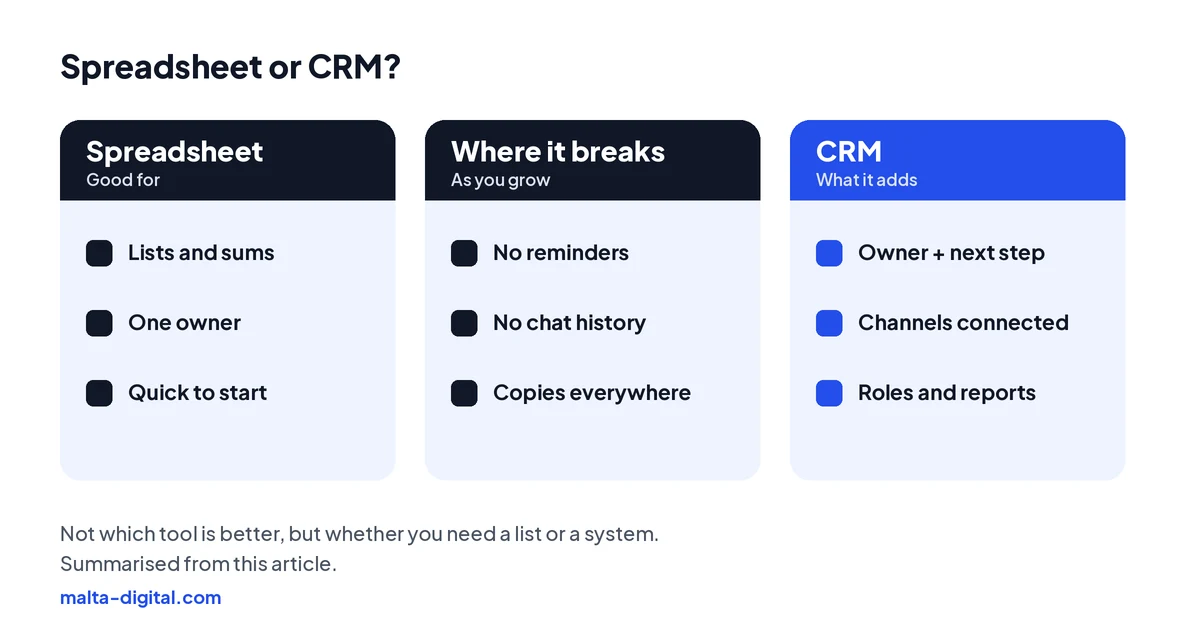
Excel or Google Sheets is a perfectly good place to start a customer list, and for one person handling a few enquiries a week it may be all you need. It stops working when several people share the list, enquiries arrive through WhatsApp, forms, lead ads and calls, and follow-ups depend on someone remembering. A CRM adds what a spreadsheet cannot: an owner and a next step on every lead, reminders, the full history including chats and emails, access by role and reports without copying data. This guide shows where the line is for businesses in Malta and Gozo, and how to move without losing anything.

leads_FINAL_v3.xlsx
Who called them back?
Row 214 · DuplicateLast edited by ?Move to a CRMExcel works as a customer list for one person with a few enquiries. A CRM is better once several people share customers, enquiries come from WhatsApp, forms and ads, and follow-ups get missed: it gives every lead an owner, a next step and a reminder, keeps the full history and controls who sees what. Malta Digital moves businesses in Malta and Gozo from spreadsheets to a CRM without losing data.
The short answer
A spreadsheet stores rows. A CRM runs a process. Excel only knows what someone typed into it, when they remembered to. It cannot see that a lead arrived on WhatsApp at 21:40, it will not remind anyone to call back on Thursday, and it does not know that two colleagues replied to the same customer with different prices.
A CRM is built around people and what happens next. New enquiries from your website form or Facebook lead ads create a record by themselves. Each record has an owner, a stage and a next step with a date. Calls, emails, notes, quotes and, where the platform allows, WhatsApp messages sit on the customer’s timeline, so anyone picking it up knows the story. Reports show how many enquiries came in, from where, and how many turned into sales, without anyone building a pivot table.
So the honest question is not which tool is better. It is whether your business has outgrown a list and needs a system. For some businesses the answer is no, and that is fine.
When Excel is enough
If you work alone or with one other person, get a handful of enquiries a week through one or two channels, and sell something simple, a well-kept spreadsheet is a sensible tool. It costs nothing extra if you already have Microsoft 365 or Google Workspace, everyone knows how to use it, and you can change it in seconds.
Make it work properly. Keep one shared file in the cloud rather than copies sent by email. Put one customer per row and one piece of information per column. Use a drop-down list for the status, so “quoted”, “Quoted” and “sent quote” do not become three different things. Add a “next action” date column and sort by it every morning. Limit who can edit it, and do not keep things like ID card numbers or health details in it.
The common mistake is the opposite one: buying a CRM before you have a process. If nobody has agreed what happens after an enquiry arrives, software will not fix that. Write the steps down first, run them in the spreadsheet for a few weeks, and you will know exactly what you need from a CRM when the time comes.
Warning signs
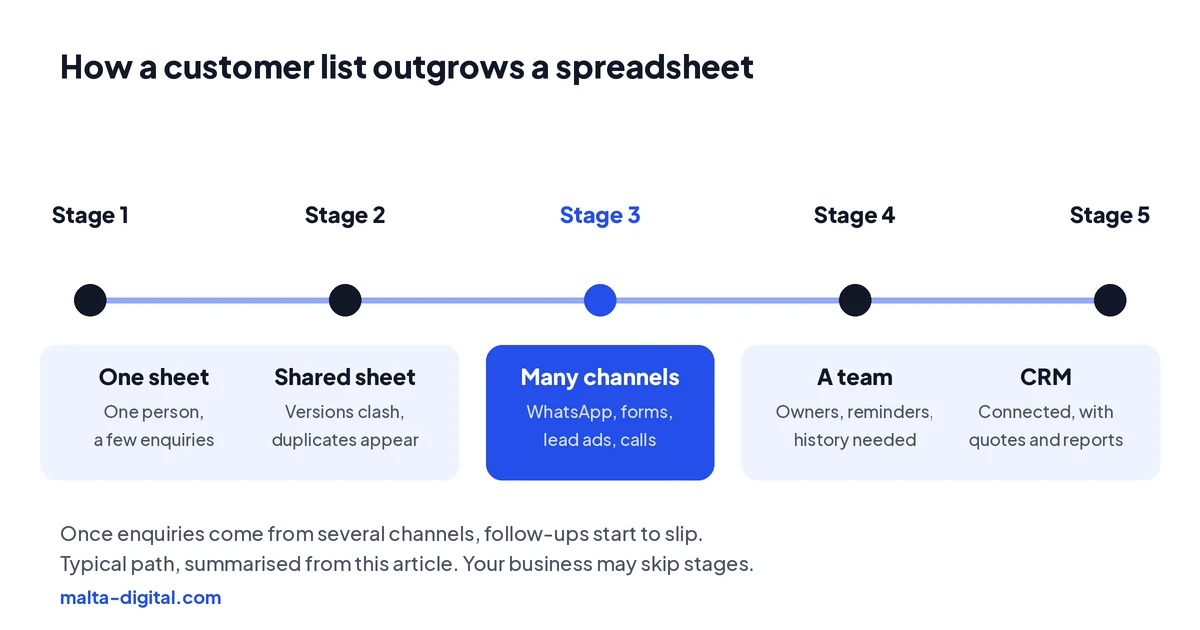
The first sign is usually a file called something like “Leads FINAL v3”, or two versions nobody can reconcile. Then duplicates appear: the same customer saved by two people with different spellings and phone formats. Then the questions start. Did anyone reply to the woman from Mosta? Who promised the man in Victoria a discount? Which quotes from last month are still open?
In Malta most of this happens on WhatsApp. Enquiries land on staff phones, the conversation stays there, and the spreadsheet only gets a line if someone remembers. Facebook and Instagram lead ads add another gap: leads sit in Meta’s Leads Center until someone downloads them, sometimes days later, by which time the person has asked someone else. For businesses with a summer peak, such as tours, rentals and restaurants, all of this gets worse exactly when there is no time to fix it.
The last sign is the one that hurts most: someone leaves and the customer history leaves with them, in their phone and their inbox. If two or three of these sound familiar, the spreadsheet is costing you sales. Our free lost leads and time cost calculator shows roughly how much, from your own numbers.
What a CRM adds
Enquiries arrive by themselves. Website forms, Facebook and Instagram lead ads and email can create records automatically, with the page or campaign they came from. Nobody retypes anything, and nothing waits in an inbox.
Every lead has an owner and a next step. The CRM assigns new enquiries, reminds the owner when a call or follow-up is due and shows the manager what is overdue. This is the part a spreadsheet cannot do, and it is where most lost sales come from.
One history per customer, and control over who sees it. Notes, calls, emails, quotes and, through the WhatsApp Business Platform, chats are kept against the customer, so a colleague can pick up where you left off. Each person sees what their role needs, and you can export or delete one person’s data when they ask.
| Excel or Google Sheets | CRM | |
|---|---|---|
| New enquiries | Typed in by hand, when someone remembers | Created by forms, lead ads and email; WhatsApp where the platform allows |
| Follow-ups | A date column you have to check | Owner, next step and reminders on every lead |
| Customer history | Whatever fits in a cell | Calls, emails, notes, quotes and chats on one timeline |
| Several people | Version clashes and overwritten rows | Shared records, assignments and an activity log |
| Access and GDPR | Copies in inboxes, laptops and downloads | Access by role, export and deletion per person |
| Reports | Built by hand, out of date by Monday | Live numbers on sources, stages and sales |
| Cost | Usually already paid for | Free plans for small teams, then per user per month; custom CRMs from Malta Digital from €7,500, excluding VAT |
GDPR
GDPR does not ban spreadsheets. It asks you to know what personal data you hold, keep it secure, use it only for the reasons you told people about, keep it no longer than you need and be able to give someone their data or delete it when they ask. A single, access-controlled file can meet that. The trouble is that spreadsheets multiply: a copy emailed to a colleague, an export on a laptop, an old version in Downloads, a printout on a desk.
When a customer asks what data you hold on them, or asks you to delete it, you need to find every copy. With a CRM there is one record, a log of who changed it and tools to export or erase it. With five spreadsheets and a dozen phones, it is guesswork. That is not a reason to panic, but it is a good reason to bring customer data into one controlled place as you grow.
Malta’s data protection authority, the IDPC, publishes guidance for organisations. If you handle health, financial or children’s data, take extra care with who can see it, wherever it is stored.
Apply now and tell us how you track customers today. We’ll show you what we’d move into a CRM first and how we’d bring your data across, or message us on WhatsApp.
Excel as a CRM
Yes, up to a point. With a table, drop-down lists, conditional formatting that turns overdue rows red, and a few formulas, Excel or Google Sheets can work as a basic lead tracker. Microsoft Power Automate or Google Apps Script can even send a reminder email or pull in form submissions. Plenty of small businesses start this way, and free CRM templates for Excel are easy to find.
The catch is that you are now building and maintaining software in your spare time, without testing, backups or permissions designed for it. It works until the person who built it leaves, a formula breaks or two people edit the same row. And it still will not hold WhatsApp conversations or call history.
If your Excel tracker is getting complicated, that is the moment to look at a free or low-tier CRM rather than adding another macro. Our two-minute quiz tells you whether a ready-made CRM, setup help or a custom CRM fits your business.
Proof
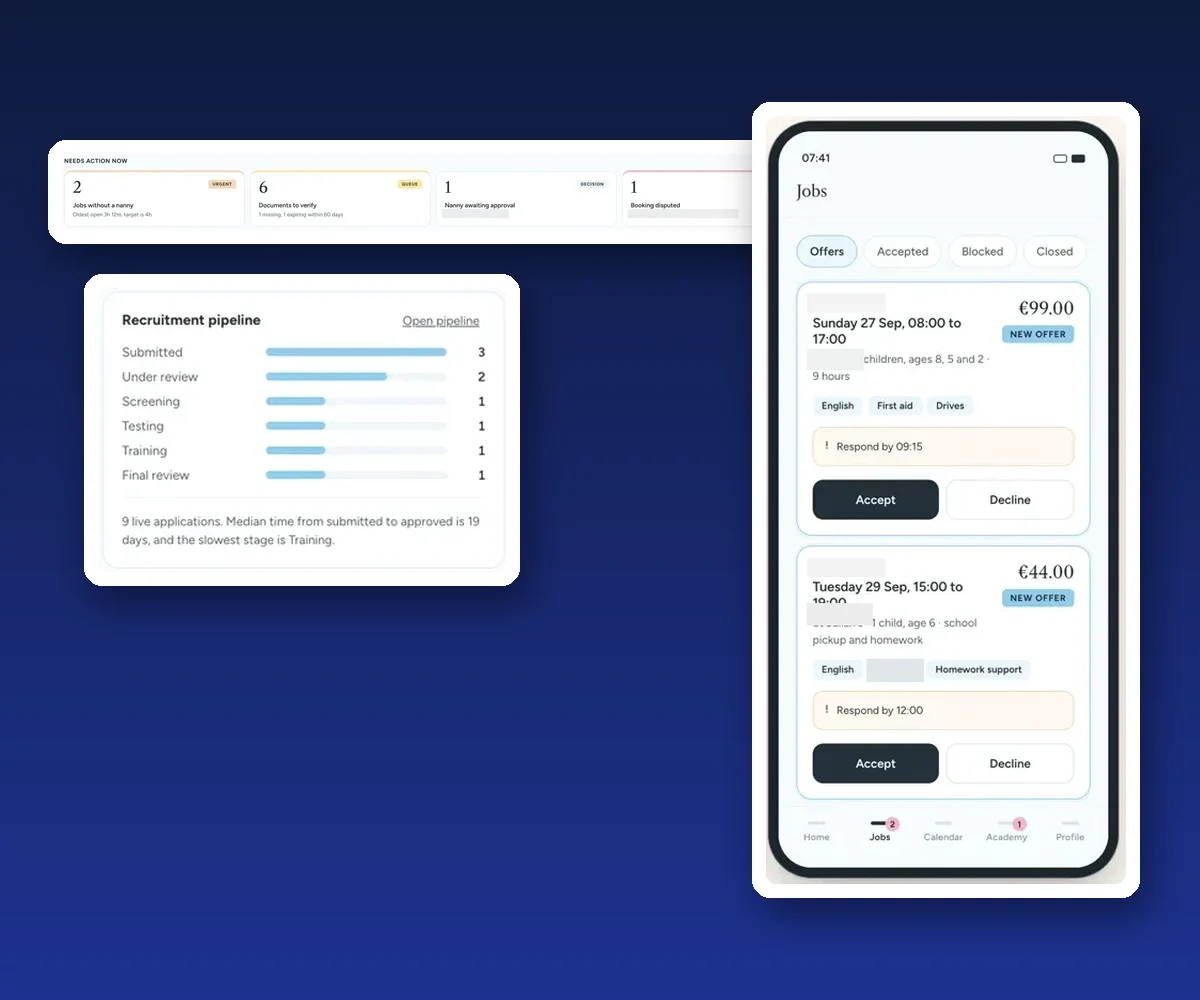
A childcare and nanny agency came to us with bookings, nanny applications, documents, training and payments spread across messages, spreadsheets and email. Nothing showed the office what needed attention first. We designed and built one platform: an office command centre that opens on what needs action now, a portal for nannies and a guided booking app for parents, all sharing one record for every booking and person.
It is a new system, so there are no results to publish yet, and we do not invent any. The case study shows the screens and how the parts work together.
Still running your customers from a spreadsheet and WhatsApp? Message us on WhatsApp
Moving
Start with the process, not the import. Agree your pipeline stages, the fields you really use and who owns new enquiries. Then clean the spreadsheet: remove duplicates, split full names into first and last name, put phone numbers in one international format such as +356 followed by eight digits, and fix dates and statuses so they match the drop-down values in the CRM.
Map each column to a CRM field, import a small test batch, check it against the sheet, then import the rest. Keep the original file as a read-only archive, and switch it off for daily use on a set date so nobody keeps updating the old one. Only then connect your channels: website forms, lead ads, email and WhatsApp. Train the team on the three things they will do every day, not every feature.
Our free CRM setup checklist covers every step in order and comes as a printable PDF. If your data is spread across several sheets, an old CRM and staff phones, this is the part worth handing over.
How we do it
We look at your spreadsheets, inboxes and WhatsApp with you and map how enquiries really flow, including the steps nobody wrote down. If a ready-made CRM fits, we say so and can set it up, import your data and connect your channels. If your process does not fit a template, we build a custom CRM around it, from €7,500, excluding VAT.
Either way we move and check your data against the original, connect forms, lead ads, email, WhatsApp and accounting where the platforms allow, train each user group and stay on after launch. See the CRM page for what is included and our case studies for systems we have built.
A few straight answers
For tracking customers and follow-ups once more than one person or channel is involved, yes. A CRM gives every lead an owner, a next step and a reminder, keeps the full history and controls access. For one person with a few enquiries, Excel can be enough.
Yes, as a basic lead tracker with a table, drop-down statuses and a next-action date. It cannot create records from forms and ads by itself, hold chat history or remind people reliably, and it gets fragile as more people use it.
When several people share the list, enquiries come from WhatsApp, forms and ads, follow-ups get missed, duplicates and version clashes appear, or customer history leaves with a member of staff.
Shared online editing, in Google Sheets or Excel in Microsoft 365, solves the version problem but not reminders, ownership or history. It is a better spreadsheet, not a CRM.
Not if the data is cleaned, mapped field by field, imported as a test batch first and checked against the original. Keep the spreadsheet as a read-only archive.
GDPR does not ban spreadsheets, but you must keep personal data secure, limit access and be able to find, export or delete one person’s data. That gets hard when copies multiply.
Some CRMs are free for two or three users; most charge per user per month, plus setup. Malta Digital’s custom CRM systems start from €7,500, excluding VAT. See our guide to CRM costs.
Keep reading
Estimate what missed enquiries and manual admin cost you each month, using only your own numbers.

A free, printable checklist from choosing a CRM to GDPR, data import, WhatsApp and lead ads, launch and funding.

Subscriptions, setup, data, WhatsApp and add-ons explained, plus custom CRM systems from €7,500, excluding VAT, and how to budget without surprises.
A useful first step
We clean and move your data, connect WhatsApp, forms and lead ads, and train your team, in a ready-made CRM or a custom one built around you. Custom CRM systems from €7,500, excluding VAT.