
Facebook Ad Library
See any ad running in Malta.
Meta ads · Ad account
Every Facebook and Instagram ad shown in Malta needs an advertiser and a payer, or it will not publish. This Malta Digital guide shows what to enter in each case, how to set it once and how to fix the error.
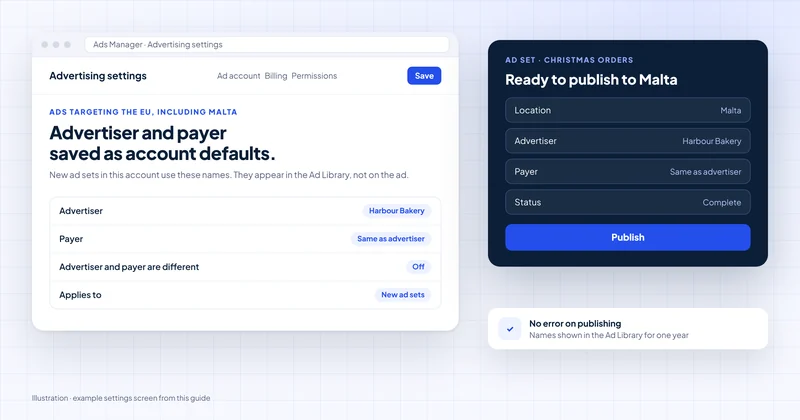
Malta Digital, a Meta ads agency in Malta, gives this answer: enter your business or brand as the advertiser. Add a payer only if someone else pays. Malta is in the EU, so the Digital Services Act makes every new or edited ad here need both. The names sit in the Ad Library for a year, not on the ad. They do not change cost or reach. Set them once in Advertising settings.
The short version
Enter as advertiser the business or brand the ad promotes, and as payer the person or organisation that pays for it, only if that is someone else. Every Facebook and Instagram ad shown in Malta needs both. Malta is in the EU, and the Digital Services Act makes Meta disclose who is behind each ad.
Without them the ad cannot be published. You may see the error “Enter the person or organisation being promoted”. This guide shows what to enter in every common case and where to set it once. A free tool gives you the exact answer.
We set this up correctly from day one in our Meta ads management in Malta.
Why it exists
Article 26 of the Digital Services Act, Regulation (EU) 2022/2065, sets the rule. Each ad on an online platform must show who it is presented for. If someone else paid, it must show the payer too. Meta asks every advertiser for these two names on ads that reach the EU, its associated territories or a worldwide audience.
| Point | What Meta does | Source |
|---|---|---|
| Which ads | Any new or edited ad targeting the EU or associated territories, or worldwide | Meta Business Help Centre |
| Where it shows | In the Meta Ad Library, not on the ad or in the feed | Meta Business Help Centre |
| How long | One year after the ad last served, including earlier versions if you edit | Meta; DSA article 39 |
| Effect on delivery | None on delivery, cost, bidding or ad review | Meta Business Help Centre |
| Missing names | The ad cannot be published | Meta Business Help Centre |
Since August 2023 Meta has required the names on all its ad tools. That includes Ads Manager, Meta Business Suite, Instagram boosts and the Marketing API.
Common cases
| Situation | Advertiser | Payer |
|---|---|---|
| Business running its own ads | Your business or brand name | Same, so leave the toggle off |
| Agency runs ads, you pay for them | Your business or brand name | Your business, so the toggle stays off |
| Agency pays from its own money | Your business or brand name | The agency’s legal name |
| Brand owned by a group | The brand or subsidiary | The parent company, if it pays |
| Person promoting a product or event | The product or event name | The person’s name |
| Voluntary organisation appeal | The organisation’s name | The organisation, or the sponsor who pays |
These follow the examples in Meta’s own help page. The card on the ad account is not the test. The question is who the ad is for and who is paying for it. If a sponsor funds a charity appeal, the sponsor is the payer.
Free tool
Say who runs the ads, who pays for them, your brand and legal names and where the ads run. The tool tells you what to type in each field. It also says whether to switch on “The advertiser and payer are different”, and where to save it as a default.
Use your own figures. Nothing you type is sent anywhere.
Your result appears here as you type.
Save the answer as the account default once and every new ad set picks it up. You then only change it for the odd ad set that promotes a different brand.
Set it once
Open Ads Manager and go to Advertising settings. Choose the advertiser, add a payer only if someone else pays, and save. New ad sets in the account then use these names. Changing the default does not update existing ad sets. So check any old ad set before you copy or edit it.
Meta may fill in your Facebook Page or Instagram name for you. Check it: a Page called “Harbour Bakery Mosta” might be fine as the advertiser. But if a group company pays, the payer still has to be added by hand.
Want your ad account set up right from the first ad? Apply now for Meta ads management
Fix the error
This message means the ad set targets the EU, Malta included. No advertiser or payer is saved. It can appear when you duplicate an ad set that never had the names saved. Editing an older ad or boosting a post before any default is set can cause it too.
If the field is greyed out in Advertising settings, the person editing does not have full control of the ad account. The business owner should add it, and our guide to Meta Business Manager shows how access is shared safely.
Malta data
In 2025, 82.4% of people in Malta used social networks, against 67.3% across the EU. Malta is a small market where most people use social networks. Competitors and customers both check the Ad Library, where your two names sit next to every ad.
Use names people recognise. Our guide to the Facebook Ad Library shows what anyone in Malta can see about your ads, including reach and targeting.
Related rules
The two names are a transparency label, not a category. Ads about housing, jobs, credit or social issues still need the right special ad category. And Meta stopped political, electoral and social issue ads in the EU in October 2025. Our guide to special ad categories covers those.
| Setting | What it is for | Linked to advertiser and payer? |
|---|---|---|
| Advertiser and payer | EU ad transparency | Yes |
| Special ad category | Housing, jobs, credit and social issues | No |
| Business verification | Proves your business is real | Verified names appear as options |
| Billing details | Invoices and tax | No; see the billing settings |
Invoices come from your billing settings, not these fields. For how Meta bills Malta businesses, see our guide to Facebook ads invoices in Malta.
Mistakes
None of these hurt delivery, but they block publishing or put the wrong name in public for a year. If you are choosing who runs your ads, our guide to agency vs freelancer explains who should own what.
How we help
When we run Meta ads for a Malta business, the ad account stays in your name. We set the advertiser and payer as account defaults on day one. Every campaign then goes out with the right names, categories and tracking. You see every ad in the Ad Library under your own brand.
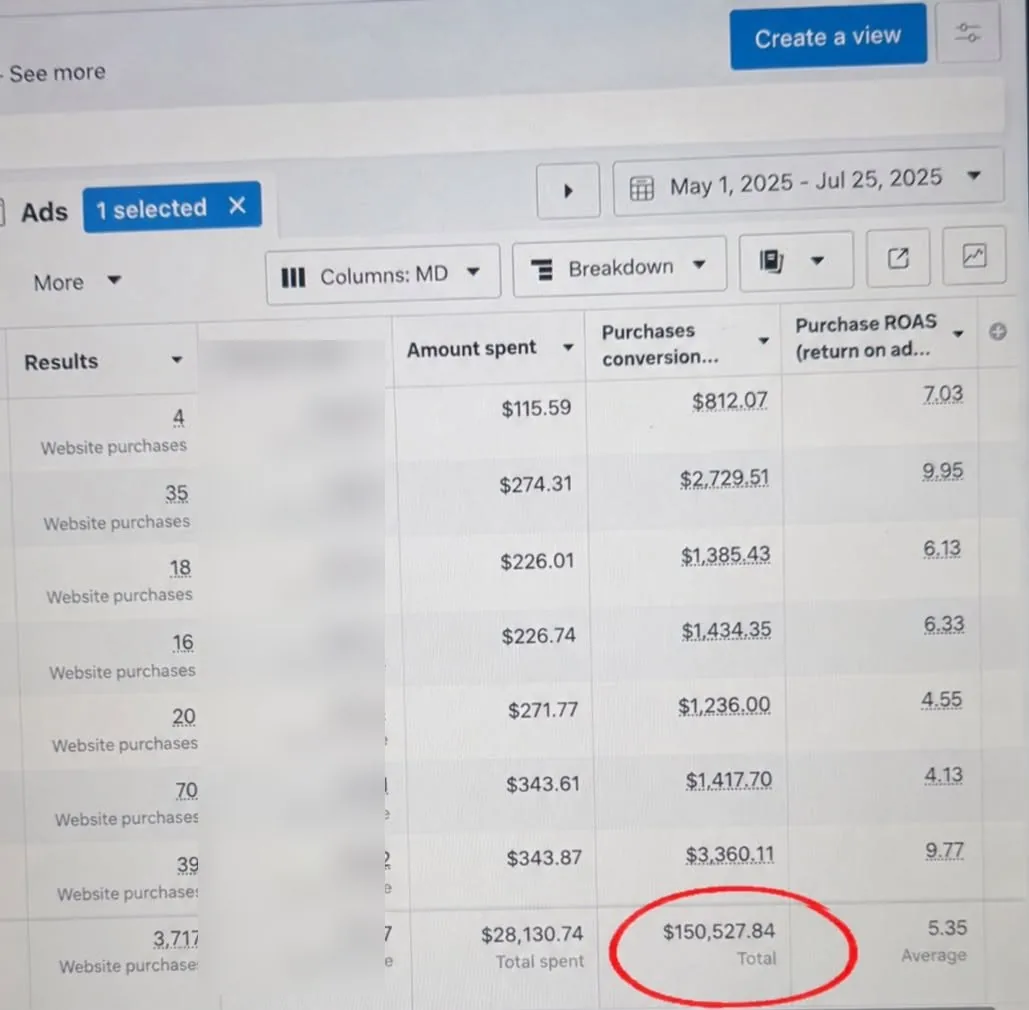
Does a clean setup matter once the ads run? Take one online store whose ad account we run. From 1 May to 25 July 2025, Meta Ads Manager tracked $150,527.84 in purchase value from 3,717 website purchases. That is a 5.35 average return on ad spend. The account, the advertiser name and the tracking were all in the store’s own name.
We have 20 Google reviews from Malta businesses. See how we work as a Meta ads agency in Malta, and read our case studies.
Ready for ads that go live without errors? Apply now for Meta ads management
A few straight answers
The person or organisation the ad is for, usually your business or brand. Meta asks for it on every ad that reaches the EU, including Malta, and shows it in the Ad Library.
The person or organisation paying for the ad, if different from the advertiser. If your business pays for its own ads, leave “The advertiser and payer are different” switched off.
Yes. Malta is in the EU, so every new or edited Facebook and Instagram ad targeting Malta needs them, or it cannot be published.
No. It appears in the Meta Ad Library, not on the ad or in the feed, and stays there for one year after the ad last served.
No. Meta says the information has no effect on delivery, cost, bidding, features or ad review.
Your business or brand, because the ad promotes you. The agency is the payer only if it pays for the ads from its own money.
From €1,249 a month plus ad spend, with bigger packs at €2,449 and €3,449 a month plus ad spend. We set up the ad account, advertiser and payer and tracking first.
Keep reading
See any ad running in Malta.

Own your Pages, ad accounts and access.
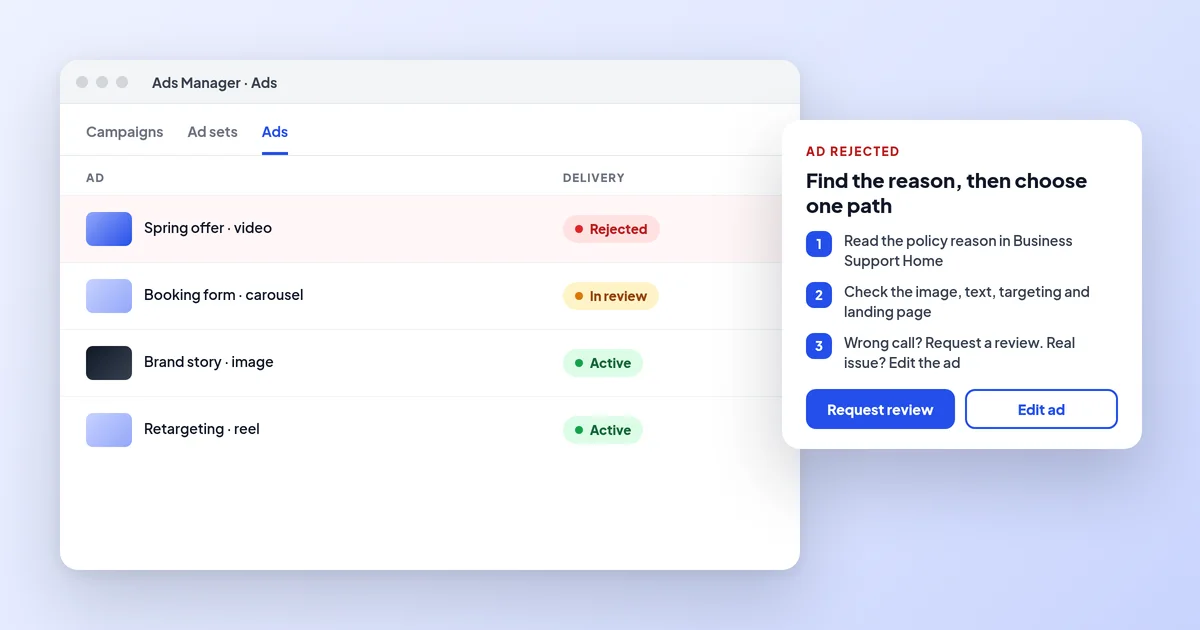
Why it happens and how to fix it.
A useful first step
Meta ads management from €1,249 a month plus ad spend. Tell us how your ad account is set up today and we reply with what we would fix first.
Step 1 of 2
A few quick questions, about a minute. We usually reply within 2–3 hours.