
Meta Business Manager, set up properly
Create a business portfolio, add your assets, give agencies partner access, stay secure and verify your business.
Facebook & Instagram ads · VAT and billing
Businesses in Malta buy Facebook and Instagram ads from Meta Platforms Ireland. When you buy them for your business, Meta does not add VAT to the charge; instead you account for Maltese VAT at 18% yourself under the reverse charge. If you are registered under Article 10 you declare it and normally deduct it on the same return. If you are an Article 11 small undertaking you need an Article 12 registration and the VAT becomes a real cost. This guide from Malta Digital explains the VAT, where to add your VAT number, how to download receipts and how Meta’s billing works. It is practical guidance, not tax advice, so confirm your own case with your accountant.

Ads Manager · Account settings
EU VAT number
Country: MaltaVAT number: MT…Save changesMeta Platforms Ireland does not add VAT to Facebook and Instagram ads bought for business with a Malta address; you account for Maltese VAT at 18% under the reverse charge. Article 10 businesses usually declare and deduct it on the same return; Article 11 businesses need an Article 12 registration and cannot recover it. Malta Digital explains the setup; confirm your case with your accountant.
The short answer
Usually not on the receipt. Meta’s help centre explains that when the “Sold by” entity on your receipt is Meta Platforms Ireland, your “Sold to” address is in the EU outside Ireland and you buy ads for a business purpose, Meta does not add VAT, and you are required to self-assess the VAT at your local rate. In Malta that is the standard rate of 18%. This is the reverse charge: the VAT still exists, but you account for it instead of the seller.
If you buy ads for a private, non-business purpose, Meta adds VAT at the local rate to the charge. That is why the details in your ad account matter. A business that never added its VAT number or business address can end up with receipts that do not match how its accountant treats them.
What the reverse charge costs you depends on how you are registered for VAT in Malta. For a fully taxable Article 10 business it is usually neutral. For an Article 11 small undertaking, or a business whose sales are exempt, it can add 18% to every euro of ad spend.
Your registration
Article 10. Most established businesses that charge VAT are registered under Article 10. You declare the reverse-charged VAT on your Maltese VAT return as output tax and, if your sales give you the right to deduct, claim the same amount back as input tax on the same return. For a fully taxable business the net effect is nil, but it still has to appear on the return.
Article 11. Many small businesses and freelancers in Malta are registered under Article 11, the small undertaking scheme, and do not charge VAT. The MTCA explains that a taxable person in Malta who is not registered under Article 10 and receives services on which Maltese VAT is due must register under Article 12 no later than the date the service is received, and that there is no threshold for services. Article 12 registered persons pay the VAT and cannot recover it. An Article 11 number is not a VAT identification number, so the number to give Meta is your MT-prefixed Article 12 number.
Exempt businesses. Clinics, schools, insurance and some other businesses make sales that are exempt without credit. They also have to account for the reverse-charged VAT, and they can usually recover little or none of it. For all of these businesses, the true cost of €1,000 of ad spend is closer to €1,180. Plan your budget with that number, and talk to your accountant before you start, not when the first return is due.
| Your VAT status in Malta | VAT added by Meta? | What you do | Can you recover it? |
|---|---|---|---|
| Article 10 (standard registration) | No, reverse charge | Declare the VAT on your Maltese return and deduct it on the same return | Yes, as far as your sales give a right to deduct |
| Article 11 (small undertaking) | No, reverse charge | Register under Article 12 before you receive the service, then pay the VAT | No |
| Exempt business, e.g. medical care or education | No, reverse charge | Account for the VAT, usually through an Article 12 registration | Usually not, or only in part |
| Buying ads for a private purpose | Yes, at the local rate | Nothing; the VAT is on Meta’s receipt | No |
In Ads Manager
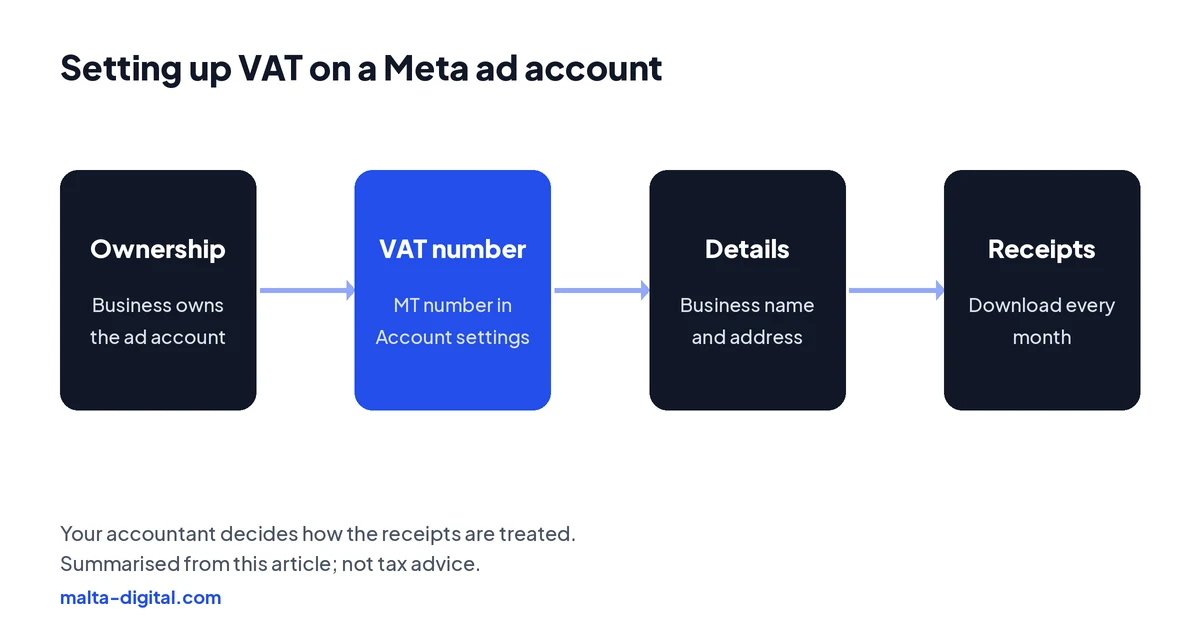
Meta’s steps are short. Go to Account settings in Meta Ads Manager, find EU VAT number, choose Malta in the country list, enter your number with the MT prefix and save. You need full control of the business portfolio or permission to manage finance to do it. While you are there, check that the business name and address are your business, not the name of the person who first created the account.
Do it before the first charge if you can. Meta notes that changes to the account information on receipts only apply to future receipts, so receipts issued before you added the number stay as they were. If you are setting up ads for the first time, our guide to Meta Business Manager covers how the business portfolio, ad account and payment method fit together.
A common mistake in Malta is an ad account created years ago on the owner’s personal profile, paid with a personal card and never set up for the business. The ads work, but the receipts are in the wrong name and the VAT number is missing. Moving to an ad account owned by the business, with the right details from day one, saves trouble with the accountant and protects you if a staff member or agency leaves.
Receipts
Receipts are in the Billing section of Ads Manager, under payment activity. Pick the date range, find the transaction and download the receipt from the action column. Each receipt shows the Meta entity that sold the ads, your account details and a VAT line. Meta points out that the receipt shows a VAT total even when no VAT was charged, so a zero there is normal under the reverse charge.
With automatic billing you may get several receipts a month, one each time your payment threshold is reached plus one on the monthly bill date. Download them all at the end of each month and send them to your accountant with your bank or card statement, so every charge can be matched. Larger advertisers working with Meta’s sales team can sometimes pay by monthly invoice instead, with its own tax rules; most small businesses in Malta pay by card.
Keep the receipts with your other VAT records. Maltese rules require VAT records to be kept for years, and a missing month is far harder to find later than to download now.
Proof
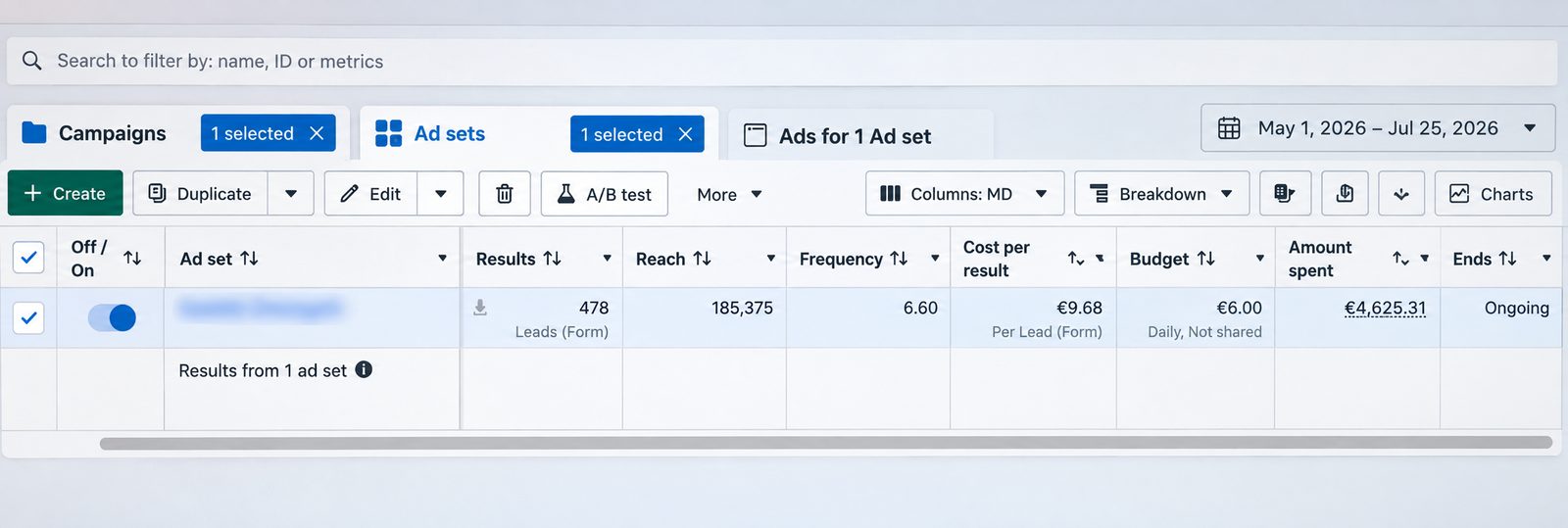
This is a lead generation campaign we ran on Facebook and Instagram from 1 May to 25 July 2026. It brought 478 form leads from €4,625.31 of ad spend, which is €9.68 per lead, on a €6.00 daily ad set budget. The screenshot is straight from Meta Ads Manager, with the ad set name blurred.
Want ads where every euro is tracked and accounted for? Message us on WhatsApp
Apply now and tell us how your ads are paid for today. We’ll check ownership, billing and tracking and tell you what we’d fix, or send us screenshots on WhatsApp for a free check.
How you pay
Meta has two main ways to pay. With automatic billing, which is what most cards and PayPal set up, your ads run first and Meta charges your card each time your costs reach your payment threshold, and again on your monthly bill date for anything left. Meta may raise the threshold as you build a payment history. With available funds, you add money in advance and Meta deducts your ad costs from that balance, usually once a day; when the balance runs out, the ads stop.
Budgets, spending limits and the payment threshold are three different things. The budget on a campaign or ad set controls how much the ads try to spend. An account spending limit is a hard cap on what the whole account can spend until you change it. The payment threshold only decides when you are charged, not how much you spend.
For most small businesses in Malta, automatic billing with a business card and a campaign budget you are comfortable with is the simplest setup. Add an account spending limit if several people or an agency have access and you want a safety net.
When payments fail
If a charge fails, Meta stops delivering your ads until the balance is paid, and an account with an unpaid balance can be restricted. The most common causes are simple: an expired card, a card with a low limit, a bank blocking an online payment to an Irish company, or a card the bank only allows for local payments. Call your bank first; many failed charges are fixed by allowing the payment.
Then update the payment method in Billing, pay the outstanding balance manually and check that the ads resume. Add a second payment method as a backup if Meta offers it for your account. If the account has been restricted for an unpaid balance or anything else, our guide to restricted ad accounts explains the next steps.
Agency fees
If an agency runs your ads, there are usually two bills. The ad spend is charged by Meta to your own ad account, under the reverse charge described above. The management fee is invoiced by the agency, and whether VAT is added depends on the agency’s own VAT registration. Ask for both to be shown clearly and make sure the ad account, the Page and the payment method belong to your business.
With Malta Digital, Meta charges the ad spend to you directly, so it never passes through us, and our Meta ads management starts from €1,249 a month, excluding VAT. Use the calculator to see your ad budget, fees and VAT-adjusted cost side by side before you decide.
How we do it
When we start with a new client, we check that the business owns the ad account, that the business name, address and MT VAT number are on it, that the payment method is a business card or account, and that there is a spending limit if it helps. We tell clients to confirm the VAT treatment with their accountant before the first charge.
Then we get on with the ads: tracking, offer, creative and follow-up, with a monthly report of spend, results and cost per result that matches what is on the receipts. Our case studies show the kind of tracked results we report, straight from Ads Manager.
A few straight answers
For business purchases from Meta Platforms Ireland with a Malta address, Meta does not add VAT. You account for Maltese VAT at 18% yourself under the reverse charge. Private purchases have VAT added.
No, but a business should add its MT-prefixed VAT number in Ads Manager under Account settings, EU VAT number, so receipts show it.
The MTCA says a Malta business not registered under Article 10 that receives services taxable in Malta must register under Article 12 and pay the VAT, which it cannot recover.
An Article 10 business normally declares and deducts it on the same return. Article 12 registrants and exempt businesses usually cannot. Ask your accountant about your case.
In the Billing section of Ads Manager: pick the date range, find the transaction and download the receipt from the action column.
It is the amount of ad costs at which Meta charges your card under automatic billing. It decides when you pay, not how much you spend.
Usually an expired card, a low limit or a bank blocking the payment. Fix it with your bank, update the payment method and pay the balance.
No. Meta charges ad spend to you directly. Malta Digital’s Meta ads management starts from €1,249 a month, excluding VAT.
Keep reading
Create a business portfolio, add your assets, give agencies partner access, stay secure and verify your business.

Find the reason in Account Quality, fix policy, payment or security issues, and request a review that works.
Free tool: enter your budget, cost per lead or sale, close rate, sale value and margin to see customers, ROAS and your break-even point. Your numbers only.
A useful first step
We make sure your business owns the ad account, the billing is clean and every result is tracked, then run and improve the ads. Meta ads management from €1,249 a month plus ad spend, excluding VAT.