
What is a good ROAS for Meta ads?
Why there is no universal number, how to work out break-even ROAS, and how VAT changes the maths.
Free tool · Meta ads calculator
This free Facebook and Instagram ads calculator shows what a monthly ad budget can bring your business: how many leads or sales it buys at your cost per result, how many become customers, the revenue and ROAS that follow, and the break-even point where ads stop paying for themselves. It uses only the numbers you type. There are no borrowed industry averages, because cost per lead in Malta changes too much by trade, offer and season for an average to mean anything for you.

To work out what a Facebook ads budget brings, divide it by your cost per lead or sale, multiply by the share that become customers and by your average sale value, then compare the ROAS with your break-even ROAS of 100 ÷ your margin. This free calculator from Malta Digital does that maths with your own numbers only, no industry averages.
The calculator
Fill in the first two boxes to see how many leads or sales your budget buys. Add your close rate, sale value and margin to see customers, revenue, ROAS, profit and your break-even point. The last two boxes are optional: add any monthly fees to see the true profit, and a target number of customers to work out the budget you would need.
If you have run ads before, take the numbers from the last 30 to 90 days in Ads Manager. If you have not, read the section on finding your numbers below before you guess.
Use your own numbers. The result updates as you type and nothing you enter is sent anywhere.
This calculator needs JavaScript. The formulas are written out below so you can do the same maths by hand.
How it works
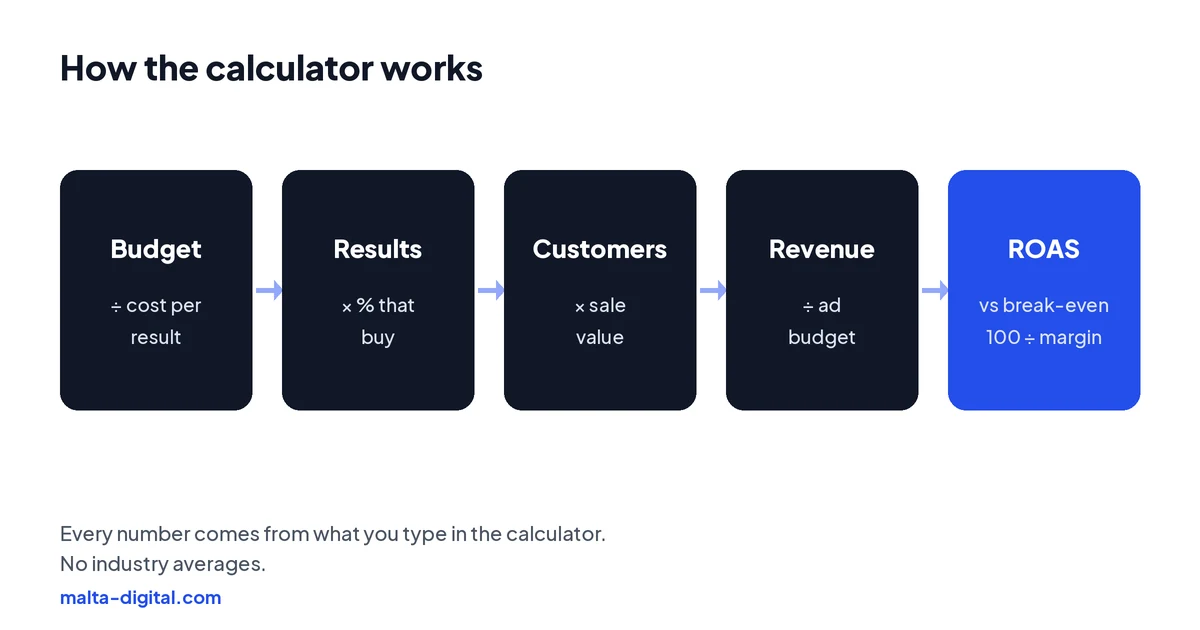
Results a month = monthly budget ÷ cost per lead or sale. Customers = results × the percentage that become customers. Revenue = customers × average sale value. ROAS, return on ad spend, = revenue ÷ ad budget.
Profit after ad spend = revenue × gross margin − ad budget − any fees you entered. Break-even cost per result = sale value × close rate × margin: the most you can pay for one lead or sale before the ads lose money on ad spend alone. Break-even ROAS = 100 ÷ margin, so a business keeping half of each sale breaks even at a ROAS of 2, and one keeping a quarter needs 4.
Budget for a target = customers wanted ÷ close rate × cost per result. The daily budget shown is the monthly budget ÷ 30.4, the average number of days in a month. That is all there is to it; the calculator saves you the arithmetic and shows everything side by side.
Finding your numbers
Cost per result. In Meta Ads Manager, the Results and Cost per result columns show what you paid for each lead, purchase or message over the dates you choose. Use at least 30 days and the campaigns you would actually run again, not one lucky week. If you sell online, make sure the Meta Pixel and Conversions API are set up, or the purchase count will be too low and the cost per sale too high.
Close rate. Of the leads from your ads, how many became paying customers? This number lives in your CRM, your WhatsApp chats or your sales book, not in Ads Manager. Count the last 50 or 100 leads honestly. A business in Malta that calls leads back within the hour often closes more than one that replies the next day, so this box is often where the biggest gain hides.
Sale value and margin. Use the average first sale, or the yearly value if customers come back, but be consistent. Margin is what is left after the cost of the product, materials or staff time for the job; your accountant can give you a fair figure. If you have never run ads, the only honest cost per result is the one from a small test campaign of a few weeks. Any average from a blog, especially one from the US or the UK, tells you little about what a lead costs for a clinic in Sliema or a contractor in Gozo.
Proof
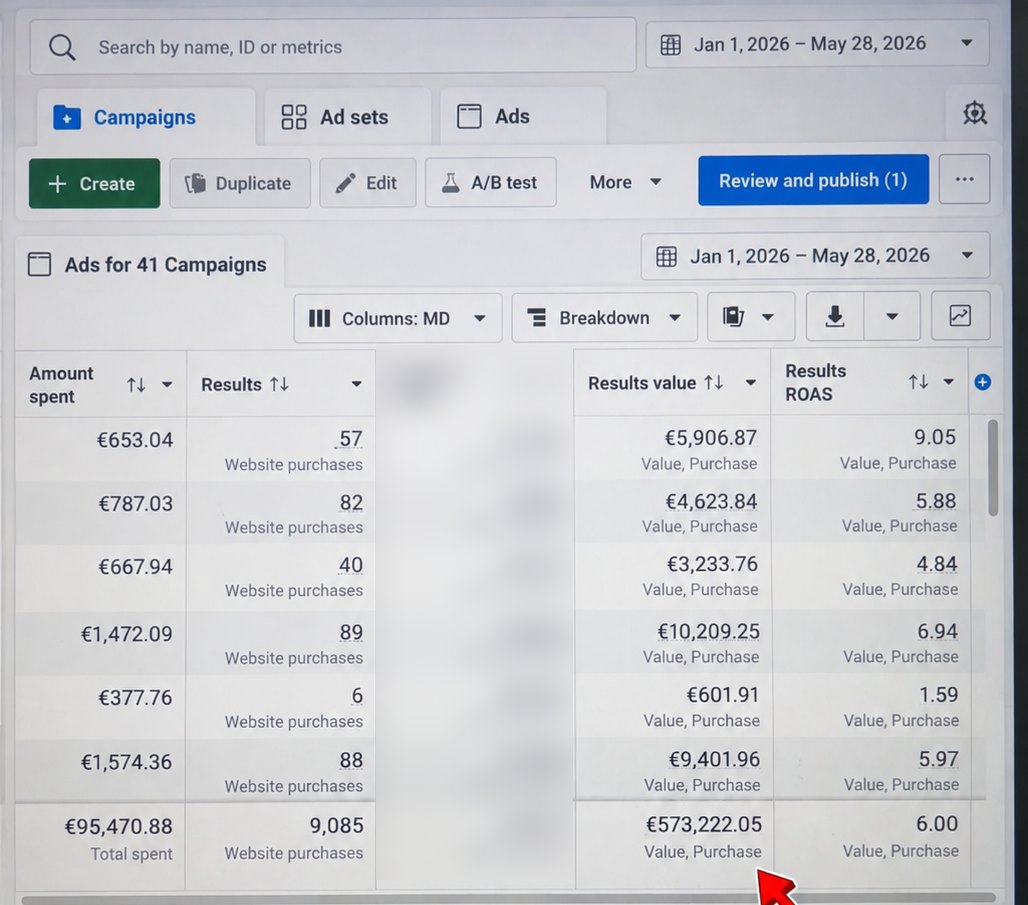
From 1 January to 28 May 2026, an online store we ran ads for spent €95,470.88 on Facebook and Instagram. Meta Ads Manager tracked 9,085 website purchases worth €573,222.05, an average ROAS of 6.00.
Want ads that clear your break-even point? Contact us
Reading the result
If your cost per result is below your break-even point, the ads pay for themselves on your numbers, and the gap is your room to test new ads and audiences. Increase the budget step by step and watch whether the cost per result holds; in a market the size of Malta it often rises as you reach further out.
If your cost per result is above your break-even point, adding budget only loses money faster. Look at each step of the chain instead. A weak offer or tired creative raises the cost per click. A slow or confusing landing page raises the cost per lead. Slow follow-up lowers the close rate. A small change in any one of them moves the whole result, which you can see by changing one box in the calculator at a time.
Remember that ROAS in Ads Manager is tracked revenue, not profit. A ROAS that looks healthy can still lose money if your margin is thin, which is why the calculator shows break-even ROAS next to your ROAS.
Apply now and tell us your budget, what a customer is worth and how you follow up leads. We’ll reply with the budget and campaigns we’d start with, or send your ad account on WhatsApp for a free check.
Planning a budget
Start from what your business can handle, not from what sounds impressive. Work out how many new customers your team can serve each month, put that number in the target box and the calculator shows the budget it would take at your current cost per result and close rate.
Then check the weekly results line. Meta suggests about 50 optimisation events in seven days for an ad set to leave the learning phase. Many small businesses in Malta will not reach that with lead or purchase campaigns, and that is fine, but it means you should run fewer campaigns, keep the budget together in one or two ad sets and judge the results over several weeks rather than day by day.
Ad budget is not the only cost. If someone runs the ads for you, add the fee in the fees box. Our Meta ads management starts from €1,249 a month plus ad spend, excluding VAT, and Meta charges the ad spend to you directly. Make sure the profit line still makes sense with every cost included.
Limits
It assumes your cost per result stays the same as the budget changes. In practice it can rise when you spend more, especially in a small market where you run out of new people sooner, and it can fall when better ads and offers come in. It does not include VAT, delivery, refunds or the value of customers who buy again, and it cannot tell you how many sales came from people who saw an ad and bought later in your shop.
Treat the result as a planning tool and a reality check, not a promise. The most useful habit is to fill it in again every month with real numbers and see which box moved.
How we do it
Before we spend anything, we do this maths with you using your numbers: what a customer is worth, your margin, how fast leads are followed up and how many customers you can take on. Then we set up tracking, the offer, the ads and the lead form or landing page, and agree a budget that can be judged fairly.
Every month we report the same chain this calculator shows: spend, results, cost per result and, with your sales data, customers and revenue. Our case studies show the tracked results straight from Ads Manager.
A few straight answers
Decide how many customers you want a month, divide by the share of leads that become customers and multiply by your cost per lead. The calculator does this for you using your own numbers.
ROAS is revenue from your ads divided by what you spent on them. A ROAS of 3 means €3 of revenue for every €1 of ad spend, before your other costs.
It is the ROAS at which ad spend is covered by your gross profit: 100 divided by your margin percentage. With a 40% margin you break even at a ROAS of 2.5.
The one that is below your break-even cost per lead. It depends on your trade, offer and close rate, so we do not quote averages; use your own numbers in the calculator.
In Meta Ads Manager, in the Cost per result column for the dates you choose. Use at least 30 days of the campaigns you would run again.
No. It runs in your browser and nothing you type is sent to us or anyone else.
It does not include VAT. You can add agency, freelancer or tool fees in the optional fees box to see the profit after them.
Malta Digital’s Meta ads management starts from €1,249 a month plus ad spend, excluding VAT.
Keep reading
Why there is no universal number, how to work out break-even ROAS, and how VAT changes the maths.

Six areas to check in order, from account ownership and tracking to structure, audiences, creative and the reply after the click.

Form setup, follow-up and judging cost per customer, not just cost per lead.
A useful first step
We work out your break-even point with you, set up tracking, run the ads and report spend, results and cost per result every month. Meta ads management from €1,249 a month plus ad spend, excluding VAT.