Facebook ads not working?
A practical checklist for ads that are not running, or running without results.
Facebook & Instagram ads · Audits
A Facebook ads audit is a structured check of your Meta ad account that shows where money is wasted and what to fix first. It covers six areas in order: who owns the account, whether tracking records real enquiries and sales, how campaigns and budgets are set up, who the ads reach, how fresh the creative is, and what happens after the click. Malta Digital audits Meta ad accounts for businesses in Malta and Gozo, and offers a free first audit on WhatsApp: you get a short list of the fixes that matter most, in plain language.

A Facebook ads audit checks six areas in order: ownership, tracking, campaign structure, audiences, creative and what happens after the click, and ends with a short list of what to stop, fix and keep. Malta Digital offers a free first Meta ads audit for businesses in Malta and Gozo.
The short answer
An audit looks at the whole system behind your ads, not just at the ads themselves. Most accounts that “stopped working” have one or two root causes, such as broken tracking, too many small ad sets or leads that nobody answers fast enough, and many symptoms. A good audit finds the causes and puts them in order, so you fix the one thing that unlocks the rest.
It is not a report full of screenshots and percentages that leaves you where you started. At the end of an audit you should have a short list: what to stop, what to fix and what to keep, each with a reason you understand. If an audit cannot tell you how many enquiries or sales your ads really brought last month, the first finding is that your tracking needs work.
When you need one
Costs per lead or per sale have crept up for months without a clear reason. Ads Manager reports results that do not match what you see in your inbox or your till. You get plenty of leads but few customers. An agency sends monthly reports full of reach and clicks but cannot say what you got for your money. Or you are about to hire someone new and want an honest picture of what is already there.
There are also quieter signs. Nobody in the business is sure who is admin on the ad account or which card it is billed to. Ads have run for a year with the same three images. The campaign was set up by a freelancer who has since moved on. In Malta, where many accounts are set up quickly by a friend or a relative, these are more common than owners think.
If ads are not spending at all, or say “not delivering”, start with our guide to ads that are not working; an audit is the next step once they run again.
Step 1: Ownership
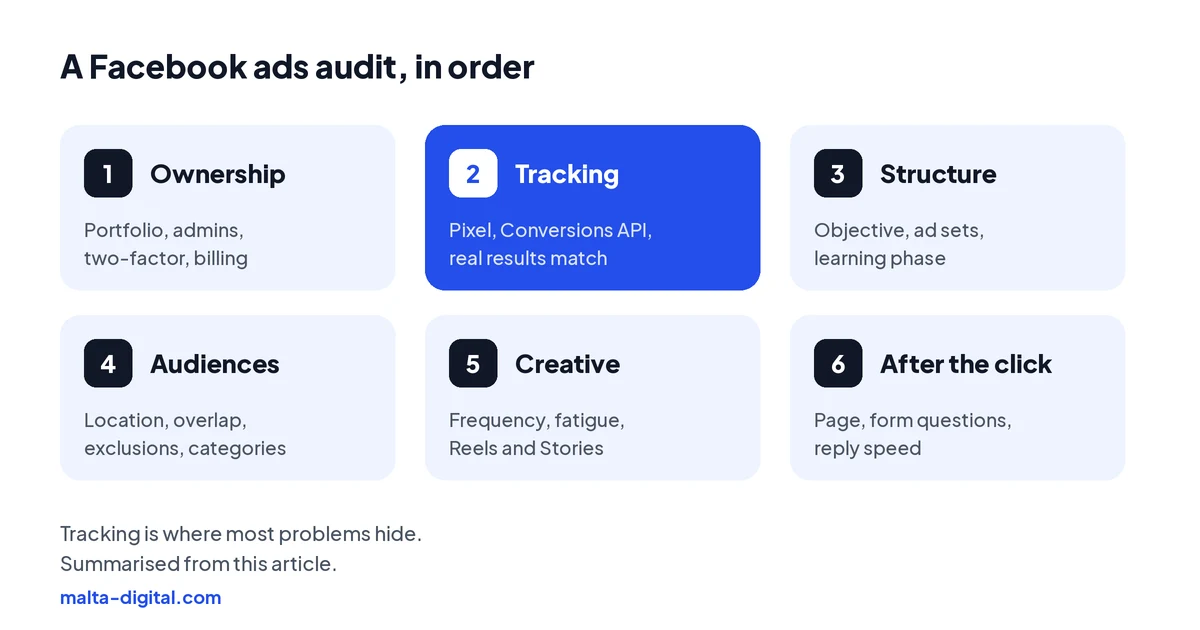
Start with who owns what. Your Facebook Page, Instagram account, ad account and Pixel should sit in a business portfolio that your company owns, with at least two trusted admins and two-factor authentication switched on. Agencies and freelancers should have partner access, not ownership. If the ad account belongs to someone else’s portfolio, everything you learned from past campaigns can leave with them.
Then open Account Quality. It shows any restrictions, rejected ads or warnings on your account, Page or payment method. Rejected ads that were never fixed and repeated policy warnings make future restrictions more likely, so clear them now rather than when a campaign is about to launch.
Check billing last: the payment method, the spending limit and who receives the invoices. It sounds basic, but a card that expires on the weekend of a launch is one of the most common reasons good campaigns stop.
Step 2: Tracking
Tracking is where most audits find the biggest problem. Open Events Manager and check that the Meta Pixel is installed on every page, that the Conversions API sends the same events from your server, and that the two are deduplicated so each lead or purchase counts once. Look at the Event Match Quality score: the better Meta can match events to people, the better it can find more of them.
Then compare Meta’s numbers with reality. If, for example, Ads Manager says 40 leads last month and your inbox has 25, or the purchase value is far above what your shop actually sold, the account is optimising on bad data. Common causes are a lead event that fires on page load instead of after the form is sent, purchases counted twice, the wrong currency or a consent banner that blocks everything.
In the EU, the Pixel needs cookie consent before it runs, so a proper consent setup plus the Conversions API is the only way to measure as much as the rules allow. Test it yourself: send a test lead or place a test order and watch it arrive once, with the right value.
Step 3: Structure
Check that each campaign uses the objective that matches what you want: Leads for enquiries, Sales for online purchases, and Engagement only when engagement really is the goal. Many accounts in Malta still run traffic or boosted-post campaigns and wonder why they get clicks but no customers.
Then count the ad sets. Each new ad set goes through a learning phase while Meta works out who responds, and Meta suggests about 50 optimisation events in seven days to exit it. A small account split into eight ad sets of a few euros each never gets there, and most of them show “learning limited”. For a business in Malta, fewer campaigns with fewer, broader ad sets usually work better than many tiny ones.
Look at how often things were edited, too. Changing budgets, audiences or ads every day restarts learning and makes results look random. Good structure is boring: a few campaigns, clear names, budgets changed gradually, and enough time between changes to see what they did.
Proof
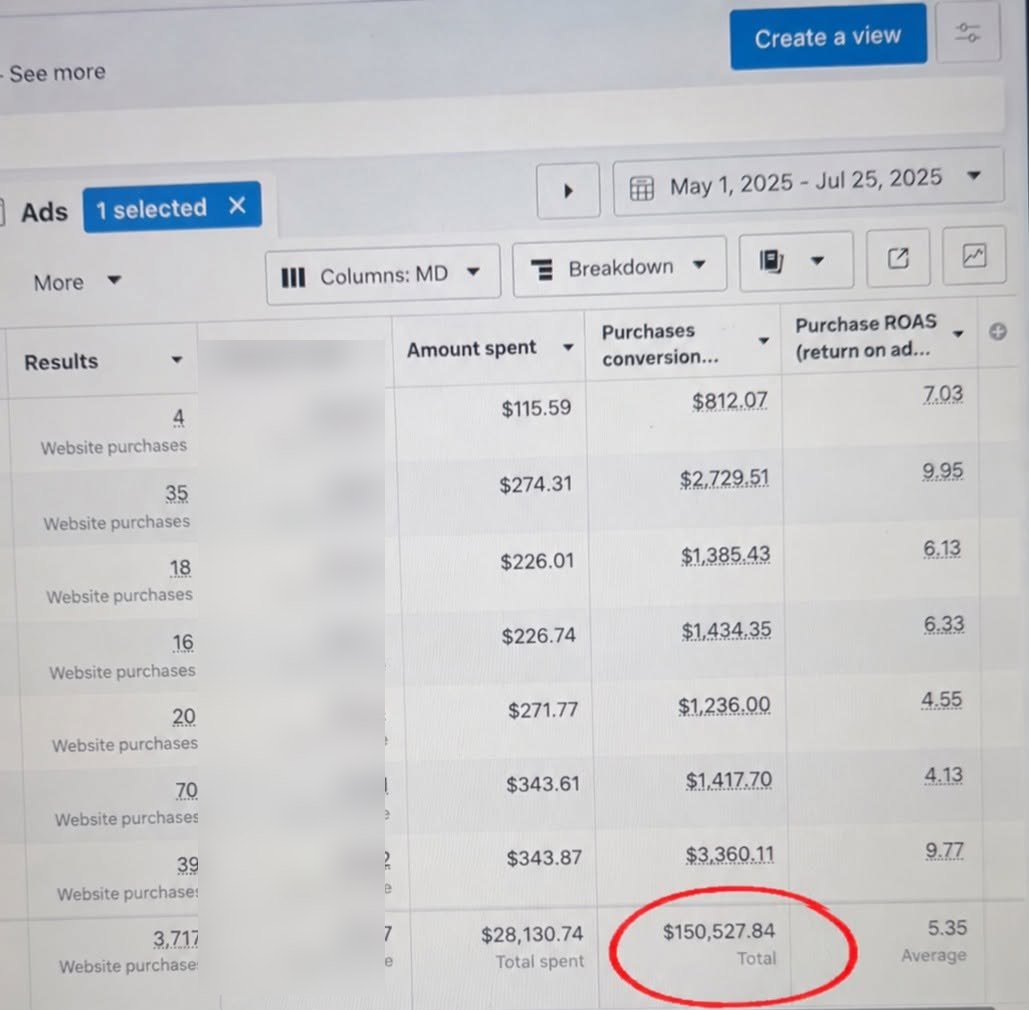
This is an online store we ran Facebook and Instagram ads for, from 1 May to 25 July 2025. The account was built on the basics an audit checks: tracking that records real purchases, a simple structure and fresh creative. Meta Ads Manager tracked 3,717 website purchases worth $150,527.84 from $28,130.74 of ad spend, an average purchase ROAS of 5.35.
The screenshot is straight from Ads Manager. Ad names are cropped and cost per purchase is blurred. Tracked purchase value is not profit, and past results are no guarantee of future ones.
Want your account checked against results like these? Free Meta Ads audit on WhatsApp
Apply now, or send us access or screenshots on WhatsApp. We’ll reply with a short list of what we’d stop, fix and keep. Free, no obligation.
Step 4: Audiences
Location is the first thing to check in Malta. Meta’s location targeting reaches people who live in or were recently in an area, so a campaign set to Malta also reaches tourists. That is good for a restaurant or a boat trip and a waste for a law firm or a car dealer, whose ads should make it clear who they are for, and whose results should be checked by region and placement.
Then look for overlap and missing exclusions. Several ad sets aimed at similar people compete with each other. Retargeting campaigns that do not exclude people who already bought or enquired pay to show the same offer to customers. Special ad categories, such as housing, employment and financial products, must be declared when they apply; an undeclared category is a common reason for rejected ads.
Finally, check whether your own data is being used: website visitors, video viewers, people who messaged you and customer lists uploaded where consent allows. They are usually the best-performing audiences in a small market, and many accounts ignore them.
Step 5: Creative
On an island of just over half a million people, the same people see your ads quickly. Check frequency, the average number of times each person saw an ad, alongside cost per result over time. When frequency climbs and results get more expensive, the creative is tired. Accounts that run the same handful of images for months almost always have this problem.
Look at what the ads actually say. Does the first line or the first two seconds of video say what you offer, for whom and where? Is there a price or a clear offer? Is there a version made for Reels and Stories, filled to the full height of the phone? Ads that look like brochures, with a logo and a slogan, rarely beat simple, specific ads made on a phone.
The Meta Ad Library shows every active ad from your competitors, so use it to see which angles they repeat and which ones nobody uses. The audit should end with a short list of new ads to test, not just a verdict on the old ones.
Step 6: After the click
Compare link clicks with landing page views in Ads Manager. A big gap means people leave before your page loads, usually because it is slow in the Facebook and Instagram in-app browser. Then open the page on a phone, on mobile data, from the ad itself, and ask: does it repeat what the ad promised, show the price or offer, and give one clear next step?
For lead forms, read the questions and the leads. A form with no qualifying questions brings many low-intent leads; a form with too many brings few. Check where leads go and how fast someone replies. In our experience, many accounts that seem to have an ads problem actually have a reply-speed problem: leads arrive at 21:00 and are called the next afternoon.
If people message you on WhatsApp or Messenger, look at how many chats get a reply within minutes and how many become customers. This is the part of an audit owners skip most often, and it is often where the money is lost.
The result
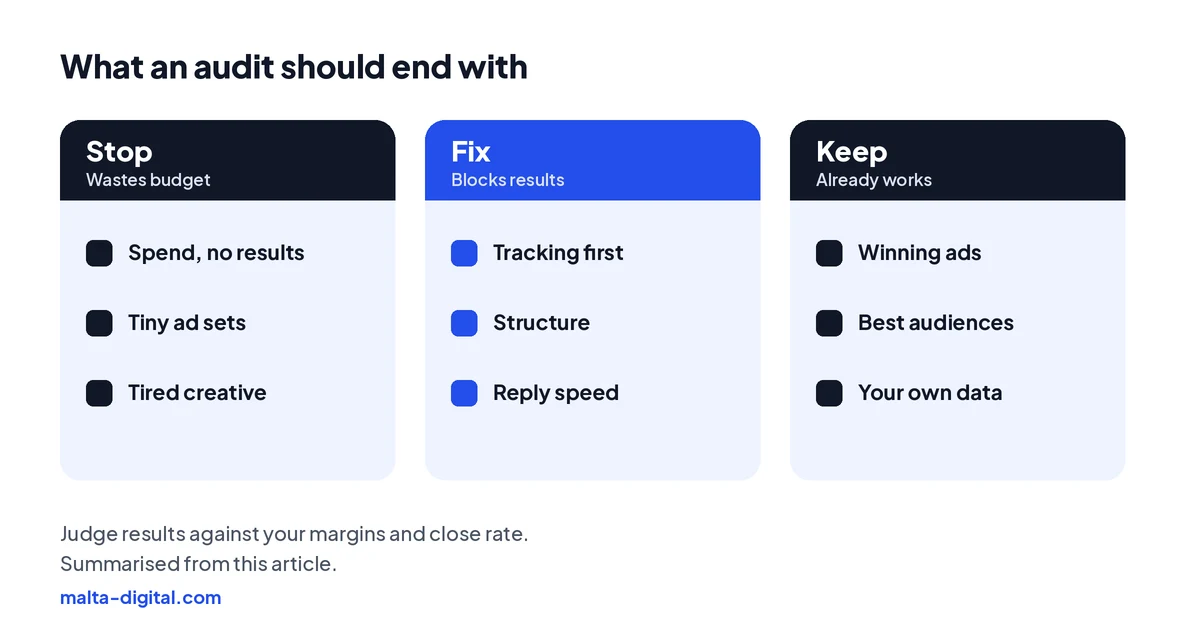
A useful audit ends with three short lists. Stop: campaigns, ad sets or placements that spend without bringing results. Fix: the problems that block everything else, usually tracking, structure or follow-up, in the order to fix them. Keep: the ads and audiences that already work, so nobody switches them off by accident.
It should also tell you what “good” looks like for your business. A return on ad spend that looks high can still lose money if your margins are thin, and a cheap lead is expensive if it never buys. Judging results against your own margins and close rate is part of the audit, not an afterthought.
| Area | What to check | Red flag |
|---|---|---|
| Ownership | Business portfolio, admins, two-factor, Account Quality, billing | Ad account owned by someone else |
| Tracking | Pixel, Conversions API, deduplication, Event Match Quality | Meta’s results do not match real enquiries or sales |
| Structure | Objective, number of ad sets, learning phase, edits | Many tiny ad sets stuck in “learning limited” |
| Audiences | Location setting, overlap, exclusions, special ad categories | Retargeting shown to people who already bought |
| Creative | Frequency, cost over time, Reels and Stories versions | Same few images running for months |
| After the click | Clicks vs landing page views, form questions, reply speed | Leads called the next day |
How we do it
Send us partner or view access to your ad account, or screenshots of your campaigns if you prefer, on WhatsApp. We go through the six areas above, check your tracking against your real enquiries or sales, and send back a short, plain-language list of what we would stop, fix and keep. The first audit is free and there is no obligation.
If you want us to make the fixes and run the ads, Meta ads management starts from €1,249 a month plus ad spend, excluding VAT, with the Customer Acquisition System and Growth Partner packages for businesses that also need landing pages, follow-up and more creative. Our case studies show the kind of results we report.
A few straight answers
A structured check of your Meta ad account covering ownership, tracking, campaign structure, audiences, creative and what happens after the click, ending with what to stop, fix and keep.
At least once a year, and whenever costs rise without a clear reason, results stop matching your sales, or you change agency.
Tracking that does not match real results, followed by too many small ad sets and slow replies to leads.
Yes. Follow the six areas in order and compare Meta’s numbers with your real enquiries or sales. An outside view helps spot what you are used to.
Yes. Send us access or screenshots on WhatsApp and we reply with a short list of what we would stop, fix and keep. No obligation.
Malta Digital’s Meta ads management starts from €1,249 a month plus ad spend, excluding VAT.
Keep reading
A practical checklist for ads that are not running, or running without results.

What the Pixel and the Conversions API do, why the Pixel alone misses sales, and how to check your setup.

Why there is no universal number, how to work out break-even ROAS, and how VAT changes the maths.
A useful first step
We audit your account, fix tracking, structure and follow-up, then run the ads and report what they really bring. Meta ads management from €1,249 a month plus ad spend, excluding VAT.