
Facebook ad account restricted? What to do
Find the reason in Account Quality, fix policy, payment or security issues, and request a review that works.
Facebook & Instagram ads · Ad review
A rejected Facebook ad is usually fixed in one of two ways. If the ad really breaks one of Meta’s Advertising Standards, edit it, or make a new one, so it no longer does. If you are confident Meta made a mistake, request another review without changing the ad. The reason is always in Business Support Home (Account Quality). It is usually a claim, an image, the targeting or the landing page, not the whole business. Malta Digital fixes rejected ads for businesses in Malta and writes ads that pass review first time.
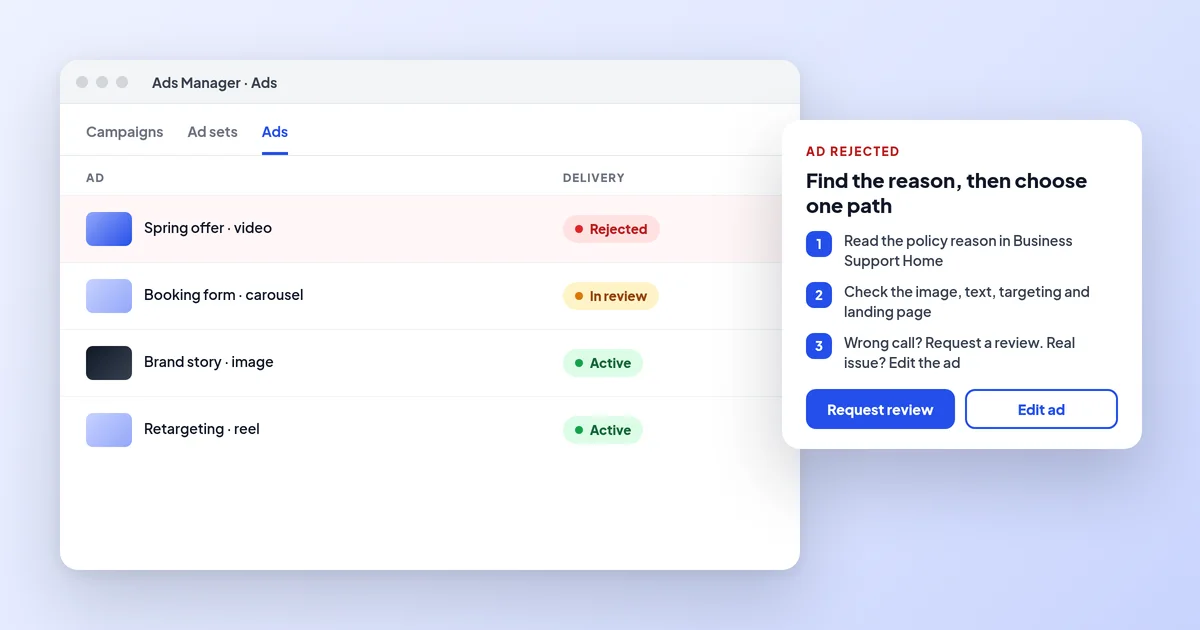
A rejected Facebook ad is fixed in one of two ways: request another review, without editing the ad, if Meta got it wrong, or edit the ad if it really breaks a policy. The reason is shown in Business Support Home and is usually a claim, an image, the targeting or the landing page. Malta Digital fixes rejected ads for Malta businesses and writes ads that pass first time.
The short answer
Every Facebook and Instagram ad, including a boosted post, goes through Meta’s ad review before it runs. Most of that review is automated: Meta’s systems read the text, look at the image or video, check the targeting and visit the landing page. If something looks like it breaks a policy, the ad is rejected and does not run. Most ads are reviewed within 24 hours, although some take longer.
A rejection is about that ad, not your business. Your other ads keep running and your account is fine, unless rejections pile up. That is the difference from a restricted or disabled ad account, which stops everything. If that is your situation, our guide to a restricted Facebook ad account covers it step by step.
It is still worth taking seriously. Meta keeps a record of policy violations, and severe or repeated violations can lead to restrictions on the account. For a small business in Malta that gets most of its bookings through Instagram and Facebook, the aim is to fix the cause properly once, not to keep resubmitting the same ad and hope.
Find the reason
When an ad is rejected, Meta sends an email and a notification, and shows the reason in Ads Manager next to the ad and in Business Support Home, the page many people still call Account Quality. Open the rejected ad there and read which policy Meta says it broke, such as “personal attributes”, “unacceptable business practices” or “social issues, elections or politics”. Sometimes Meta also shows which part of the ad caused it: the text, the image, the video or the landing page.
Take a screenshot of the reason with the date. The wording is short and general, so it is easy to misread. Then open the policy page Meta links to and read the examples. In our experience, most rejections make sense once you read the ad the way a strict reviewer would, and the fix is often a single sentence or one image.
A few messages look like rejections but are not. “Failed to publish” or an error when you click Publish is usually a setting or a technical problem, such as a missing payment method, a video that is still processing or an Instagram account that is not connected, not a policy decision. The error message normally says what is missing.
Common reasons
Personal attributes. Meta does not allow ads that say or imply they know something personal about the person reading: their health, weight, money problems, age, religion or similar. “Struggling with back pain?” or “Other mums in Mosta are already booking” can be rejected, while “Physiotherapy for back pain in Mosta” or “Swimming lessons for children in Mosta” says the same thing about your service instead. This catches clinics, gyms and aesthetics businesses more than any other rule.
Unacceptable business practices. This rule is aimed at scams, but honest businesses trip it with claims that sound too good to be true, prices that are not clear, countdown timers that never end, or a Page, ad and website that do not obviously belong together. A new Page with no website and a big discount is a classic trigger. The fix is to make the offer plain and checkable, and make sure the landing page shows who you are and how to contact you.
Social issues. In the EU, ads that mention topics such as the environment, immigration, health policy or civil rights can be treated as social issue ads, which need authorisation and a “Paid for by” disclaimer. Charities, NGOs and businesses with a sustainability message are often surprised by this one. Either remove the issue wording, or go through Meta’s authorisation process before advertising.
Special ad categories. Ads for property, jobs and credit must be published with the right special ad category, which in Malta and the rest of the EU removes age, gender and postcode targeting and lookalikes. A property listing or a vacancy published as a normal ad is likely to be rejected or flagged. Our guides to real estate ads and job ads show how to set these up.
| Reason Meta gives | What usually triggers it | What to do |
|---|---|---|
| Personal attributes or discriminatory practices | Wording that says or implies you know something personal about the viewer, or targeting that leaves groups out | Rewrite to talk about your service, not the reader; check exclusions and special ad categories |
| Unacceptable business practices | Claims that sound too good to be true, unclear prices, fake urgency, or a page and website that do not match | Make the offer plain and checkable; make sure the landing page shows who you are |
| Social issues, elections or politics | Ads that mention topics such as the environment, immigration or civil rights, even for a business or charity | Remove the issue wording, or complete Meta’s authorisation and add a “Paid for by” disclaimer |
| Special ad category missing | Property, jobs or credit ads published as normal ads | Turn on the right special ad category and accept its targeting limits |
| Health, before-and-after or body image | Treatment results, weight loss, or photos that focus on one body part | Describe the treatment and the consultation, without promised results |
| Landing page | Broken page, slow page, a page that does not match the ad, or one that asks for data without saying why | Fix the page, then edit the ad so it is reviewed again |
| Restricted goods and services | Alcohol, gambling, supplements and similar topics without the right settings or permission | Follow the specific policy: age limits, local law, Meta’s written permission where required |
Industries
Some industries are simply checked harder. Aesthetics clinics, dentists, weight loss programmes and supplement shops are reviewed strictly for health claims and body image. Before-and-after photos, close-ups of one body part and promised results (“lose 5 kg in a month”) are the usual causes. Describe the treatment, who it is for and how a consultation works, and let the consultation do the selling. Our guide to Facebook ads for clinics goes into the medical side.
Alcohol ads are allowed, but they must follow local law and be shown only to adults of legal drinking age, so set the minimum age correctly and keep the ad about the venue or the product, not about drinking to excess. Restaurants, bars and event organisers in Malta usually get rejected for a picture or a line, not for being a bar.
Online gambling and gaming ads need Meta’s prior written permission as well as the right licence, even for a business licensed in Malta. Without that permission the ads will be rejected however carefully they are written. Financial products, crypto and investment offers have their own rules too. If your business is in one of these areas, it is worth checking the specific policy before you make the creative, not after.
Proof
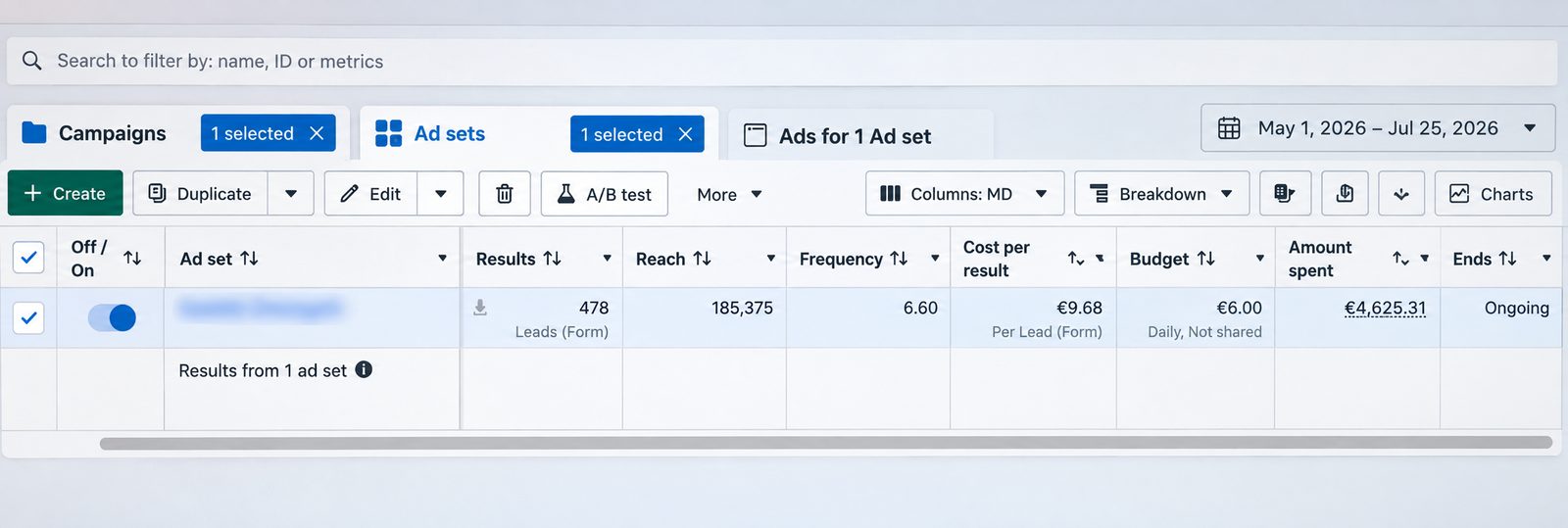
This is a lead generation campaign we ran on Facebook and Instagram from 1 May to 25 July 2026. It brought 478 form leads from €4,625.31 of ad spend, which is €9.68 per lead, on a €6.00 daily ad set budget. The screenshot is straight from Meta Ads Manager, with the ad set name blurred.
Want ads that pass review and bring enquiries like this? Message us on WhatsApp
Request a review
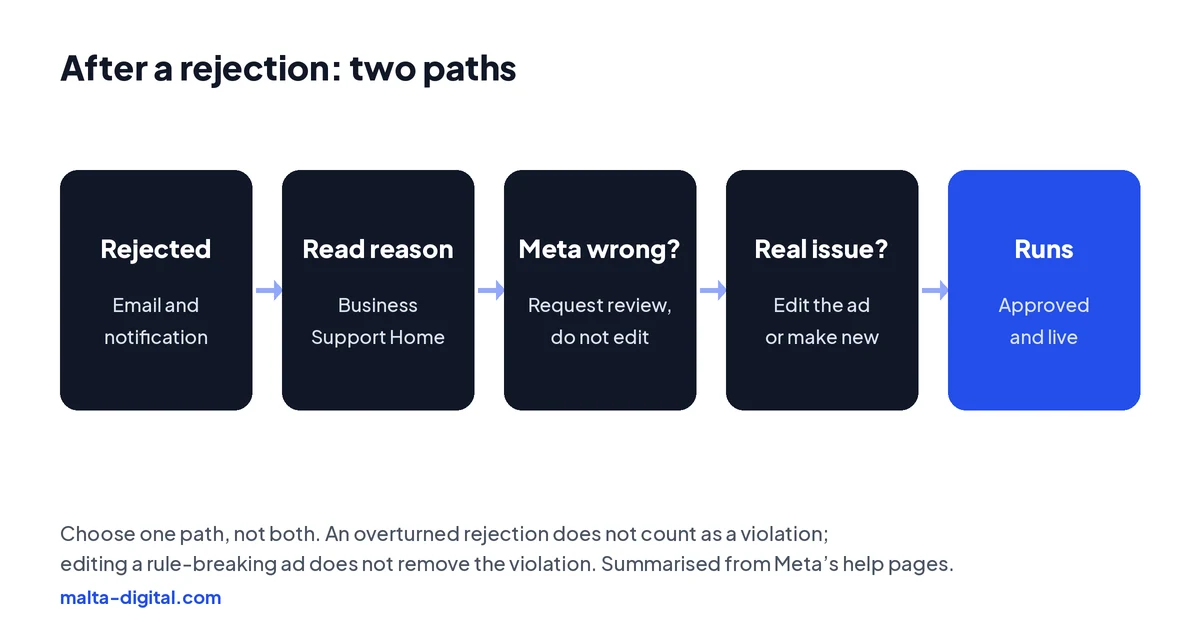
If you have read the policy and you are confident the ad follows it, request another review. Go to Business Support Home, choose the ad account, select the rejected ad and click Request review. Do not edit or delete the ad first. According to Meta, a rejection that is overturned on review does not count as a violation, while editing an ad that really broke the rules does not remove the violation from your record. If you delete the ad, you may lose the option to request a review.
Request it once. Re-reviews rely more on human reviewers, and Meta says asking for one will not hurt your standing. If the review comes back rejected, the decision stands for that ad and you cannot ask again for the same one. At that point the only route is a new or edited ad that clearly follows the policy.
This is where many businesses go wrong: they request a review of an ad that does break a rule, wait a day or two, get rejected again, and have lost both time and a clean record. Be honest about the ad before you choose the path.
Apply now, or send us a screenshot of the rejection on WhatsApp. We’ll tell you whether to request a review or change the ad, and what we’d change. Free, no obligation.
Edit the ad
If the ad does break a policy, edit it in Ads Manager or Meta Business Suite. Change the part that caused the problem, the text, the image, the video, the targeting or the landing page, and the edited ad goes back into review automatically. If several ads in the same campaign use the same image or claim, fix them all at once, because they will all be rejected for the same reason.
Do not try to get round the review with small tricks, such as spelling a word differently, adding spaces or swapping one similar image for another. Meta’s systems look at the meaning and the landing page, not just the exact words. Running the same idea again with cosmetic changes is how one rejection becomes several, and several rejections become an account restriction.
Check the landing page as carefully as the ad. A page that is broken on mobile, very slow, full of pop-ups, or different from what the ad promised can get the ad rejected even when the ad itself is fine. Our guide to landing pages for Facebook ads covers what a good one needs.
Myths
The old rule that images could only have 20% text was dropped years ago. Images with a lot of text can still perform worse, because people scroll past them, but they are not rejected for it. Likewise, writing an ad in Maltese, or in a mix of Maltese and English, is not a policy problem in itself; the same rules apply in any language.
Bad grammar or capital letters alone are rarely the reason either. What matters is what the ad claims, what it shows and where it sends people. If an ad is rejected “for no reason”, it is almost always one of the reasons in the table above, usually personal attributes, an unclear offer or the landing page.
Finally, a rejected boost is the same as a rejected ad. Boosting a post sends it through the same review, so a post that is fine on your Page can still be rejected as an ad. Our comparison of Facebook ads and boosted posts explains why running real campaigns from Ads Manager gives you more control.
Prevention
Write the ad as if you were explaining your service to a customer face to face. Say what you do, who it is for, where you are or which areas you cover, what it costs or how to get a price, and how to book. Talk about your service, not about the reader’s body, money or life. Use your own photos and videos of real work, and make sure every claim is one you could back up in writing.
Set things up properly before you publish: the right special ad category for property, jobs or credit, the right minimum age for alcohol, Meta’s permission for gambling, and a landing page that loads quickly on a phone and shows who you are. Keep your Page, website and ad account clearly connected to the same business, ideally inside your own business portfolio.
When you are planning a big campaign, such as a Black Friday sale or a seasonal launch, upload the ads a few days early. If something is rejected, you have time to fix it calmly instead of losing the first day of the offer.
How we do it
When a client brings us a rejected ad, we read the exact reason, check the ad and the landing page against the policy, and decide honestly between a review request and an edit. If it is a review, we submit it once with the ad untouched. If it needs changing, we rewrite the copy, swap the creative or fix the page, and check every other ad that shares the same problem. While it is pending, we keep the rest of the campaign running.
For the accounts we manage day to day, prevention is part of the job: compliant copy, the right special ad categories, landing pages that match and regular checks of Account Quality. Meta ads management from Malta Digital starts from €1,249 a month plus ad spend, excluding VAT, and the ad account stays in your name.
A few straight answers
Because Meta’s review decided it breaks one of its Advertising Standards. The exact reason is shown next to the ad in Ads Manager and in Business Support Home. Common causes are personal attributes, unclear offers, social issue wording, a missing special ad category and the landing page.
Request a review, without editing the ad, if you are confident it follows the policy. Edit it, or make a new one, if it really breaks a rule. An overturned rejection does not count as a violation; an edit does not remove one.
Most ads are reviewed within 24 hours, although some take longer. Upload important ads a few days before they need to run.
Because it says or implies something personal about the reader, such as their health, weight, money or age. Describe your service instead of the person reading.
In the EU, ads mentioning topics such as the environment, immigration or civil rights can need authorisation and a “Paid for by” disclaimer. Remove the issue wording or complete Meta’s authorisation.
One rejection will not, but severe or repeated violations can lead to restrictions. Fix the cause properly instead of resubmitting the same ad with small changes.
Yes. We find the reason, choose between a review and an edit and keep the rest of your campaign running. Meta ads management starts from €1,249 a month plus ad spend, excluding VAT.
Keep reading
Find the reason in Account Quality, fix policy, payment or security issues, and request a review that works.

A practical checklist for ads that are not running, or running without results.

Sizes and safe zones, hooks, formats, examples, testing and creative fatigue.
A useful first step
We write compliant copy, set the right special ad categories, check landing pages and handle reviews when Meta gets it wrong. Meta ads management from €1,249 a month plus ad spend, excluding VAT.