
What Is a Good ROAS for Meta Ads in Malta?
A good ROAS is one above your break-even figure (1 divided by your margin). At 40% margin that is 2.5. Work yours out for Meta ads in Malta.
Facebook & Instagram ads · Tracking
Malta Digital runs Facebook and Instagram ads for local businesses as a Meta ads agency in Malta, and every report we send says which attribution setting it uses. This guide explains how Meta decides which sales your ads get credit for, what changed in 2026, why Ads Manager and your shop show different numbers, and how to check the gap with a free tool. For what the ads themselves cost, see Facebook ads cost in Malta.
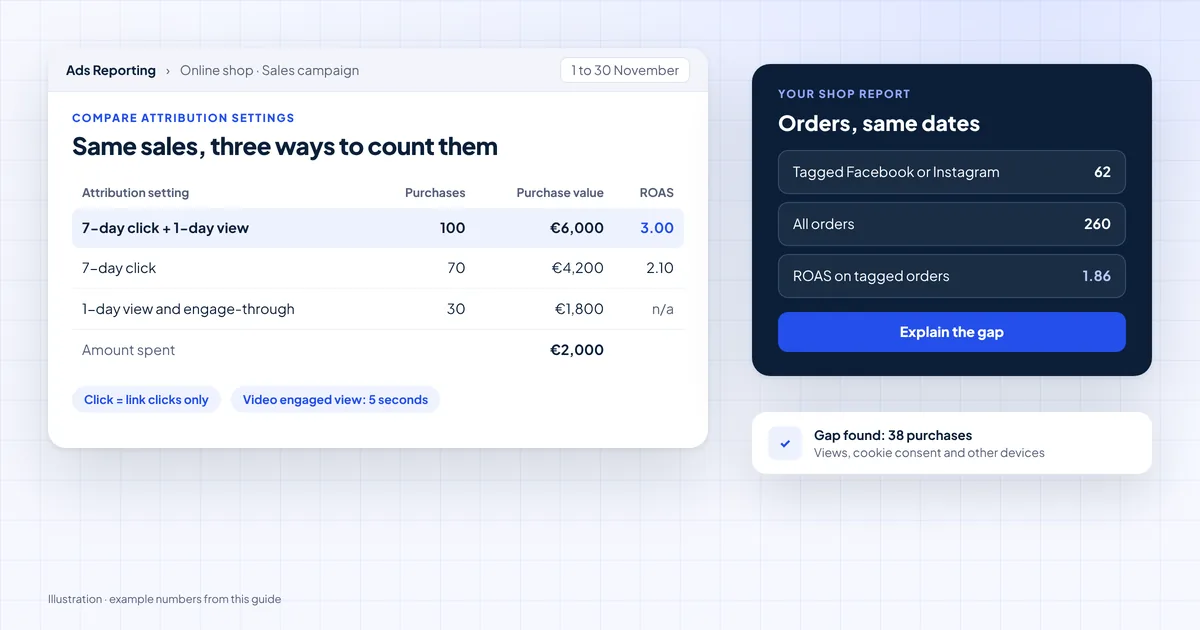
Attribution is the rule Meta uses to decide which sales or leads came from your ads. The standard setting counts a purchase made within 7 days of a link click, or 1 day after someone saw the ad. Since March 2026, a “click” means a link click only. Likes, shares, saves and 5-second video plays now count as engage-through. Malta Digital reports the Meta number next to your shop or CRM number, so you can see the gap.
The short answer
Someone sees your ad on Monday. They click it on Tuesday, leave, and buy on Friday. Did the ad cause that sale? Attribution is the rule that answers yes or no.
Meta calls the time limit a window. A 7-day click window means Meta counts a purchase if it happens within 7 days of someone clicking your ad. A 1-day view window means Meta counts a purchase made within a day of someone seeing the ad, even without a click.
You choose the setting for each ad set. It changes two things. It changes which results you see in Ads Manager. It also changes what Meta learns from, because Meta tries to get you more of the results it can count.
The three windows
Meta’s Business Help Centre lists three kinds of standard attribution for website and in-store sales. You can combine them. The common choice is 7-day click with 1-day view.
| Window | What it counts | Time limit |
|---|---|---|
| Click-through | A purchase after someone clicks the link in your ad | 1 day or 7 days |
| View-through | A purchase after someone sees your ad, without clicking | 1 day |
| Engage-through | A purchase after a like, share, save or other non-link action, or a 5-second video play | 1 day |
| Compare tool only | 28-day click, to see slower buyers in reports | Partial if the campaign ran under 28 days |
An engage-through counts when someone interacts with your ad without clicking the link, then buys within a day. For video, a play of 5 seconds counts. For a video shorter than 5 seconds, it is 97% of the video. Meta says some accounts may still show the older versions while the change rolls out.
What changed
Two changes landed this year, and both can make your numbers look different from 2025.
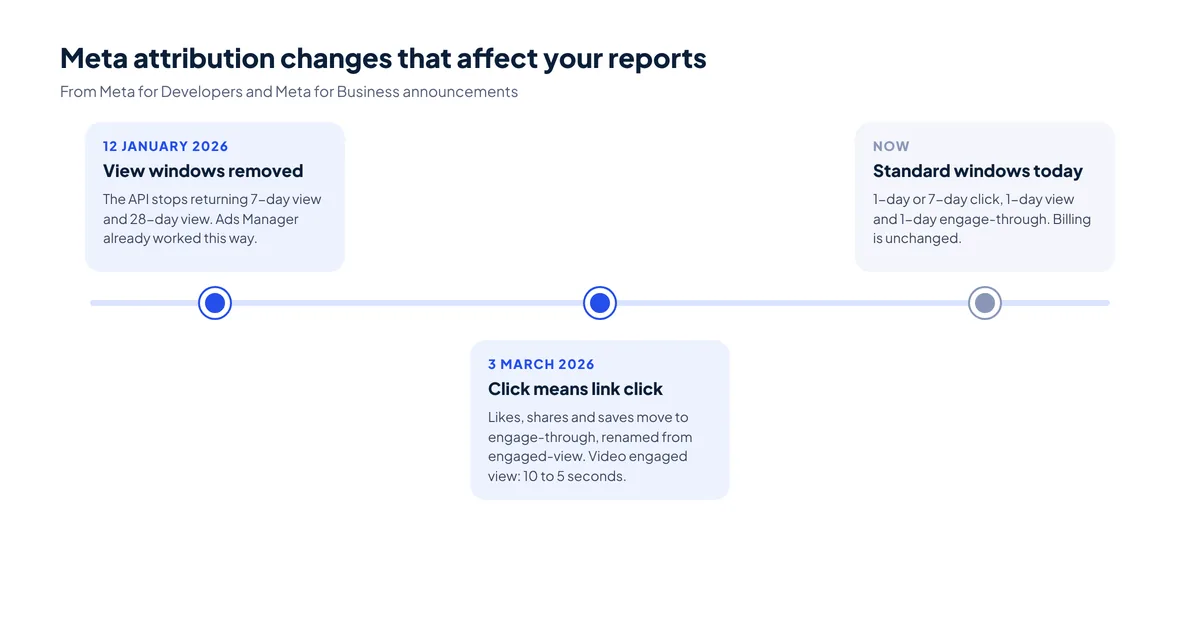
On 12 January 2026, Meta’s reporting API stopped returning the 7-day view and 28-day view windows. Meta said this matches what Ads Manager already shows. If a dashboard or spreadsheet still asks for those windows, its view columns go blank or change.
On 3 March 2026, Meta said it would change what a “click” means. Before, a like, a share or a save counted as a click. Now click-through counts only link clicks. The other actions moved into engage-through, which Meta renamed from engaged-view. The engaged view for video also dropped from 10 seconds to 5.
Meta said there would be no change to how you are billed. But your click-through results can drop, while engage-through results rise. So if your ROAS moved in spring 2026, check the setting before you blame the ads.
Apply now and tell us what you sell and what Meta and your shop show. We’ll reply with what we’d check first.
Three models
Meta now offers three attribution models, set at ad set level. Standard is the one described above. It counts sales inside the windows you pick.
Incremental attribution tries to count only the sales your ads caused. Meta uses models that predict whether a sale would have happened anyway. Custom attribution lets you share data from your own analytics tool, so Meta learns from your rules instead.
One warning from Meta matters a lot. You cannot compare results across ad sets that use different models in the normal results table. Each model counts in a different way. Use the compare attribution settings feature instead, or judge them in your own analytics tool.
Free tool
Enter what Ads Manager shows on your normal setting and on 7-day click alone, then what your shop recorded for the same dates. The checker shows three ROAS figures side by side, how much of Meta’s count comes from views and engagement, and what to check next. Nothing you enter leaves this page.
Starting numbers match the worked example below. Replace them with yours.
Your result appears here as you type.
Why numbers differ
Almost every business we audit has the same question. Why does Meta show 100 sales when the shop shows fewer from Facebook? There is usually no single bug. Several small reasons add up.
| Reason | What happens | What to check |
|---|---|---|
| Views and engagement | Meta counts some buyers who never clicked | Compare 7-day click alone with your default setting |
| Cookie consent | Visitors who refuse cookies are not tracked | Your consent rate, and the Conversions API setup |
| Duplicate events | Pixel and server both send the same sale | Event ID deduplication in Events Manager |
| Different credit rules | Analytics gives credit to the last channel it saw | UTM tags on every ad link |
| Another device | Someone clicks on a phone and buys on a laptop | Accept some gap; Meta may match it, analytics often cannot |
| Time zones and dates | Meta reports by the time of the ad view or click | Use the same dates and time zone in both tools |
Consent is a big reason in Malta. Under regulation 5 of S.L. 586.01, a website may only store tracking cookies after the visitor agrees. The IDPC’s guidance adds that pre-ticked boxes, scrolling and cookie walls do not count as consent. So the Meta Pixel and your analytics miss people who say no. That is the law working, not a fault.
The Conversions API sends sales from your server as well as the browser. It closes part of the gap, inside what your consent setup allows. Our Meta Pixel and Conversions API guide shows how to set both up and remove duplicates.
Worked example
This is an example to show the maths, not a result or a benchmark. Say a Malta online shop spends €2,000 on Meta ads in a month. Its average order is €60.
Ads Manager, on 7-day click and 1-day view, shows 100 purchases. That is €6,000 in sales and a return on ad spend (ROAS) of 3.0. The compare tool shows that 70 of those came from link clicks. The other 30 came from views or engagement.
The shop’s own analytics shows 62 orders tagged as coming from Facebook or Instagram, out of 260 orders in total. On those 62 orders, the ROAS is about 1.9. If the shop breaks even at a ROAS of 2.5, Meta’s number says “scale up”, while the shop’s number says “not yet”.
Neither number is the truth. Meta’s figure includes some people who would have bought anyway. The shop’s figure misses people who refused cookies or bought on another device. The honest next step is a test that holds back part of the audience. The checker above starts with these numbers.
Our setup
For most Malta online shops, we optimise on 7-day click and 1-day view, as Meta suggests by default. Then we judge results three ways: Meta’s figure, the click-only figure and the shop’s own orders. Our guide to what a good ROAS is shows how to find your break-even point.
For lead campaigns, the real check sits outside Meta. We count enquiries that turn into quotes or bookings in your CRM, or in a simple sheet. Tagging every ad link with UTM parameters makes that easy.
Malta Digital manages Facebook and Instagram ads from €1,249 a month plus ad spend, paid to Meta in your own ad account. Tracking setup and monthly reports are part of the service.
Proof
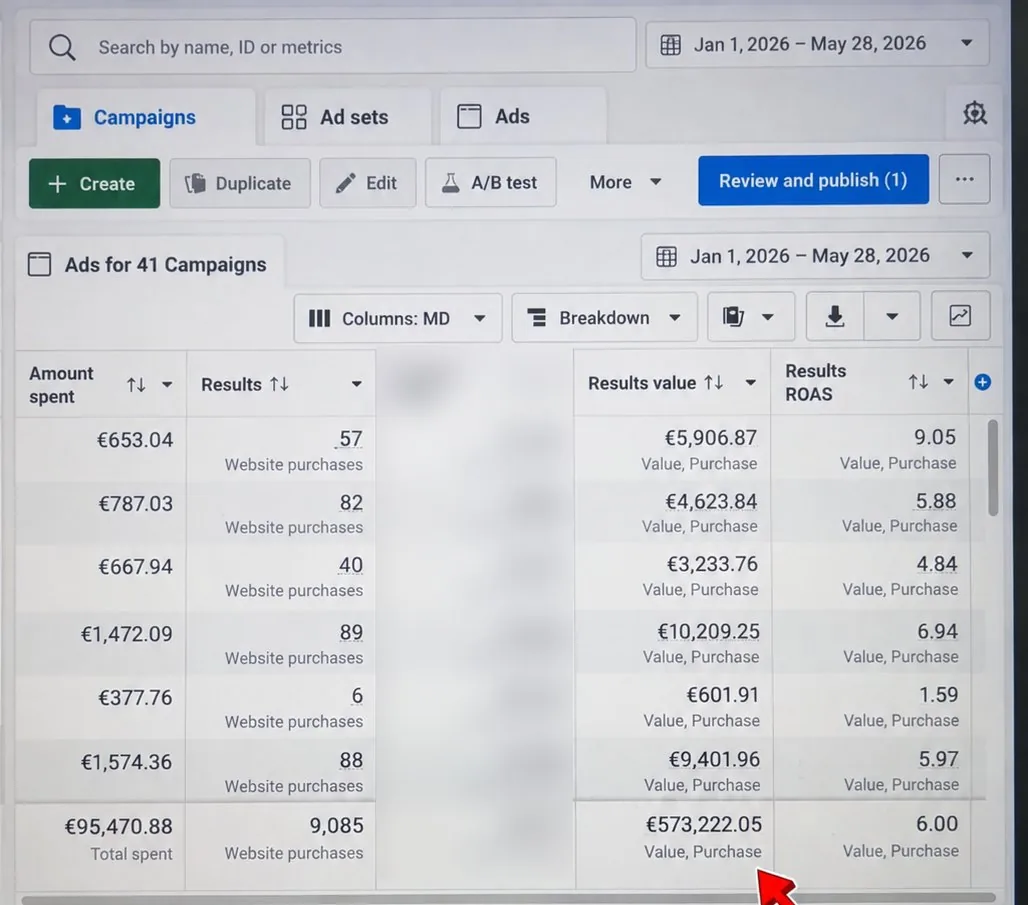
Every ROAS we report comes with the window behind it, because a number without its setting can mislead. One online store we manage turned €95,470.88 of ad spend into €573,222.05 in tracked sales from 1 January to 28 May 2026, a 6.00 return on ad spend as Ads Manager reported it. Tracked sales value is not profit, and we say so in every report.
A few straight answers
Most website sales campaigns use 7-day click and 1-day view. It counts purchases within 7 days of a link click, or within 1 day of someone seeing the ad.
On 12 January 2026, Meta’s API stopped returning 7-day view and 28-day view. From March 2026, click-through counts only link clicks, and likes, shares and saves moved to engage-through.
It counts a purchase within 1 day after someone interacts with your ad without clicking the link, such as a share or save. For video, a 5-second play counts.
Meta counts some sales after views and engagement, while analytics only sees tracked visits. Visitors who refuse cookies, change device or arrive without UTM tags widen the gap.
No. Meta says the 2026 changes do not affect billing. The setting changes what results you see and what Meta optimises for.
It is a model that tries to count only the conversions your ads caused, using Meta’s predictions of what would have happened anyway. You choose it at ad set level.
Not in the normal results table, Meta says. Use the compare attribution settings feature, or judge them in your own analytics tool.
Sources
Keep reading
A good ROAS is one above your break-even figure (1 divided by your margin). At 40% margin that is 2.5. Work yours out for Meta ads in Malta.
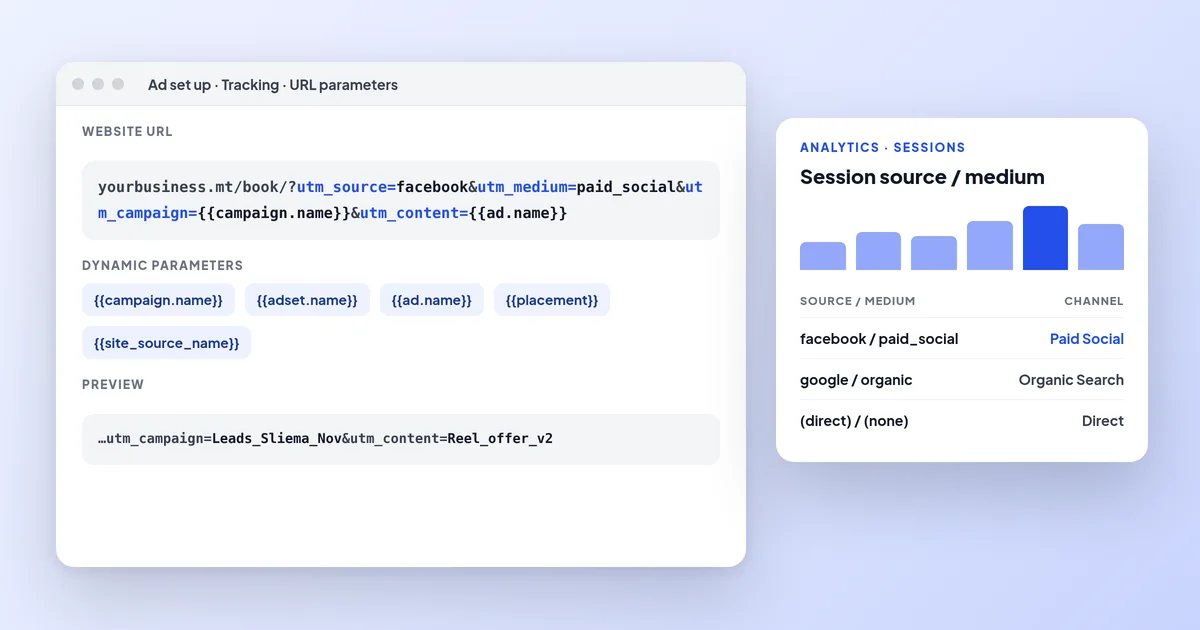
How to add UTM parameters to Facebook and Instagram ads, which dynamic parameters to use, how to see Meta traffic in GA4 and why the numbers differ.

Meta Pixel vs Conversions API: what each does, the difference, why you need both, and how to set them up on Shopify, WordPress or a custom site and test them.
A useful first step
Tell us what you sell, your monthly ad spend and what Meta and your shop report. We’ll reply with what we’d check and fix first.
Step 1 of 2
A few quick questions, about a minute. We usually reply within 2–3 hours.