
Meta Pixel and Conversions API explained
What the Pixel and the Conversions API do, setup on Shopify, WordPress or a custom site, deduplication, data restrictions for clinics and finance, and testing.
Facebook & Instagram ads · Tracking
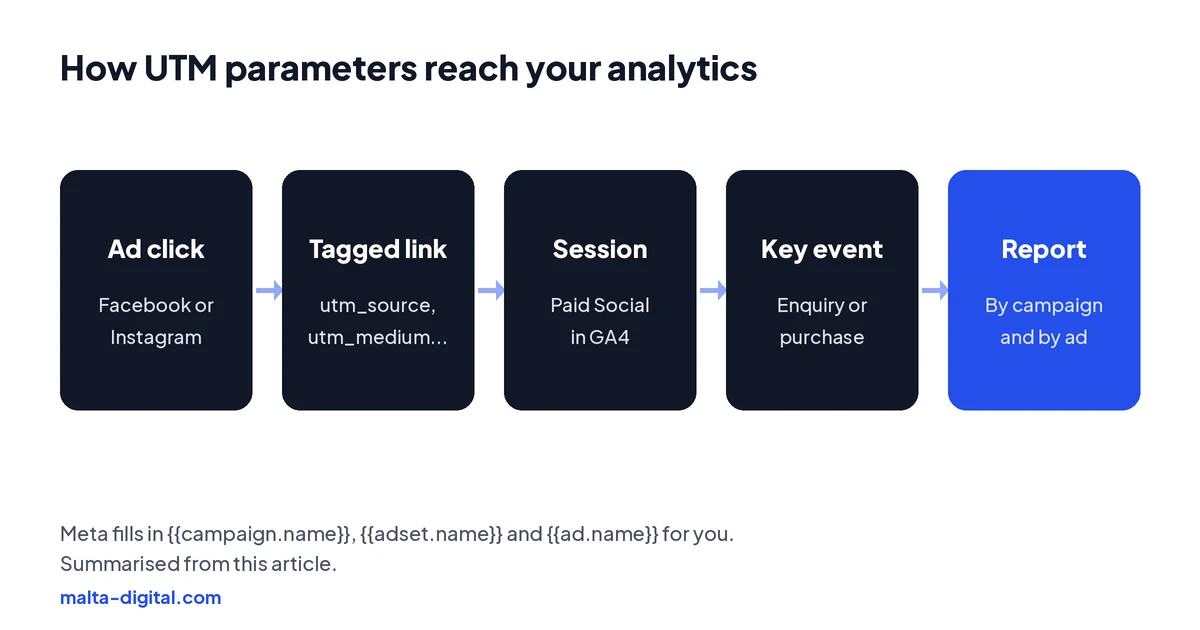
To track Facebook and Instagram ads in Google Analytics, add UTM parameters in the URL parameters field at ad level: utm_source=facebook, utm_medium=paid_social, and Meta’s dynamic parameters {{campaign.name}}, {{adset.name}} and {{ad.name}} for the campaign, ad set and ad. Your analytics then shows each visit under Paid Social, by campaign and by ad. Expect the numbers to differ from Ads Manager, because the two tools count in different ways. Malta Digital sets up this tagging on every Meta ads account we manage.
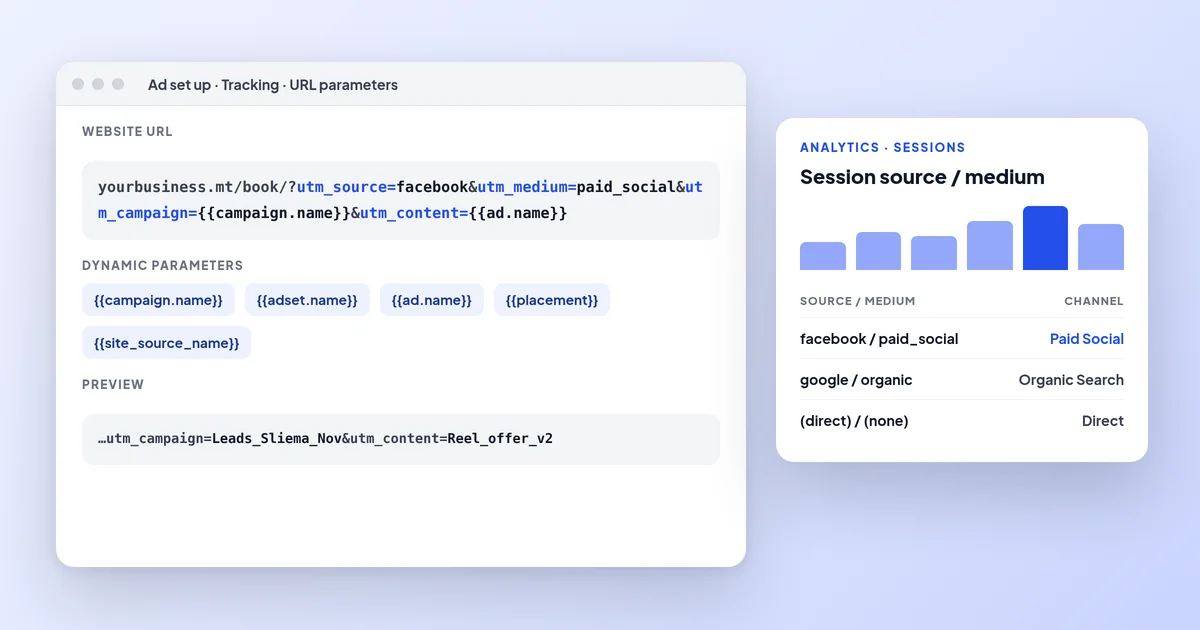
To track Facebook and Instagram ads in Google Analytics, add UTM parameters in each ad’s URL parameters field: utm_source=facebook, utm_medium=paid_social and Meta’s dynamic parameters for the campaign, ad set and ad names. Visits then show as Paid Social, by campaign and ad. Expect the numbers to differ from Ads Manager. Malta Digital tags every Meta ad it manages.
The short answer
UTM parameters are short labels added to the end of the link in your ad, such as ?utm_source=facebook&utm_medium=paid_social&utm_campaign=autumn_offer. They do not change the page people land on. They tell your website analytics, usually Google Analytics 4, where the visit came from, so you can see visits, enquiries and sales from your Facebook and Instagram ads next to Google, email and everything else.
Without them, analytics has to guess. Some clicks from Meta ads arrive as Organic Social, as if someone had clicked a normal post; some arrive as Referral or Direct; some are Unassigned. For a business in Malta that is also posting organically every day, that makes it impossible to tell whether the paid campaign or the free posts brought last week’s bookings.
Ads Manager already reports results, so why bother? Because Ads Manager only sees Meta. Analytics shows what people did on your website after the click, which pages they read, how they compare with visitors from Google, and whether the visitors from one ad behave differently from another. The two views together are far more useful than either alone.
How to add them
Open the ad (not the campaign or ad set), scroll to the Tracking section and find URL parameters. Paste the parameters there, without the question mark, rather than adding them to the website URL itself. Meta then adds them to the link automatically, and the URL people see in the ad stays clean. There is also a Build a URL parameter option that fills in the fields for you.
Add them before you publish. Meta’s own help pages warn that changing URL parameters after an ad is published may send the ad set back into the learning phase, so it is better to get them right first. If you use the same parameters on every ad, save them once and copy them, or duplicate a tagged ad when you make a new one, so nothing goes out untagged.
Test the link before you spend. Use the ad preview, click through to the website, and check the address bar shows the parameters. Then open the real-time report in your analytics and confirm the visit arrives with the right source and medium. It takes two minutes and saves weeks of untracked data.
Dynamic parameters
Typing the campaign name into every ad by hand is slow and causes mistakes. Meta offers dynamic parameters that it fills in for you: {{campaign.name}}, {{adset.name}} and {{ad.name}} for names, {{campaign.id}}, {{adset.id}} and {{ad.id}} for the numeric IDs, {{placement}} for where the ad appeared (such as Facebook Feed or Instagram Stories), and {{site_source_name}}, which becomes fb, ig, msg, an or th for Facebook, Instagram, Messenger, Audience Network or Threads.
One detail catches people out. Name-based parameters take the name the campaign, ad set or ad had when the ad was first published. If you rename a campaign later, your analytics keeps showing the old name. So name things properly before you publish. The IDs never change, which is why we add them too when a client wants to match analytics data back to Ads Manager exactly.
Dynamic parameters work for most objectives and conversion locations. For app promotion they go on the end of the deferred deep link instead, and Meta notes they are not supported for collection ads on Instagram placements. If you run a Shopify shop, Meta may add its own source and medium parameters to ad traffic automatically, so check what is already being added before you add your own.
| Parameter | What we put | Why |
|---|---|---|
| utm_source | facebook (one fixed value for all Meta ads) | Groups every Meta click under one source that analytics tools recognise as social |
| utm_medium | paid_social | Puts the visit in the Paid Social channel instead of Organic Social or Unassigned |
| utm_campaign | {{campaign.name}} | Shows which campaign brought the visit, filled in by Meta |
| utm_content | {{ad.name}} | Shows which ad, so you can compare creatives |
| utm_term | {{adset.name}} | Shows which ad set (audience or locality) |
| placement | {{placement}} | Optional: whether it was Feed, Stories, Reels and so on |
Our template
Our default string is utm_source=facebook&utm_medium=paid_social&utm_campaign={{campaign.name}}&utm_content={{ad.name}}&utm_term={{adset.name}}. We use one fixed source for all Meta ads rather than {{site_source_name}}, because a fixed value is easy to filter and analytics tools reliably recognise “facebook” as a social source. If a client wants to split Facebook from Instagram, we add {{site_source_name}} or {{placement}} as an extra parameter and check how it appears in their reports.
The medium matters more than people think. Google Analytics 4 puts a visit in its Paid Social channel when the source is a social site and the medium matches a pattern such as cpc, ppc, retargeting or anything starting with “paid”. paid_social fits that pattern. A medium like “facebook_ads” or “social” does not, so those visits end up as Organic Social or Unassigned.
Keep names readable and consistent, because they become your reports. A campaign called Leads_Sliema_Nov and an ad called Reel_offer_v2 tell you something at a glance; New Campaign (copy) (copy) does not. Use lowercase or one fixed style, avoid personal details in any parameter, and agree the naming with whoever builds the ads.
In GA4
In Google Analytics 4, open Reports, then Acquisition, then Traffic acquisition. Change the primary dimension to Session source / medium and look for facebook / paid_social, or switch to Session campaign to see each campaign by name. To see individual ads, add Session manual ad content as a secondary dimension, which is where utm_content lands. Your enquiries or purchases should be set up as key events, so each row shows how many happened.
Look at the right things. Sessions from Meta tell you how many clicks turned into real visits. Engagement rate and the pages people view tell you whether the landing page matches the ad. Key events and revenue tell you what the visits produced. Compare campaigns and ads with each other inside analytics, not with the numbers in Ads Manager.
A common question from businesses in Malta is how to “connect” Facebook ads to Google Analytics. There is no direct link between the two, unlike Google Ads, which can be linked to GA4. UTM parameters are how the connection is made. If you also want Meta to learn from your website enquiries and sales, that is a separate job for the Meta Pixel and Conversions API.
Why numbers differ
This is the question we hear most. For the same week, Ads Manager usually shows more link clicks than GA4 shows sessions from facebook / paid_social, and often a different number of purchases or enquiries. Neither tool is broken. They count different things in different ways, and the gap is normal.
Clicks are not sessions: a link click is counted even if the page is slow, the person taps back, or the in-app browser closes before analytics loads. Attribution differs too. Meta credits a purchase to its ad if it happened within the ad set’s attribution setting, which can include one day after someone viewed the ad without clicking. Analytics only sees the visit it can track, gives credit across every channel, and uses its own model and window. If someone clicks your Instagram ad on Monday and comes back through a Google search on Thursday to book, Meta and Google can both claim the booking.
Then there is consent. Under EU rules, visitors who decline analytics cookies may not be recorded at all, depending on how your consent banner and Consent Mode are set up. Instant forms and click-to-WhatsApp ads never reach your website, so analytics cannot see those leads. And people switch devices. Read each tool on its own terms, look at trends rather than single days, and use your CRM or till for the final word on what was sold.
| Reason | What happens | What to do |
|---|---|---|
| Clicks are not sessions | A link click is counted in Ads Manager even if the page never loads or the person leaves at once | Compare landing page views with sessions, not link clicks |
| Different attribution | Meta credits its ads within its attribution setting, including some views; analytics credits the visit it can see, across every channel | Read each tool on its own terms; do not add them together |
| Consent and blockers | Visitors who refuse cookies or block scripts may not be recorded by analytics | Use Consent Mode or server-side tagging where it fits your consent setup |
| Journeys off the website | Instant forms and WhatsApp chats never reach your site | Count those leads in Ads Manager or your CRM |
| Different devices | Someone sees the ad on a phone and books on a laptop days later | Expect analytics to show these as direct or organic |
Apply now, or send us your website on WhatsApp. We’ll check how your Meta ads show up in your analytics and what we’d fix in the tracking first. Free, no obligation.
Proof
From 1 January to 28 May 2026, an online store we ran ads for spent €95,470.88 on Facebook and Instagram. Meta Ads Manager tracked 9,085 website purchases worth €573,222.05, an average ROAS of 6.00.
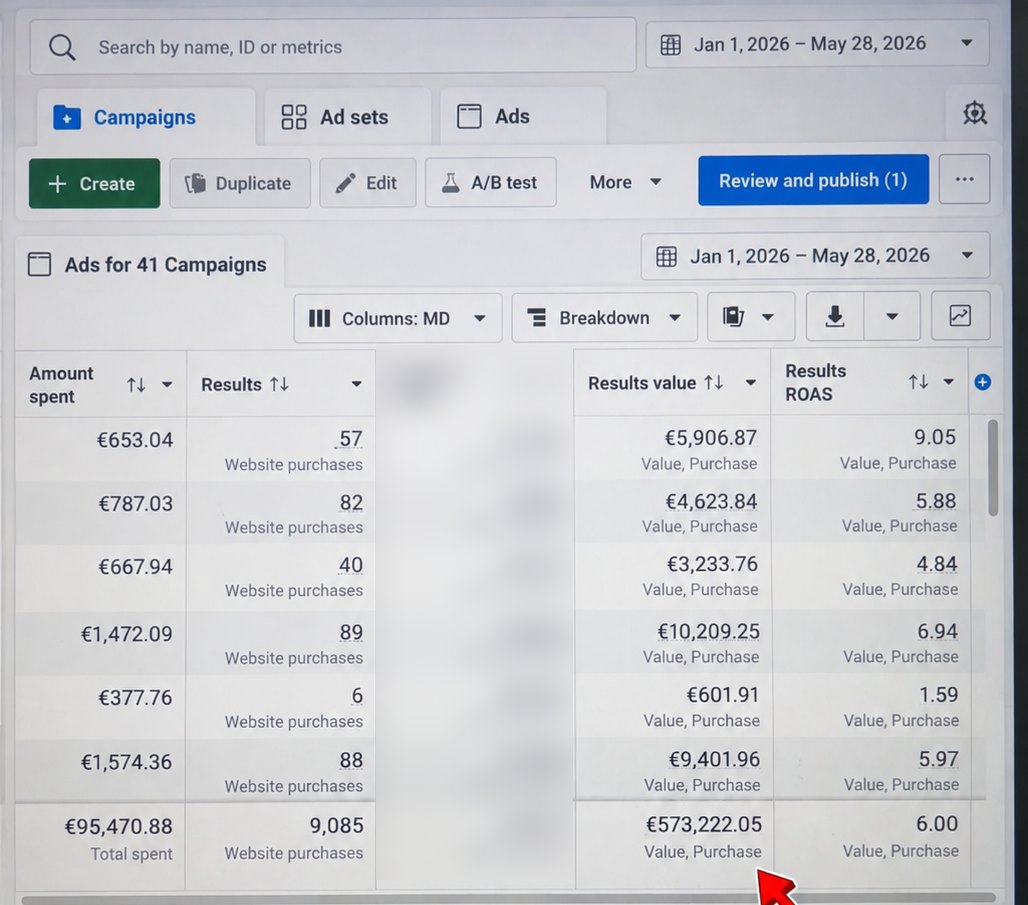
Want your tracking set up so results like this are measured properly? Contact us
Leads and WhatsApp
Many Meta campaigns in Malta never send anyone to a website. A clinic collects enquiries through an instant form, a contractor runs click-to-WhatsApp ads, a restaurant takes bookings by phone. UTM parameters do nothing for these, because there is no page view to tag. That is fine: the lead is counted in Ads Manager, and the important tracking happens next, in your CRM or wherever leads arrive.
For lead forms, record the campaign and ad with each lead, which Meta includes when leads are sent to a CRM, then mark what happened: called, booked, bought. For WhatsApp, use a pre-filled first message that names the offer, so you know which ad started the chat. Our guides to Facebook lead ads and click-to-WhatsApp ads cover both.
Where the website is part of the journey, a mix works well: the ad sends people to a landing page tagged with UTMs, and the page offers a form, a WhatsApp button and a phone number. Tag the WhatsApp and call buttons as events in analytics, so you can see how many Meta visitors chose each route.
How we set it up
On every account we manage, we agree a naming system first: campaign, ad set and ad names that read well in reports. We add the UTM template at ad level on every ad, test the links, and check that Meta traffic lands in Paid Social in the client’s analytics. Where the client sells online, we also check that purchases and revenue are recorded as key events, and that the Meta Pixel and Conversions API are reporting the same sales to Meta.
Then we look at it every month. The monthly report shows results from Ads Manager and, beside them, what analytics and the CRM say happened. Where they disagree a lot, we find out why: a page that loads slowly on mobile, a consent banner that blocks too much, an ad sending people to the wrong page. Tracking is not set and forget; a website update can quietly break it.
If you run your own ads, the checklist is short: add the template to every ad, test one click, check the real-time report, name things properly, and look at Session campaign in GA4 once a week. For the numbers to watch in Ads Manager itself, see our guide to Facebook ads metrics, and for judging profit, what a good ROAS is.
Common mistakes
Putting the parameters on the website URL and also in the URL parameters field, so they appear twice. Using a different source on every ad (“fb”, “Facebook”, “facebook.com”, “meta”), which splits one channel into four rows. Choosing a medium that analytics does not recognise as paid, so the visits fall into Organic Social or Unassigned. Renaming campaigns after publishing and wondering why analytics still shows the old names.
Two more are worth avoiding. Never put personal data, such as an email address or phone number, into a URL parameter; it ends up in analytics and in Meta, and that is a privacy problem. And do not tag links in your normal, unpaid posts with paid_social, or your organic results will be counted as ads. Use a different medium, such as social, for those.
A few straight answers
Open the ad in Ads Manager, go to Tracking, and paste the parameters into the URL parameters field without the question mark, for example utm_source=facebook&utm_medium=paid_social&utm_campaign={{campaign.name}}&utm_content={{ad.name}}. Then test one click.
Placeholders Meta fills in automatically, such as {{campaign.name}}, {{adset.name}}, {{ad.name}}, the IDs, {{placement}} and {{site_source_name}}. Name-based values keep the name used when the ad was first published.
Use paid_social, or another value starting with paid, so Google Analytics 4 puts the visits in its Paid Social channel. Values like social or facebook_ads end up as Organic Social or Unassigned.
Tag every ad with UTM parameters, set your enquiries or purchases as key events, then use Traffic acquisition with Session source / medium or Session campaign. There is no direct link between Meta and GA4; the UTMs are the link.
The tools count differently. Meta credits conversions within its attribution setting, including some after views; analytics only sees tracked visits, across all channels, and misses visitors who decline cookies, change device or never visit the site.
No. Those leads never reach your website, so there is nothing to tag. Track them in Ads Manager and your CRM, and use a pre-filled WhatsApp message that names the offer.
Meta says changing URL parameters after publishing may send the ad set back into the learning phase, so add them before you publish.
Yes. Tracking is part of our Meta ads management, from €1,249 a month plus ad spend, excluding VAT.
Keep reading
What the Pixel and the Conversions API do, setup on Shopify, WordPress or a custom site, deduplication, data restrictions for clinics and finance, and testing.

Which Ads Manager numbers decide whether your ads work, what CPM, CTR, CPC, frequency and landing page views mean, and how to read them without industry averages.

Why there is no universal number, how to work out break-even ROAS, and how VAT changes the maths.
A useful first step
We name campaigns properly, tag every ad, check your analytics and report what each campaign produced. Meta ads management from €1,249 a month plus ad spend, excluding VAT.