
Facebook ad frequency
What frequency means, why it climbs fast in Malta, how to read it with cost per result and how to fix ad fatigue without wasting budget.
Facebook & Instagram ads · Metrics and reporting
The Facebook ads metrics that matter most are results and cost per result: how many leads, bookings or sales you got and what each one cost. Every other number in Ads Manager, such as CPM, CTR, CPC and frequency, is there to explain why that cost is going up or down. Meta publishes no “good” CTR or CPM for Malta, and averages from big markets will mislead you, so the useful comparison is your own numbers week on week and against what a customer is worth to you. This guide from Malta Digital explains each metric in plain words, shows how they fit together and how we read them for clients every week.

The Facebook ads metrics that matter most are results and cost per result: how many leads or sales you got and what each cost. CPM, CTR, CPC, frequency and landing page views explain why that cost changes. Meta publishes no good CTR or CPM for Malta, so Malta Digital compares each client’s numbers with their own previous weeks and with what a customer is worth.
The short answer
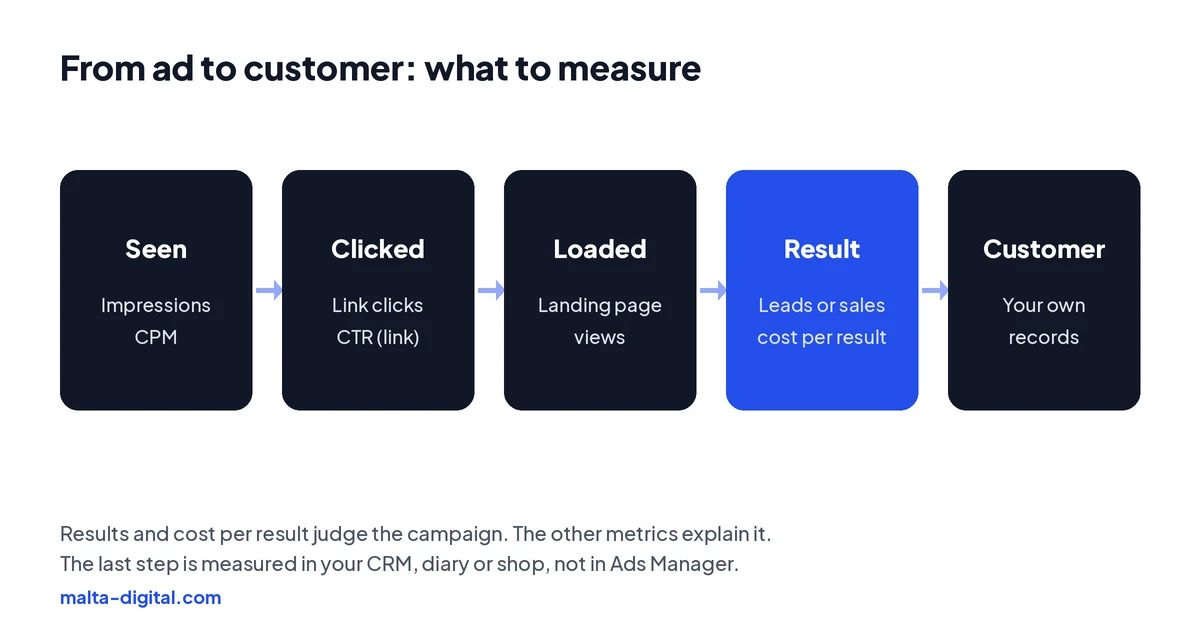
Start with the two numbers your business can feel. Results is the number of times your ad achieved the outcome you chose when you set up the campaign: form leads, WhatsApp conversations, website purchases or bookings. Cost per result is the amount spent divided by those results. If a lead costs less than it is worth to you, the campaign is doing its job, whatever the other columns say.
The second group is the diagnostic numbers: CPM, CTR, CPC, frequency and landing page views. They do not tell you whether the ads are working, but when cost per result rises they tell you where to look. Is the audience getting more expensive (CPM)? Has the ad stopped earning clicks (CTR)? Have people seen it too often (frequency)? Are clicks being lost before the page loads (landing page views)?
The third group is what owners often notice first and should worry about least: likes, comments, shares, followers gained and post engagement. They can be pleasant, and on a small island word of mouth matters, but a campaign set up to get leads should be judged on leads. A common mistake in Malta is a business that boosts posts for months, sees plenty of likes and still cannot say how many customers came from the money.
The definitions
Ads Manager can show hundreds of columns, but a small set covers almost every decision. The table below gives Meta’s definition of each in plain words, how it is calculated and what we use it for. Two details are worth knowing. Reach is an estimate built from sampled data, so it can differ slightly between views. And results are counted under the attribution setting of the ad set, so a purchase made a few days after someone clicked can still be credited to the ad.
The order of the table is deliberate. The first two rows decide whether the campaign is profitable. The rest explain the first two. When we set up a client’s Ads Manager we save a custom column preset in this order, so the numbers that matter are the first thing anyone sees, instead of the default columns, which differ by campaign objective.
For campaigns that sell online, purchase ROAS joins the first group, because a cheap purchase is not much use if the basket is small. Our guide to what a good ROAS is explains how to compare it with your margin, and the Facebook ads calculator works out your break-even point from your own numbers.
| Metric | What it means | How it is worked out | Use it to |
|---|---|---|---|
| Results | The outcome your campaign was set up to get, such as leads or purchases | A count, under your attribution setting | Judge the campaign |
| Cost per result | What each of those outcomes cost on average | Amount spent ÷ results | Judge the campaign against what a customer is worth |
| Reach | Accounts that saw your ads at least once | An estimate | See how much of your market you are reaching |
| Impressions | Times your ads were on screen | A count | Context for the rates below |
| Frequency | Average times each account saw your ads | Impressions ÷ reach | Spot ad fatigue |
| CPM | Average cost of 1,000 impressions | Amount spent ÷ impressions × 1,000 | See how expensive the audience is right now |
| CTR (link) | Share of impressions that got a link click | Link clicks ÷ impressions | Check whether the ad earns the click |
| CPC (cost per link click) | Average cost of a link click | Amount spent ÷ link clicks | Combine the two above |
| Landing page views | Clicks where your page actually loaded | A count, needs the Meta pixel | Find slow pages and lost clicks |
| ROAS | Tracked sales value for each euro spent | Purchase value ÷ amount spent | Judge sales campaigns against your margin |
Clicks
Ads Manager has two families of click metrics, and mixing them up is the most common reading mistake we see. Clicks (all) counts every click on the ad: link clicks, but also likes, comments, shares, clicks on your Page name or profile and taps to expand a photo or video. Link clicks only counts clicks that lead to the destination you chose, such as your website, a lead form or WhatsApp.
Each family has its own rate and cost. CTR (all) and CPC (all) are built on clicks (all). CTR (link click-through rate) is link clicks divided by impressions, and CPC (cost per link click) is amount spent divided by link clicks. Because clicks (all) includes more actions, CTR (all) usually looks higher and CPC (all) lower for the same ad. When someone in Malta quotes you a CTR, ask which one it is; a report built on CTR (all) can make an ad look far better than it is.
For a website campaign, also add landing page views, which only count when the page actually loaded after the click, and needs the Meta pixel on the site. A big gap between link clicks and landing page views usually means a slow page, a broken link or people tapping by accident. On mobile data in a busy café, a page that takes several seconds to load loses people before they see anything; our guide to the landing page for Facebook ads covers what to fix.
CPM
CPM is the average cost of 1,000 impressions. It is the price of attention in Meta’s auction, and it is set by competition: how many other advertisers want to reach the same people at the same time, and how relevant Meta expects your ad to be to them. You cannot set your CPM directly, and a high CPM is not a problem on its own. An ad with an expensive audience that converts well can bring cheaper customers than a cheap audience that never buys.
CPM moves for reasons that have nothing to do with your ads. It tends to rise when many advertisers compete for the same people, which is why it is worth planning for November and December, the period our guide to Black Friday and Christmas ads in Malta covers. In Malta the audience is small, so a narrow area, a long list of interests or a short age range can make each impression more expensive simply because there are fewer people to show the ad to.
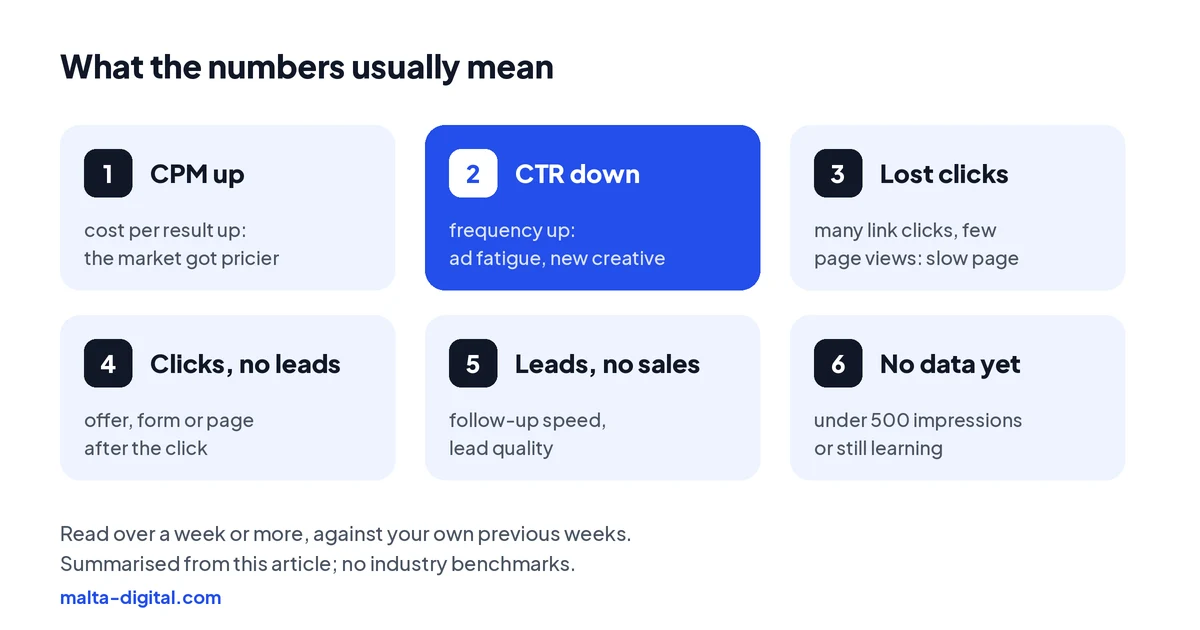
Read CPM together with cost per result. If CPM rose and cost per result rose with it, the market got more expensive, and the answer is usually patience, a broader audience or a stronger offer. If CPM stayed flat and cost per result rose, the problem is after the impression: the ad, the page or the follow-up.
Proof
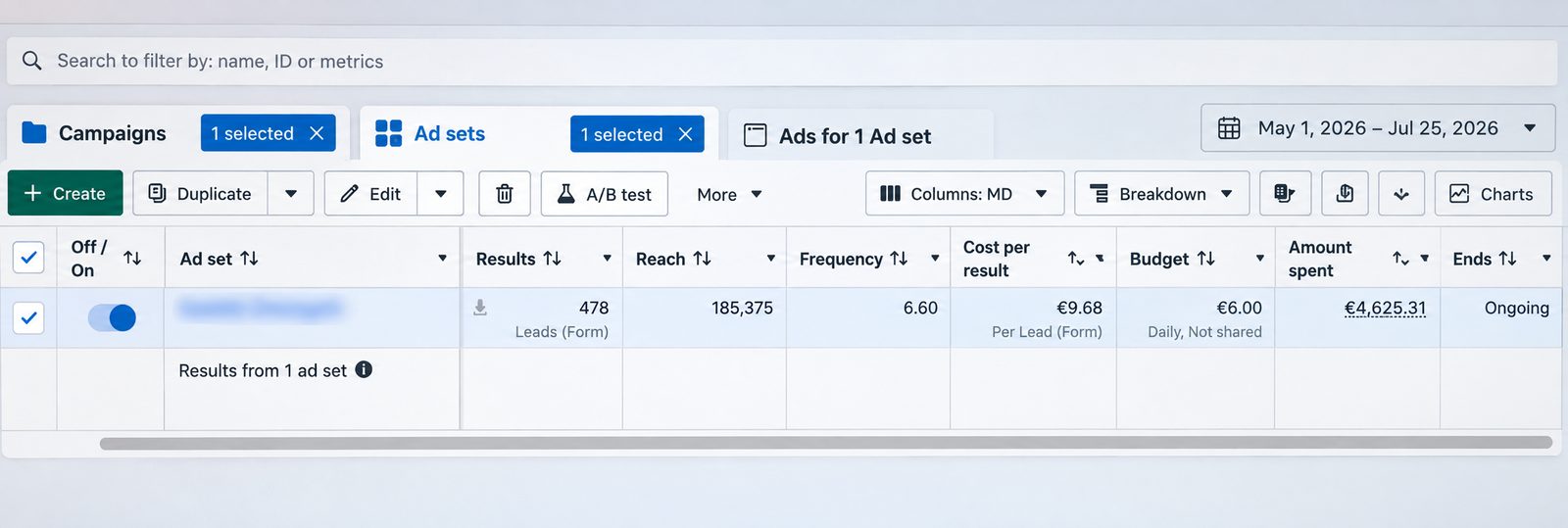
This is a lead generation campaign we ran on Facebook and Instagram from 1 May to 25 July 2026. It brought 478 form leads from €4,625.31 of ad spend, which is €9.68 per lead, on a €6.00 daily ad set budget. The screenshot is straight from Meta Ads Manager, with the ad set name blurred.
Want leads you can measure, not just likes? Message us on WhatsApp
Reading a real report
The screenshot above is a good example of reading the numbers in order. The headline is the result the campaign was set up for: 478 form leads between 1 May and 25 July 2026. The cost per result is €9.68 per lead, from €4,625.31 of spend. Those two numbers are the ones the business can compare with what a lead is worth to it.
The supporting numbers explain how it got there. Reach was 185,375 accounts and frequency was 6.60, so each account reached saw the ads about six and a half times on average over almost twelve weeks. That is why we watch frequency next to cost per result: if the cost per lead had started climbing while frequency rose, it would have been time for new creative or a broader audience, as our guide to ad frequency explains.
What the screenshot cannot show is how many of those leads became customers. Leads are enquiries, not sales. That last step happens in the business, in a CRM, a booking diary or a spreadsheet, and it is the number that decides whether €9.68 per lead was cheap or expensive for that business.
Apply now, or send us screenshots of your Ads Manager on WhatsApp. We’ll tell you which numbers matter for your goal and what we’d change first. Free, no obligation.
Benchmarks
No single number is right, and Meta does not publish benchmarks for Malta. Averages you find online usually come from much larger markets, mix many industries and objectives, and often do not say whether they mean CTR (all) or link CTR. Comparing a Maltese clinic’s lead campaign with a worldwide average for e-commerce traffic campaigns tells you very little.
A better benchmark is your own account. After the first few weeks of a campaign you have a baseline for your cost per result, CTR and CPM with your offer, in your area, at that time of year. From then on, the questions are whether a change made things better or worse than your own baseline, and whether the cost per result is below the most you can afford to pay for a customer.
That last figure is the one benchmark that really matters, and only you can work it out. Divide what a customer is worth to you after costs by how many leads you need to win one, and you have the most a lead can cost before the ads lose money. The calculator linked above does this for you. Anyone who promises you a specific CTR or cost per lead before seeing your business is guessing.
Diagnostics
For each ad, Ads Manager can show three ad relevance diagnostics. Quality ranking shows how your ad’s perceived quality compares with ads competing for the same audience. Engagement rate ranking compares its expected engagement rate. Conversion rate ranking compares its expected conversion rate with ads that have the same optimisation goal. They only appear once an ad has had at least 500 impressions, so a new ad on a small Maltese budget may show nothing for a few days.
Meta is clear that these rankings are not inputs into the ad auction and that a high ranking does not guarantee better results. They are for diagnosing ads that are not meeting your goal. Read them together: a low engagement ranking with good quality and conversion rankings suggests the ad is not interesting enough; a low conversion ranking with good engagement suggests the problem is the call to action, the form or the page after the click.
Two cautions. “Average” in Meta’s scale covers the 35th to 55th percentile, so it is not as reassuring as it sounds. And an ad that is already bringing customers at a cost you are happy with does not need to be changed just because a ranking says “below average”.
Timing
Daily numbers on a small Maltese budget swing a lot, because a few leads more or less on one day change every rate. Judge campaigns over a week or more, and compare like with like: the last 7 days against the 7 days before, not today against yesterday.
New ad sets also go through a learning phase. Meta’s help centre says an ad set usually exits it after about 50 results in the week after its last significant edit, and that changes to targeting, creative, the optimisation event or pausing for a week or more count as significant edits. Every time you change something, the numbers since that change are the ones that count. Owners who check Ads Manager several times a day and change something each time often keep their ads permanently unsettled.
Our routine for clients is simple: a quick daily check for anything broken, such as a rejected ad, a payment problem or a page that is down, then a proper look at the numbers once a week and a decision on what to change, one thing at a time.
How we report
Every month we send each client the same short report: spend, results and cost per result for each campaign, with the month before for comparison. Then a few lines on what changed and why, using the diagnostic metrics only where they explain something. The screenshots come straight from Ads Manager, so the client can check every number in their own account.
Where we can, we connect the ads to what happens next. For lead campaigns that means asking how many leads were answered, booked and won, or connecting the form to a CRM so the numbers are there without asking. For online stores it means checking that the Meta pixel and Conversions API send the right purchase values, so the ROAS in the report matches the orders in the shop.
Meta ads management from Malta Digital starts from €1,249 a month plus ad spend, excluding VAT, and the reporting is part of it. If you would like us to look at your current numbers first, apply now and send us access or screenshots.
A few straight answers
Results and cost per result: how many leads, bookings or sales you got and what each cost. CPM, CTR, CPC and frequency explain why that cost changes.
CPM is the average cost of 1,000 impressions. It is set by competition in Meta’s auction and is not a measure of success on its own.
CTR (all) counts every click, including likes, comments and profile clicks. Link CTR only counts clicks to your chosen destination, so it is usually lower.
There is no reliable Malta benchmark. Compare your CTR with your own previous weeks and judge the campaign by cost per result.
Landing page views only count when your page loaded. A big gap usually points to a slow page, a broken link or accidental taps.
Meta only shows quality, engagement and conversion rankings once an ad has at least 500 impressions.
A quick daily check for problems, and a proper review weekly. Judge results over at least a week and change one thing at a time.
Yes. Clients get a monthly report of spend, results and cost per result per campaign, with Ads Manager screenshots. Management starts from €1,249 a month plus ad spend, excluding VAT.
Keep reading
What frequency means, why it climbs fast in Malta, how to read it with cost per result and how to fix ad fatigue without wasting budget.

Why there is no universal number, how to work out break-even ROAS, and how VAT changes the maths.
Free tool: enter your budget, cost per lead or sale, close rate, sale value and margin to see customers, ROAS and your break-even point. Your numbers only.
A useful first step
We set up tracking, run the ads and send a monthly report of spend, results and cost per result, straight from Ads Manager. Meta ads management from €1,249 a month plus ad spend, excluding VAT.