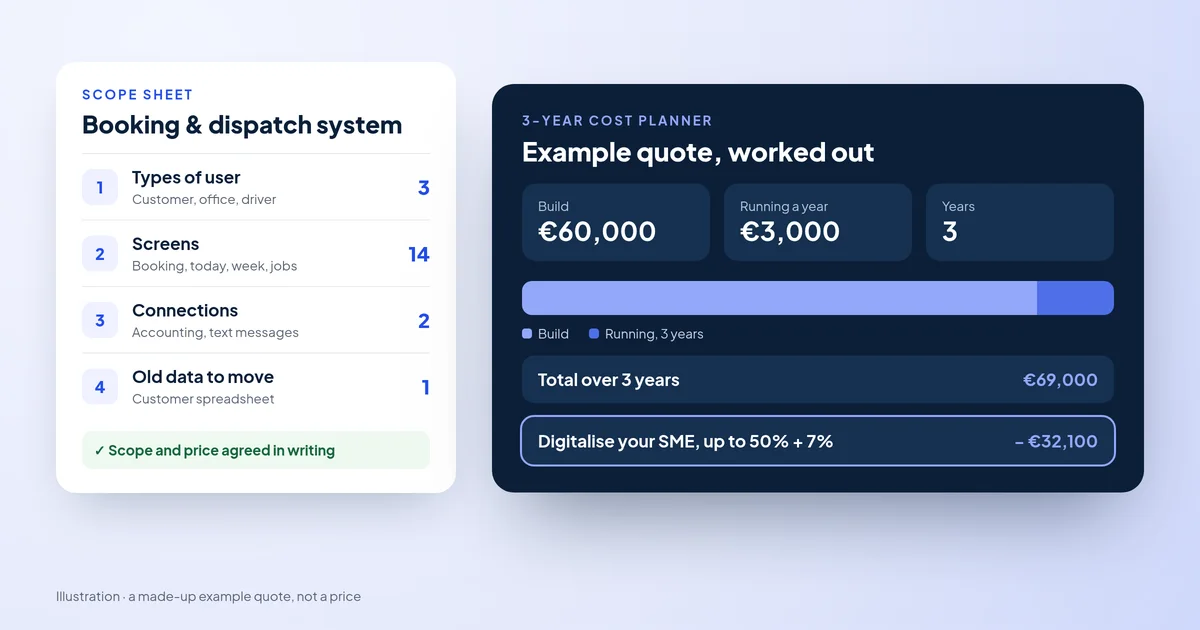
Custom software cost in Malta
What moves the price, the running costs and a free planner, with grant maths.
Grants & funding · How to apply
A step-by-step guide to the online application, from the official User Guide V2.1. For the scheme rules, see our Digitalise your SME grant guide.
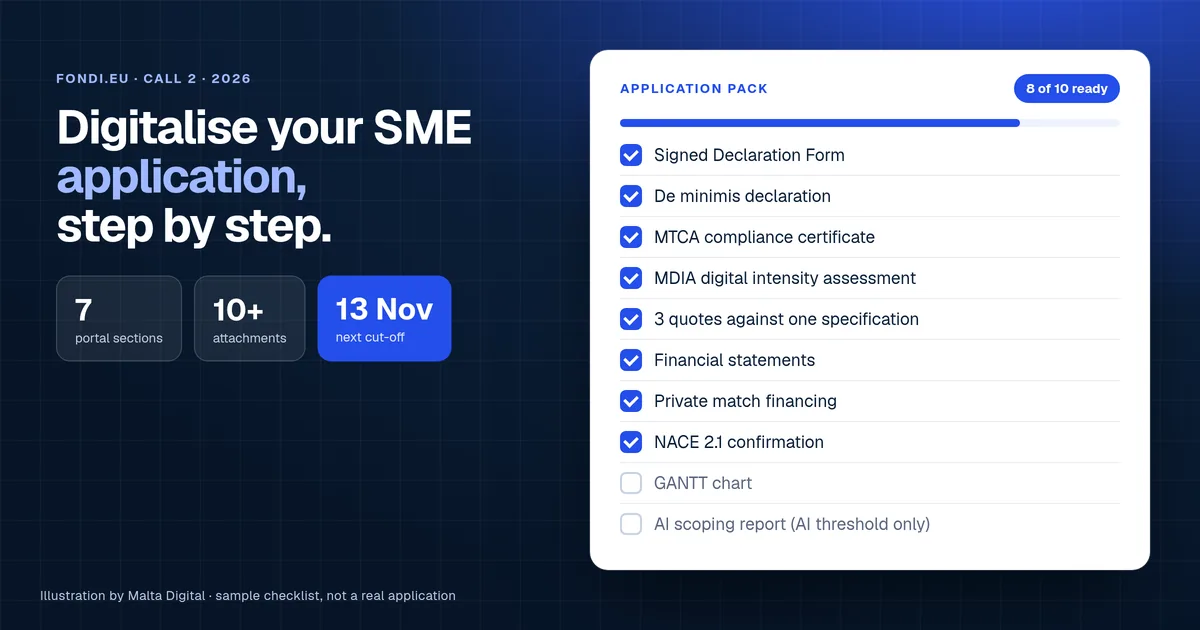
You apply online on the fondi.eu portal before a cut-off. The next is 13 November 2026. You fill in five sections, sign a declaration and upload about ten documents, including an MDIA assessment and three quotes. Malta Digital builds systems that can qualify and writes the specification.
Before you start
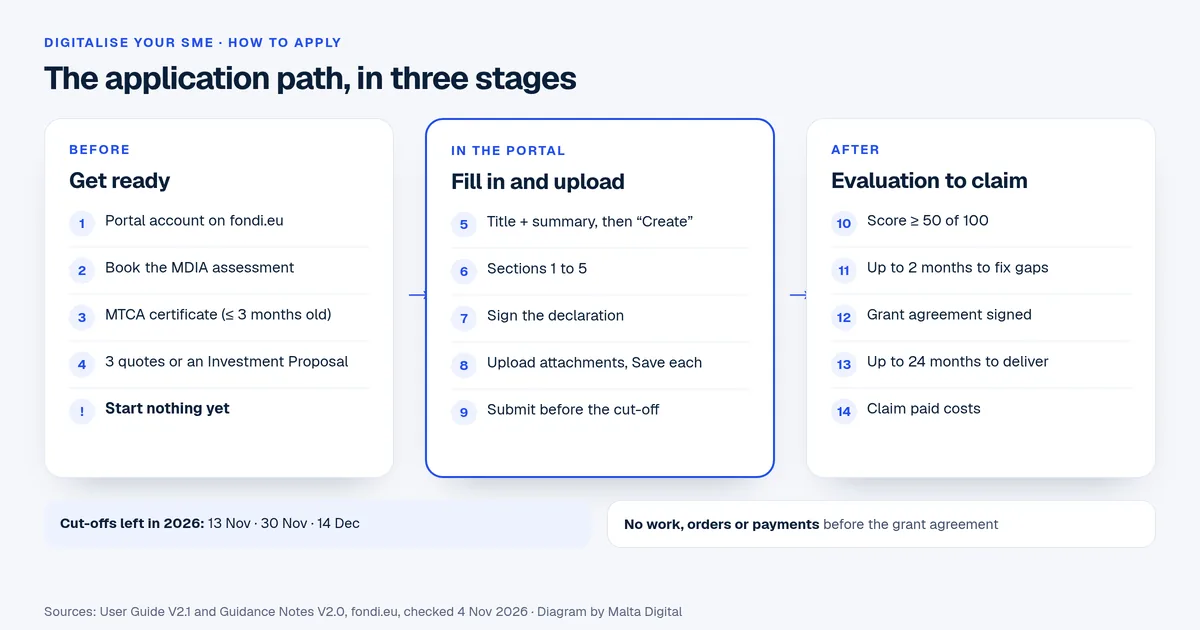
Most delays happen before anyone opens the portal. Two of the documents come from other offices, so ask for them first. We read the User Guide V2.1 and the Guidance Notes V2.0 on 4 November 2026. This is what they ask for.
One rule matters more than any form. Do not start the work, order or pay anything before the grant agreement is signed. Starting early can rule the whole project out.
Section by section
First you type a project title and a short summary, then press “Create”. The title cannot be changed after that, so keep it short and clear. For example: “New booking and CRM system for a Gozo tour company”. The summary can still be edited later.
| Section | What you fill in | Tip from the User Guide |
|---|---|---|
| 1. Disclaimer and Executive Summary | Read the disclaimer. The summary fills itself in from the other sections. | Check it last. If a number looks wrong, fix it in the section it comes from. |
| 2. The Applicant | Company details, size, owners, linked businesses, NACE code (your activity code) and past EU funding. | Name one Project Manager only. Confirm the email the portal sends you, or you cannot submit. |
| 3. The Project | Address (Malta or Gozo), then seven written parts: what you will buy, why, impact, delivery, risks, national priorities and harm to the environment. | Each written part allows up to 5,000 characters. If you attach a business plan, you can point to the right page instead. |
| 4. Financial Plan | Each item as a sub-activity, with dates, a description and its cost. | Type amounts without commas. Put all VAT under “VAT Non Eligible”. The 7% is added for you. |
| 5. Additional Information | Anything else the evaluators should know. | Keep it short and factual. |
| 6. Declaration | Legal statements about funding, de minimis aid and compliance. | Download the Declaration Form, sign it and upload it. |
| 7. Checklist of Attachments | Every document the scheme asks for. | File names must not contain commas. Press Save after each upload. |
For section 3, the evaluators want plain facts. Say what you will buy, what problem it fixes and how you will measure the change. Name the digital technologies you will add, such as cloud, cyber security or AI. They are scored.
Free checklist
This is the attachments list from the Guidance Notes, in plain words. The last three items are only for projects that use the extra AI threshold. For the AI Act declaration, see our EU AI Act guide.
Tick what you already have. It shows what is missing and how many days are left to the next cut-off. It runs on your device. Nothing is sent anywhere.
Does your project include AI items you want on the AI threshold?
This checker needs JavaScript. The full list is in Section 7 of the User Guide V2.1.
Financial plan
The financial plan has four types of activity. Digital Solutions covers hardware, software and cloud. AI Solutions is for items on the extra AI threshold. Staff Costs is only for hours spent building the AI. The 7% flat rate covers indirect costs, such as admin, and the portal adds it for you.
Add each item as its own sub-activity. Give it a start date, an end date and a short description. Then type the cost.
A made-up example, worked out. A Malta shop buys a €60,000 booking and CRM system and €20,000 of laptops and Wi-Fi. That is €80,000 of eligible costs. The 7% flat rate adds €5,600, so the plan totals €85,600. At 50%, the grant could be up to €42,800. The same project in Gozo, at 60%, could get up to €51,360.
Two checks before you type a number. The grant must reach at least €25,000. So in Malta you need at least €50,000 of eligible costs, or about €41,700 in Gozo. If you are not a start-up and your net assets are low, the grant can be capped. Section 2.6 of the Guidance Notes has the rule.
Apply now and tell us what the system must do. We’ll reply with a first scope, a price range and whether it looks like a grant fit.
Quotes
There are two ways to show prices. You can choose either one.
The three suppliers must be outside your business and not linked to each other. No shared owners and no family ties. If they turn out to be linked, the grant can be cut or taken back.
Fees for design, marketing and consultancy are not eligible. Nor are maintenance, insurance or used items.
After you submit
The fondi.eu scheme page lists the cut-off dates. We checked it on 4 November 2026. Dates can change, so check it again before you apply.
Common mistakes
Stuck on the portal? The Measures and Support Division (MSD) is on 2555 2642 or msd.eufunds@gov.mt. The portal team (SFD) is on 2555 2646 or support.fondi.eu@gov.mt.
Want a specification suppliers can quote against? Apply now for a grant-ready system
Proof
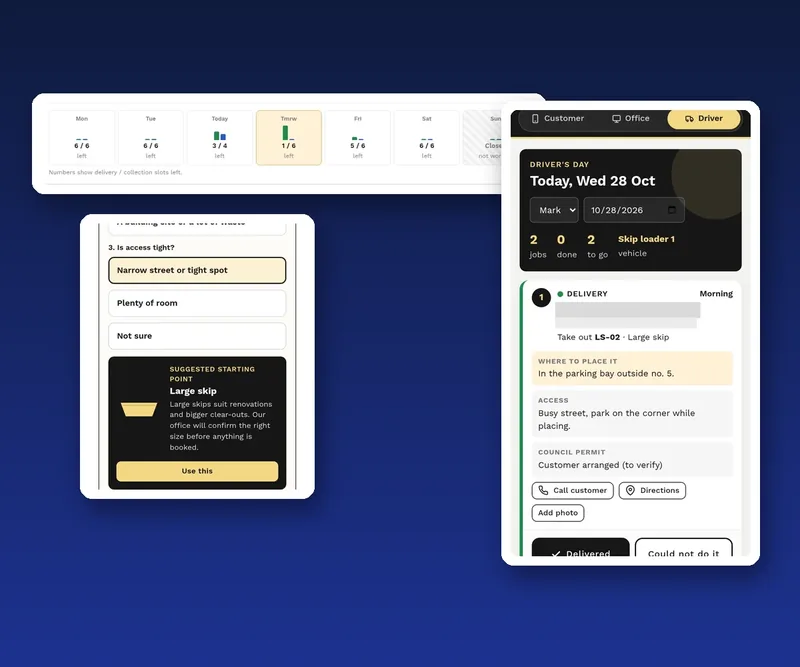
A skip hire and waste business took bookings by phone, Messenger and a web form. We specified one system for three groups of people. Customers book on a phone in seven steps, with a helper to pick the skip size. The office sees each day’s capacity and assigns jobs. Drivers see their jobs in order and tick each one off.
A list like that becomes the minimum specification each supplier quotes against. It was not a grant project.
Where we fit
You, the business, are the applicant. You fill in and submit the form. We build custom business systems, CRM and AI automation. For a project that could qualify, we can be one of the quoting suppliers. We can write the technical specification and, for AI projects, the AI scoping report.
We do not decide eligibility and cannot promise approval. The funding body assesses every application. For the scheme rules in brief, read our Digitalise your SME guide. For AI projects, see the AI grant in Malta. To budget first, read what custom software costs or our Malta business grants overview.
A few straight answers
Online, on the fondi.eu application portal, before a cut-off date. You fill in five sections, sign the declaration and upload the attachments. The next cut-off is 13 November 2026.
About ten. They include the signed declaration, an MTCA tax certificate, the MDIA assessment and three quotes or an Investment Proposal. You also need accounts, proof of match funding and a GANTT chart. AI projects need three more reports.
No. Once you press Create, the project title cannot be changed. The project summary can still be edited in the Executive Summary.
The funding body sends a rectifications letter. You have up to two months to send what is missing. Your application is then evaluated at a later meeting.
No. The business is the applicant and submits it. We can be a quoting supplier, write the technical specification and prepare the AI scoping report. The funding body decides on approval.
Keep reading
What moves the price, the running costs and a free planner, with grant maths.

The main grants and tax credits for Malta businesses, in one place.
What each one does, Malta’s 2025 Eurostat figures and a quick check to see which you need first.
A useful first step
Tell us what the system must do. We’ll scope it, write a clear specification and quote. Custom systems from €7,500.
Step 1 of 3
A few quick questions, about a minute. We usually reply within 2–3 hours.