
Meta Business Manager: Setup Guide for Malta
Set up Meta Business Manager, now a business portfolio. Add your Page, Instagram and ad account, give the right access, and keep control in Malta.
Facebook & Instagram · Meta Verified
Malta Digital runs Facebook and Instagram ads for local businesses as a Meta ads agency in Malta, and clients often ask if the blue badge is worth paying for. This guide explains what Meta Verified for business became in 2026, what each plan includes, how a Maltese business gets verified, and when the money is better spent on ads.
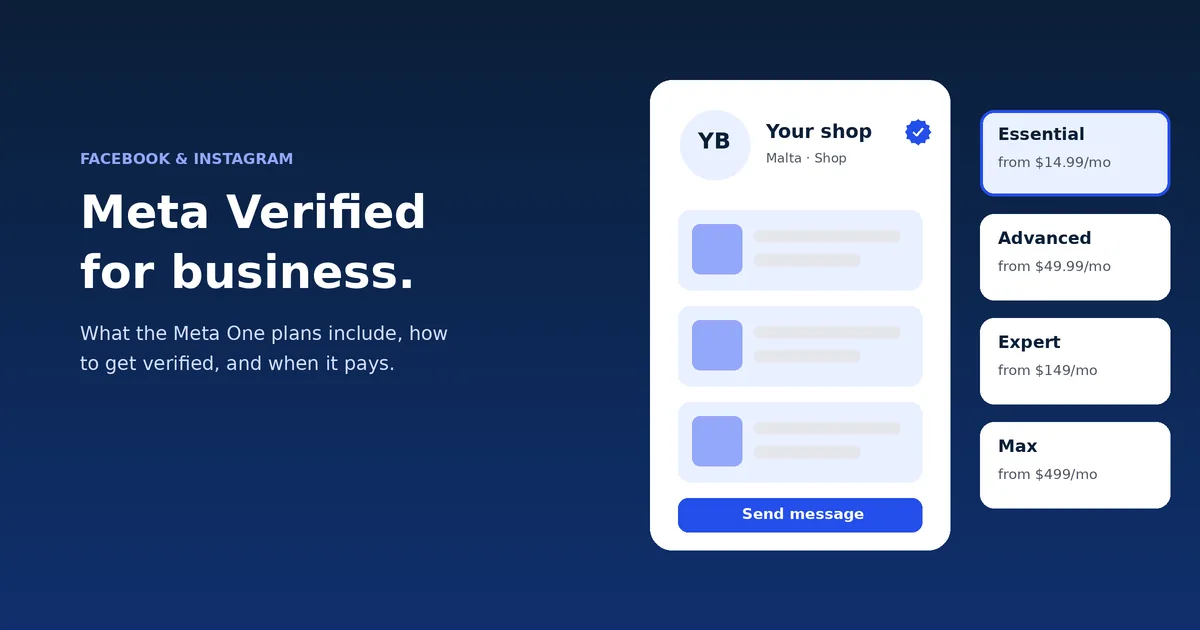
Meta Verified for business now comes inside Meta One. The cheapest business plan, Essential, starts at $14.99 a month and includes a verified badge, impersonation protection and more replies from Meta’s AI agent on WhatsApp. None of the plans list cheaper ads or better ad delivery. Malta Digital suggests it when people copy your Page, or when you sell through messages and want stronger support.
What changed
On 15 September 2026, Meta launched Meta One, a paid plan across Facebook, Instagram and WhatsApp. It has plans for people, for creators and for businesses. The verified badge and impersonation protection, which used to be sold as Meta Verified, now sit inside the business plans.
Meta’s own help page says this plainly. The Essential, Advanced, Expert and Max plans include the option to apply for a verified badge and impersonation protection, if you meet the rules.
Meta says the plans are rolling out gradually around the world. Its help pages also say Meta One is still in limited testing and not available everywhere yet. So the only sure test in Malta is to open the subscription screen on your Page or profile and see what Meta offers your account.
The plans
Meta lists four business plans. The prices below are Meta’s published starting prices in US dollars. Meta says plans, prices and availability can vary by region, app and account, so your price in euro shows when you start the subscription.
| Plan | From | What it adds |
|---|---|---|
| Essential | $14.99 a month | Verified badge, impersonation protection and a verified WhatsApp channel (after verification), profile tools, more access to Meta’s AI agent on WhatsApp |
| Advanced | $49.99 a month | Stories scheduled up to 30 days ahead, links in posts and reels, exportable analytics, deeper audience insights, team access without sharing a password, more WhatsApp devices and broadcast credits |
| Expert | $149 a month | Higher feature access and agent capacity, for teams managing at scale |
| Max | $499 a month | The highest feature access and agent capacity |
Meta’s business announcement says the prices are per asset. In practice, that means a Facebook Page and an Instagram profile may each need their own plan. Check this on the subscription screen before you budget for two.
For most small firms in Malta, the choice is between Essential and Advanced. Essential is about trust: the badge and protection against fake copies. Advanced adds tools for people who post a lot, such as scheduling stories up to 30 days ahead and links in normal posts and reels.
Getting verified
When you sign up, Meta first tries to verify you from your history on its apps. If that does not work, it offers other routes. Meta lists four: business details that match a public business record, an official document, a government photo ID, or a login to your business bank account.
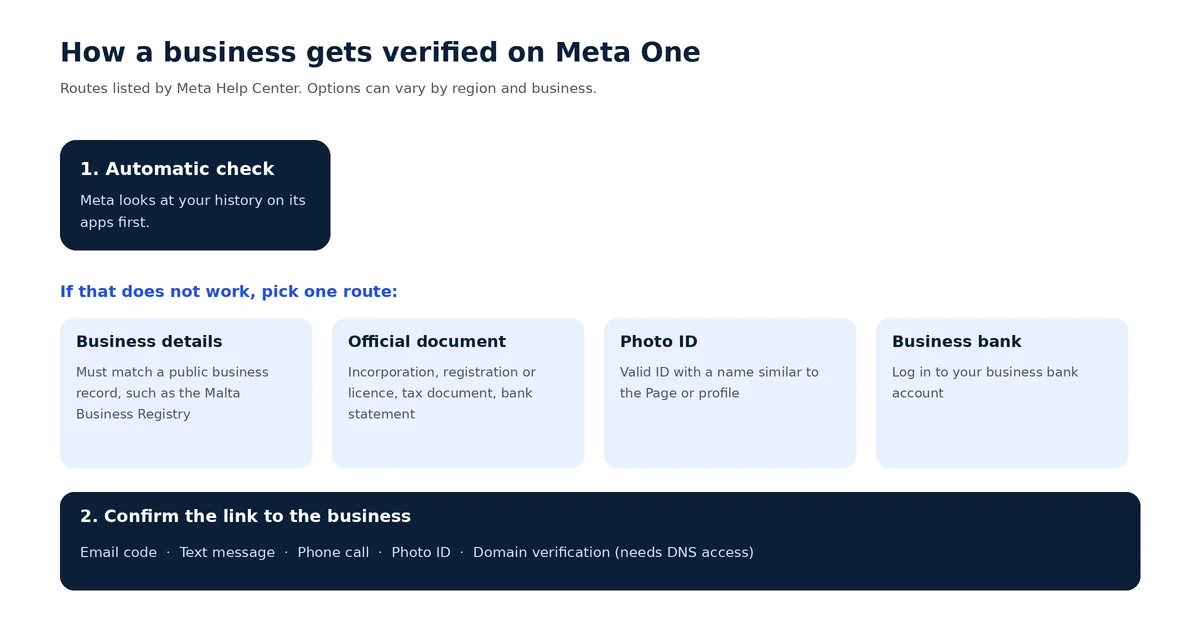
For a limited company, the public record is usually the company’s entry with the Malta Business Registry. Use the same name on your Page that appears on your registration, or something close to it. If the names do not match, Meta may ask for a document instead. It lists certificates or articles of incorporation, business registration or licence documents, government business tax documents and business bank statements.
Sole traders need to watch one rule. Meta says the name on your ID must be similar to the name of the Page or profile. Its own example is a shop called “Annie Smith’s Flowers”, where the ID should contain “Annie” or “Smith”. A sole trader who trades under a brand name may need to verify with documents instead of an ID.
Meta may then ask you to confirm the link by email, text, phone call, ID or domain verification. Domain verification needs admin access to the place where your website’s domain is managed. If someone else built your site, get that access first. Our guide to a business email on your own domain explains who usually holds it.
Apply now and tell us which Pages and profiles you run and what you sell. We’ll reply with what we’d set up first.
Ads
Not directly. Meta’s plan lists cover the badge, protection, profile tools, publishing, insights, team access and the AI agent on WhatsApp. None of them say your ads will cost less, reach more people or be approved faster.
Your ad results still come from the offer, the creative, the audience and the form. Those decide what you pay in the auction. Our guide to why CPM is high in Malta explains what really moves ad costs here.
The badge can help in a quieter way. Many people tap through to your Page before they buy or send an enquiry. A badge, real reviews and recent posts make that check easier. It also helps when a scam page copies your name and photos, because impersonation protection is part of every business plan.
A badge does not protect your ad account from restrictions either. Those follow Meta’s ad rules and payment checks. Our guide to an ad account that has been restricted covers what to do then.
Free tool
Answer five questions about your Pages and profiles. The picker suggests the lowest Meta One business plan that covers what you need, or tells you to skip it for now, and shows Meta’s US starting price for the number of profiles you run. Nothing you enter leaves this page.
Pick the answers closest to your business.
Your result appears here when you pick your answers.
Worked example
Say a clinic in Sliema has a Facebook Page and an Instagram profile. Someone sets up a copy of its Page and messages patients with fake offers. Here the badge and impersonation protection are worth having. On Essential for both profiles, the cost starts at $29.98 a month at Meta’s US prices, or about $360 a year.
Now say a café in Birgu posts twice a week and gets a few messages a month. Nobody copies its Page, and it does not need scheduled stories or team access. For this café, the same $360 a year buys more if it goes into ads. At €10 a day, that pays for about a month of a small local campaign.
Most businesses sit between these two. The picker above helps you decide, and it shows the starting price for the number of profiles you run.
Set-up
Turn on two-factor authentication for every admin too. Our guide to Meta Business Manager setup shows how.
Our view
We suggest Essential when a business has been copied, when customers often message before they buy, or when the owner wants a faster route to Meta’s support. We suggest Advanced only when someone in the team posts often and needs scheduling, links and shared access.
We do not suggest it as a way to fix weak ads. If your ads bring likes but no customers, the fix is a better offer, creative and form. Malta Digital manages Facebook and Instagram ads from €1,249 a month plus ad spend, and we judge each campaign on enquiries and sales. See how our Facebook advertising in Malta works, or start with our step-by-step guide to running Facebook ads.
Proof
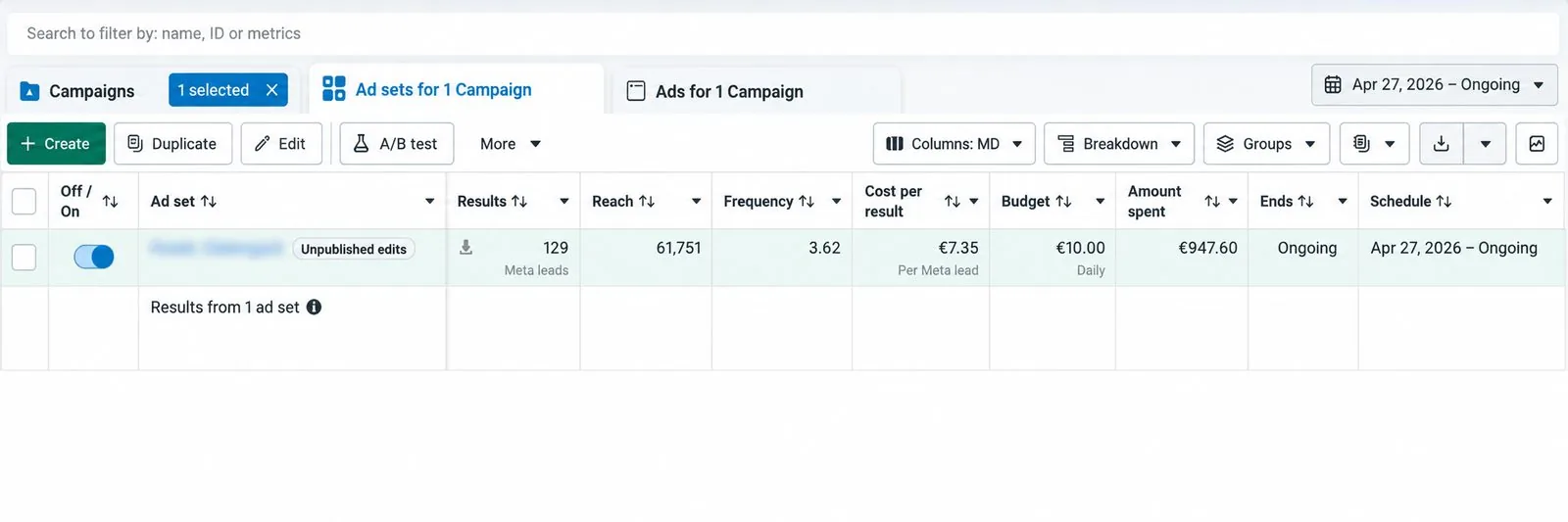
A badge does not bring customers by itself. The ad, the offer and the form do. One lead campaign we ran on Facebook and Instagram brought 129 leads at €7.35 each, on a budget of €10 a day.
A few straight answers
Since September 2026, the verified badge and impersonation protection come inside Meta One business plans: Essential, Advanced, Expert and Max. Meta’s help pages say these plans include the option to apply for the badge if you meet the rules.
Meta lists starting prices of $14.99 a month for Essential, $49.99 for Advanced, $149 for Expert and $499 for Max. Meta says prices can vary by region, app and account, so check the price in euro on your subscription screen.
Meta says Meta One is rolling out gradually around the world and is still in limited testing in places. The sure check is to open the subscription screen on your Facebook Page or Instagram profile and see what Meta offers.
No. None of the Meta One business plans list lower ad costs or better ad delivery. Ad costs depend on your offer, creative, audience and the auction.
Meta lists certificates or articles of incorporation, business registration or licence documents, government business tax documents and business bank statements. It can also verify through public business records, a photo ID or a business bank login.
It is worth it if people copy your Page, if customers message you a lot before buying, or if you need stronger support. If none of these apply, the money usually works harder in ads.
We can help you check your names, portfolio access and documents before you subscribe. Our main work is Facebook and Instagram ads, from €1,249 a month plus ad spend.
Sources
Keep reading
Set up Meta Business Manager, now a business portfolio. Add your Page, Instagram and ad account, give the right access, and keep control in Malta.

If your Facebook ad account is restricted or disabled, open Account Quality, read the reason, fix the cause and request a review. Do not open a new account.

How click-to-WhatsApp ads work: setup, the first message, cost and the free 7-day window, Malta examples and measuring chats that become sales.
A useful first step
Tell us which Pages and profiles you run and what you sell. We’ll reply with what we’d set up first, from ads to account safety.
Step 1 of 2
A few quick questions, about a minute. We usually reply within 2–3 hours.