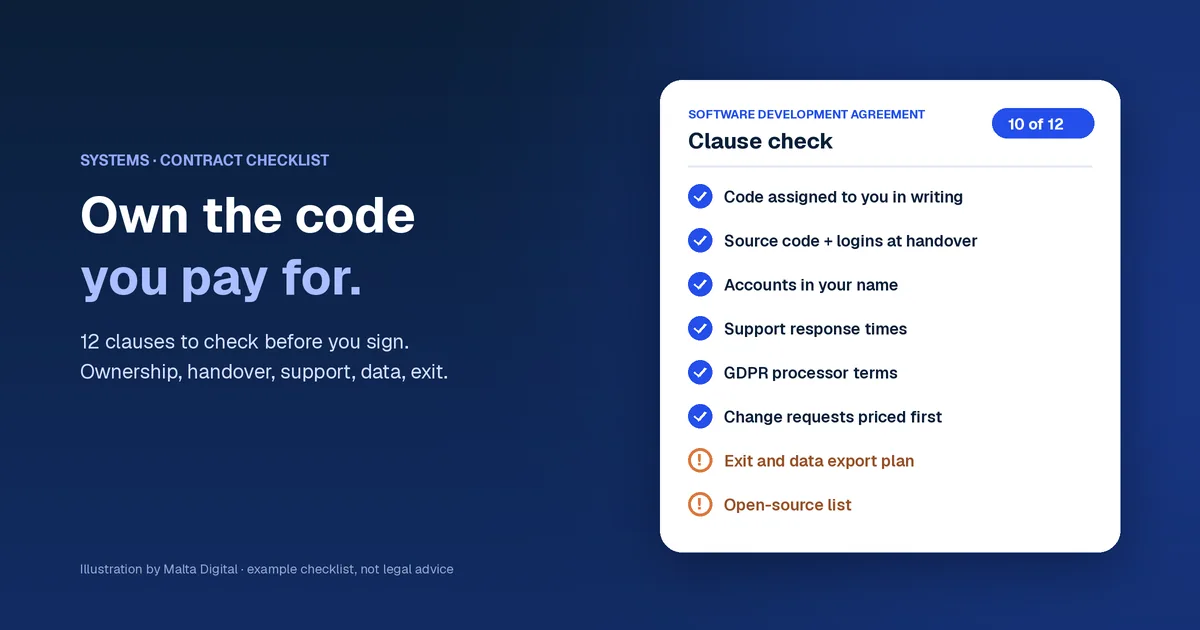
Software development contract checklist
Ownership, handover, support, data and exit, with a free clause checker.
Systems & automation · Client portals
A client portal is one secure login where your customers approve quotes, share files, check job status and pay invoices without calling you. Malta Digital builds client portals for Malta and Gozo businesses, linked to your CRM, from €7,500.
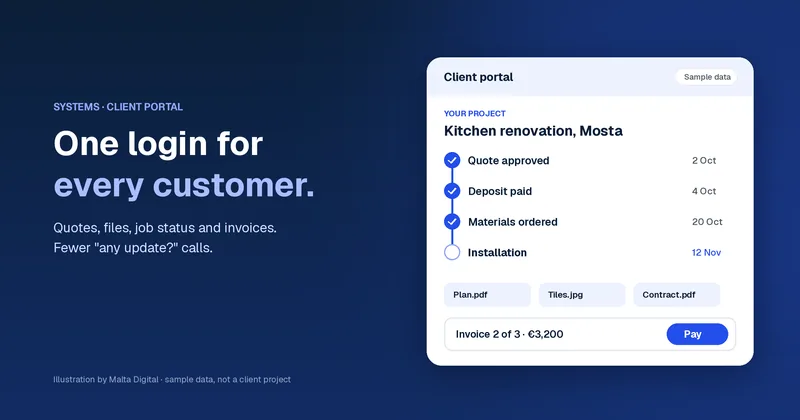
A client portal gives each customer a private page to approve quotes, upload files, see the status of their job and pay invoices. It cuts the “any update?” calls and keeps every record in one place. Malta Digital builds portals on top of your CRM as part of our business systems in Malta work, from €7,500.
The problem
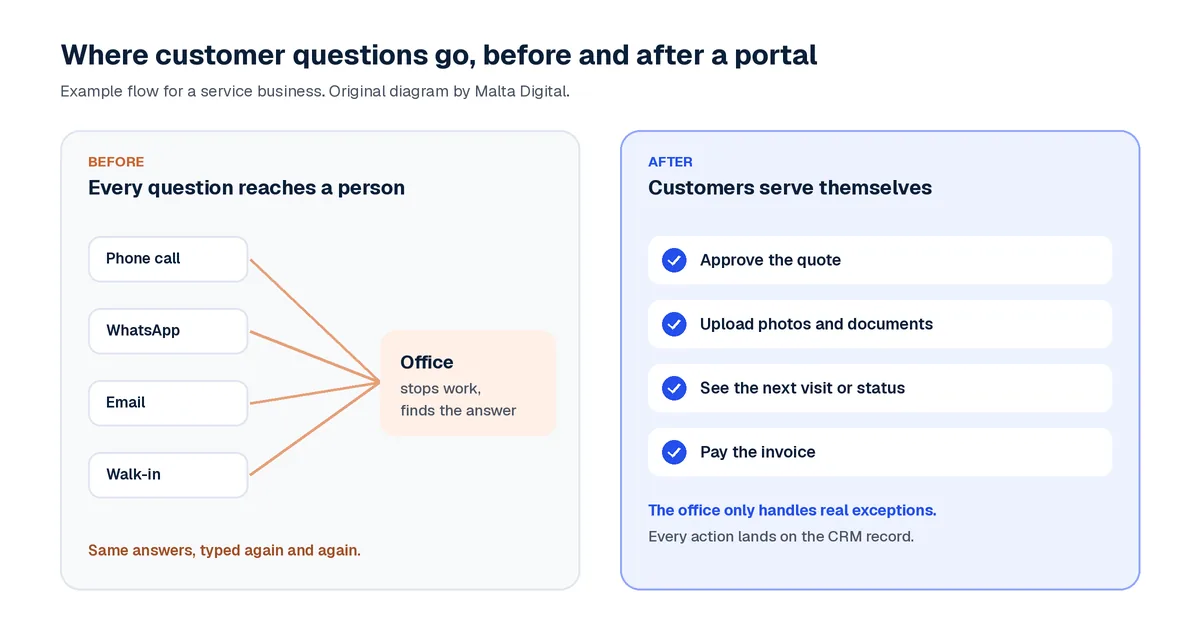
Most service businesses in Malta are good at the first step. A customer finds you, asks for a quote and books. Then the quiet part starts. Where is my quote? When is the next visit? Did you get my photos? Is the invoice paid?
Each question is small. Together they fill the day. Someone stops what they are doing, opens three apps and types the same answer again. The customer waits, and often asks a second time on WhatsApp.
Example sceneA renovation firm in Mosta runs 14 jobs at once. Every client sends a few messages a week asking about dates, tiles and payments. The office manager spends her mornings answering them instead of ordering materials. This is a made-up example, but the pattern is common.
The official numbers show the gap. In 2025, 35.8% of Malta businesses with 10 to 49 staff let customers order or book on their website, against 21.6% across the EU. But only 11.7% let customers track an order online. So most firms take the booking online, then go back to phone calls for everything after it.
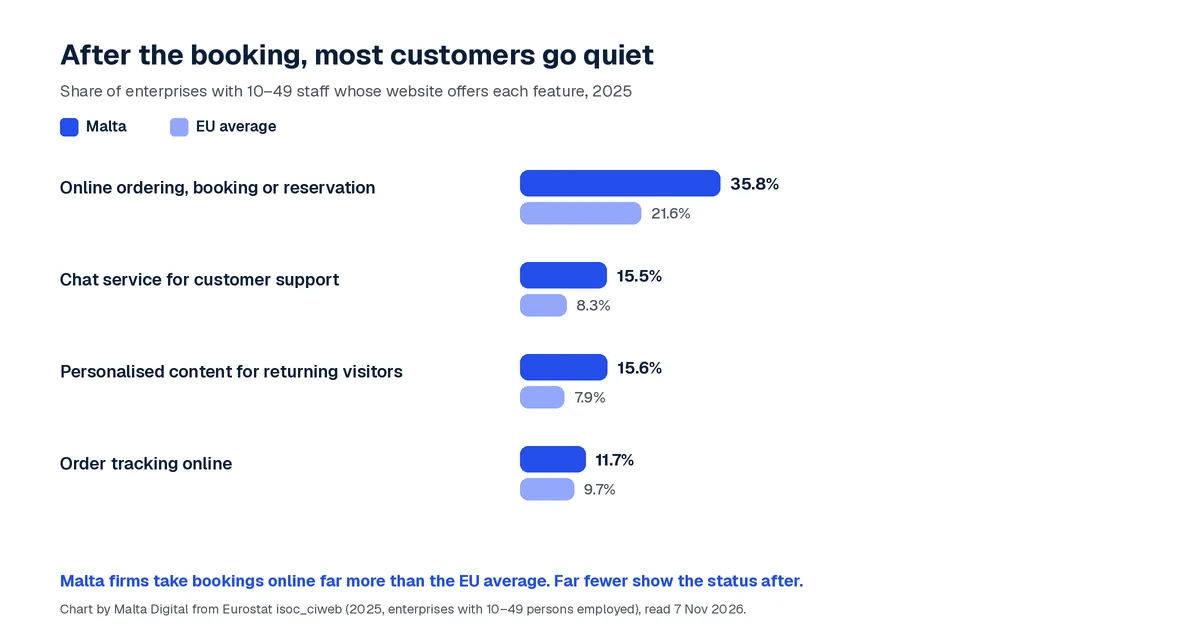
A client portal closes that gap. If you want the wider picture first, start with our guide to business systems in Malta. This page stays on one question: is a portal worth it for your business, and what should it include?
The solution
A client portal is a private, logged-in page for each customer. It shows only their own work. Think of it as the customer’s window into your system. They see what you want them to see, and they can act without calling.
| Portal feature | What the customer does | What your team stops doing |
|---|---|---|
| Quotes and approvals | Reads the quote, asks a question, approves it | Chasing “did you see the quote?” |
| Visits and bookings | Sees the next date, asks to move it | Phoning to confirm times |
| Files and photos | Uploads plans, photos, IDs or forms | Hunting through WhatsApp and email |
| Status timeline | Sees each step as it is done | Typing the same update again |
| Invoices and payments | Downloads the invoice and pays online | Sending reminders by hand |
| Messages on the record | Writes one message tied to the job | Losing notes in personal phones |
Some businesses gain more than others. Accountants and corporate service firms collect many documents, so uploads with reminders save hours. Contractors gain from stage photos and approvals. Agencies that place staff, like nanny or cleaning agencies, gain from a booking record both sides can see. Property managers gain from repair requests that arrive with photos.
The common thread is repeat contact. If one customer contacts you many times per job, a portal pays back faster. If customers buy once and leave, a good booking page and email updates may be enough.
Free tool
Count one normal week. How many messages or calls ask for an update on something you already know? How long does each take, once you find the answer? Type your own numbers below.
Your numbers only. Worked out on your device. Nothing is sent anywhere.
This calculator needs JavaScript. By hand: questions a week × minutes each ÷ 60 × 52 ÷ 12 = hours a month.
Here is a worked example with made-up numbers. Forty update questions a week at six minutes each is four hours a week. That is about 17.3 hours a month. At €15 an hour, it costs about €260 a month, or €3,120 a year. If a portal answers half of those questions, you get back about 8.7 hours a month.
Those hours matter more than the euros. They are hours your best person spends typing instead of selling or delivering. To see the same maths for lost leads, try our CRM ROI calculator.
Apply now and tell us the questions customers ask most. We will show you which three portal screens remove most of them.
Your options
You have three routes. A ready-made portal app has a monthly fee and works well if your process is standard. Many CRMs also include a basic portal. A custom portal is built around your own steps and sits on the records you already keep.
The real risk is a third login. If the portal does not share data with your CRM and accounts, someone copies updates by hand. That is the same work, just moved to a new screen.
| Common route | How Malta Digital does it | |
|---|---|---|
| Data | Portal app, CRM and accounts kept apart | Portal sits on your CRM record, one source of truth |
| Fit | Your process bends to the app | Screens follow your steps and words |
| First screens | After long specs and meetings | First working version in 2–4 weeks |
| Start | Weeks of paperwork first | We start as soon as the first payment is made |
| Ownership | A licence you rent each month | You own every line of code we build for you |
| Hosting | Wherever the supplier hosts it | Where you want it hosted |
If a ready-made tool fits, we will say so. Our which CRM is right for me quiz helps you check that in two minutes. If you already run a CRM, the portal is often the next step, and the CRM setup checklist shows what to tidy first. For the CRM side, see CRM in Malta.
Proof
Our clearest example is a platform for a childcare and nanny agency. Bookings, nanny applications, documents, training and payments were spread across messages, sheets and email. Nobody could see what needed action first.
We built three connected parts. The office has a command centre. Nannies have their own portal, from a six-step application to job offers and payouts. Parents follow a guided booking journey and then track the live booking record. An audit log records every change.
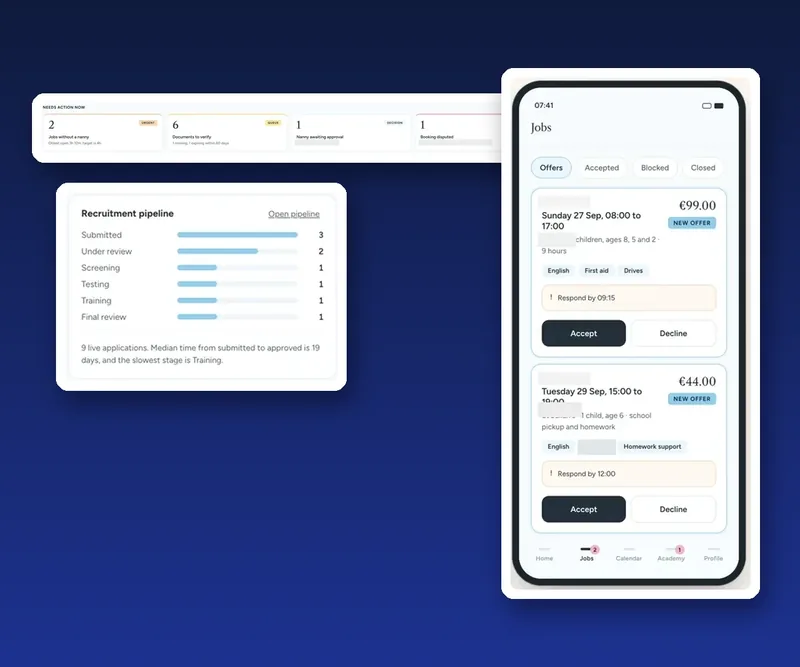
That is what a good portal does. Each person sees their own part of one shared record. The office stops being the switchboard.
Want your customers to see their own status like this? Apply now for a client portal
Trust
A portal holds personal data, so treat security as a feature. Each customer gets their own login. Staff get roles, so a technician sees jobs and not invoices. Every change is logged, so you can see who did what.
A portal also helps with GDPR duties. The EDPB small business guide says you must answer requests from people about their data within one month. It asks firms to make those rights easy to use, in particular by electronic means. It even notes that a request made outside an authenticated customer account may need an identity check. A logged-in portal makes that simpler. Malta’s national authority is the Information and Data Protection Commissioner (IDPC), Malta.
If an outside firm hosts or runs the portal for you, it acts as your processor. GDPR Article 28 says that relationship needs a written contract, which can be electronic. Our software development contract checklist lists what that contract should say.
Two promises from us are simple. You own every line of code we build for you. And the portal is hosted where you want it.
How we do it
We start with your top ten customer questions, not with features. Then we pick the three screens that answer most of them. Usually that is status, files and invoices. Everything else waits for version two.
We start as soon as the first payment is made. A focused system has its first working version in 2–4 weeks. Bigger systems are live within 2–3 months at most. The only waiting is for government payouts, if you use a grant.
Bigger digital projects may qualify for the Digitalise your SME grant. On 7 November 2026, fondi.eu listed cut-off dates of 13 November, 30 November and 14 December 2026. The funding body decides who qualifies. We prepare the technical specification and quote, so you can relax and focus on running the business.
Ready to stop being your customers’ switchboard? Apply now for a client portal
A few straight answers
A client portal is a secure login where each customer sees their own quotes, bookings, files, job status and invoices. They can approve, upload and pay without calling you.
Ready-made portal apps charge a monthly fee paid to the provider. Malta Digital builds custom client portals, linked to your CRM, from €7,500. You get a fixed quote before work starts.
We start as soon as the first payment is made. A focused portal has its first working version in 2–4 weeks. Bigger systems are live within 2–3 months at most.
No. A good portal works in the phone’s browser with a secure login. Customers can add it to their home screen if they want.
It can. Logins, roles and an audit log help you control access. A portal also makes it easier to answer data requests, which the EDPB says you must answer within one month.
Yes, and it should. The portal should show data from your CRM and accounting tools, so nobody copies updates by hand. We confirm each connection before it goes into the quote.
You do. You own every line of code we build for you, and the portal is hosted where you want it.
Sources
Keep reading
Ownership, handover, support, data and exit, with a free clause checker.
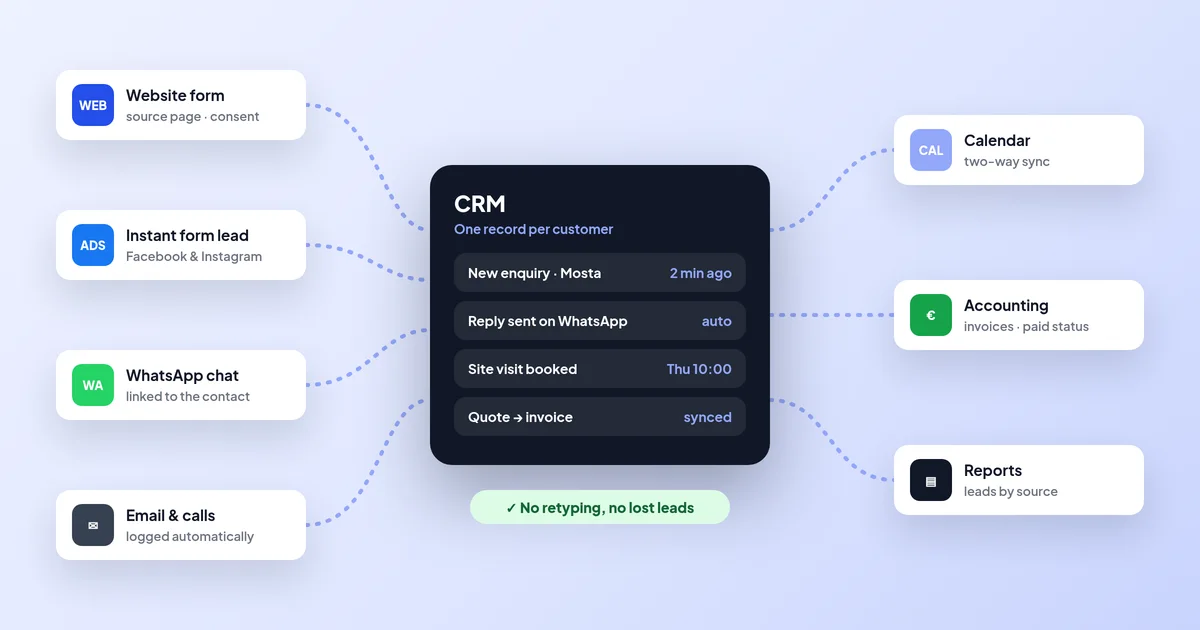
Forms, lead ads, WhatsApp, calendar and accounting on one record.
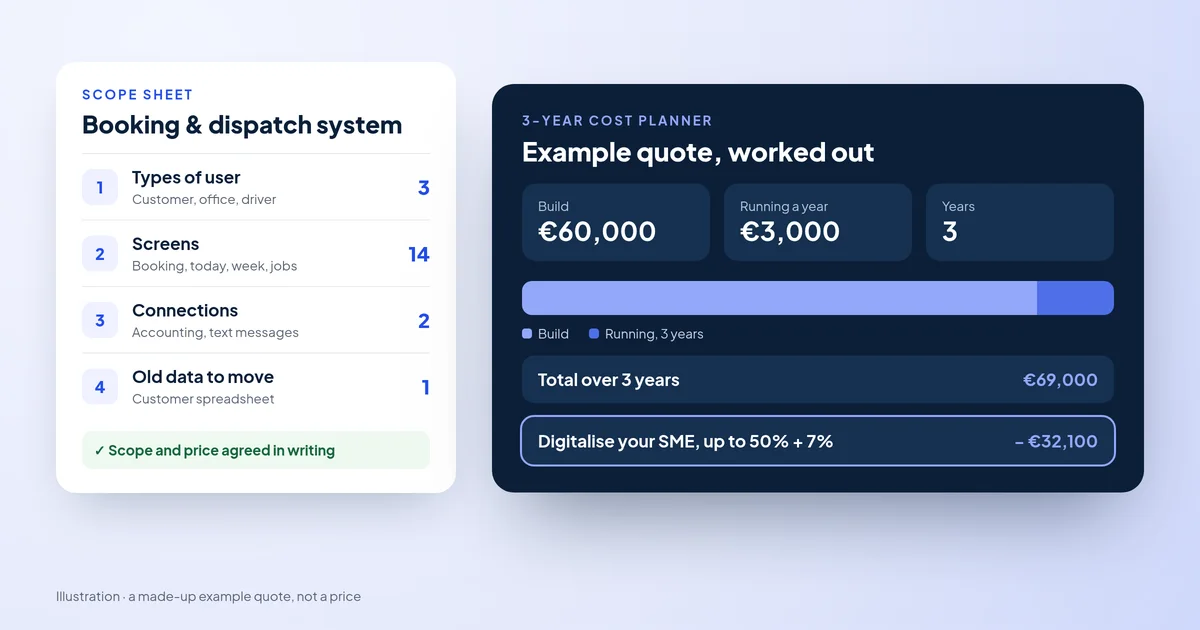
What drives the price, running costs and grant co-funding.
A useful first step
Tell us what customers ask you about most and which tools you use today. We reply with a clear first version and what it would cost.
Step 1 of 3
A few quick questions, about a minute. We usually reply within 2–3 hours.