
Lead follow-up automation
Reply to every enquiry in minutes, follow up on a schedule that stops when they book, and use AI only where it helps.
Systems & automation · CRM integration
CRM integration means connecting the tools your business already uses, such as your website forms, Facebook and Instagram lead ads, WhatsApp, email, calendar and accounting software, so every enquiry and every customer lands in one CRM record automatically. Nobody retypes a lead, nothing waits in an inbox, and your reports finally add up. This guide explains the three ways to connect a tool, what to connect first, how Meta lead ads reach your CRM, and the mistakes that break integrations quietly.
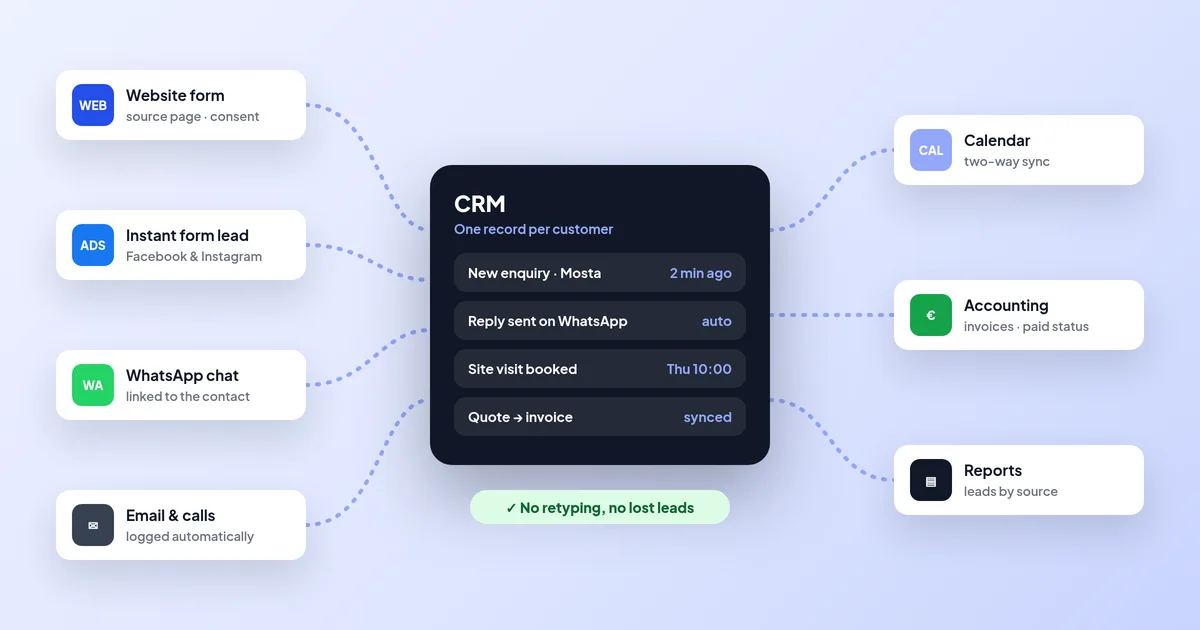
CRM integration connects your website forms, Facebook and Instagram lead ads, WhatsApp, calls, email, calendar and accounting software to your CRM, so every enquiry and customer lands in one record automatically and nobody retypes it. Each link is native, a connector such as Zapier, or custom code using APIs and webhooks. Malta Digital builds and tests these integrations, with alerts when something fails.
The short answer
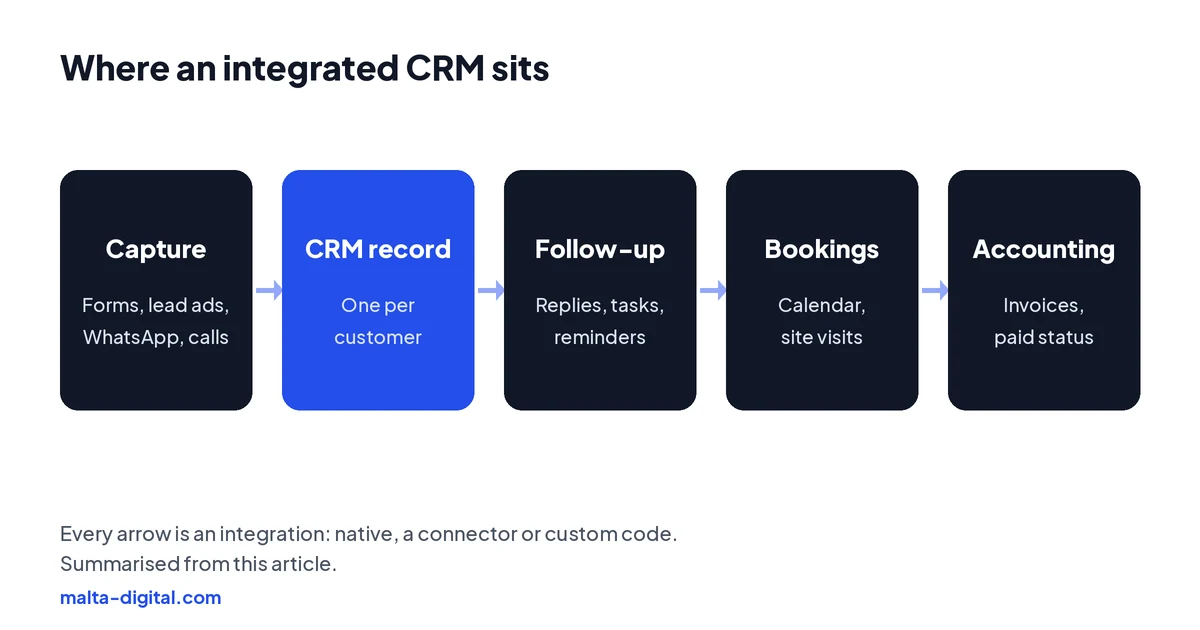
A CRM on its own is a database someone has to fill in. A connected CRM fills itself. When a person sends your website form, taps a Facebook lead ad, messages you on WhatsApp or books a slot, a record is created or updated in the CRM with their details, where they came from and what they asked for. The right person gets a task, the customer gets a reply, and the history stays on one record.
At Malta Digital, we describe CRM integration in one sentence: every enquiry and every customer, from every channel, in one record, without anyone retyping it. If staff still copy leads from an email into a spreadsheet, or from a phone into the CRM at the end of the day, your CRM is not integrated yet.
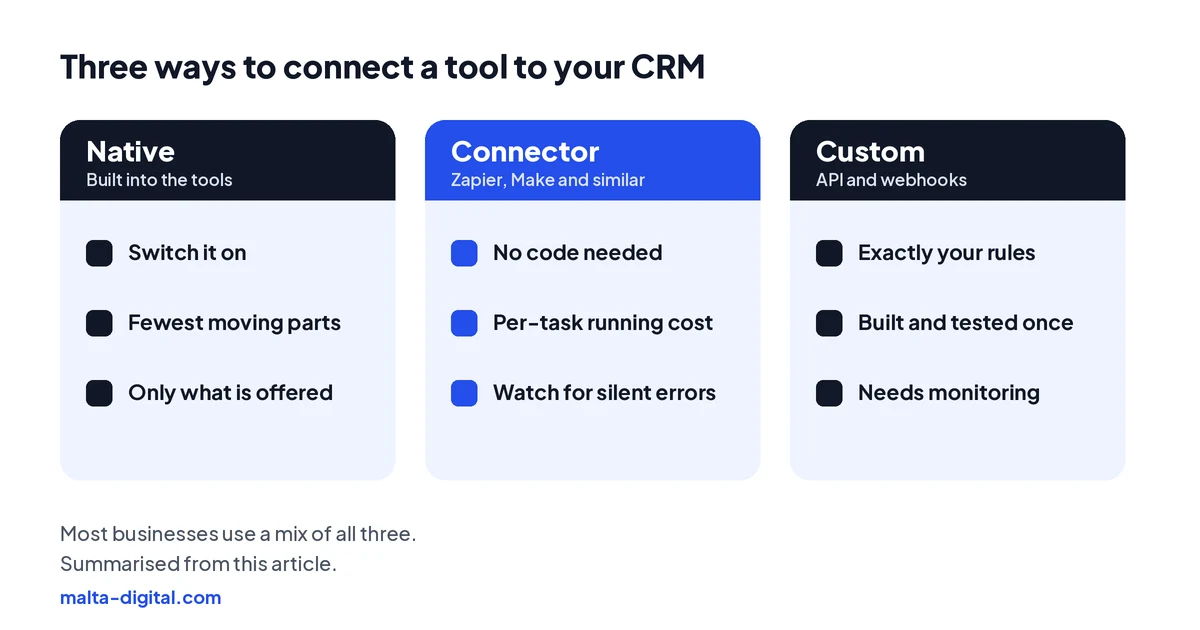
There are three ways to make each connection. A native integration is built into one of the tools: you log in and switch it on. A connector such as Zapier or Make sits between two tools and moves data when something happens. A custom integration uses the tools’ APIs and webhooks to do exactly what your process needs. Most businesses end up with a mix.
Start with enquiries
Your website form is usually the easiest win. Instead of sending an email to an inbox, the form posts straight into the CRM and creates a lead with the name, phone, email, message and consent. Add a few hidden fields and every lead also carries the page it came from and the campaign that brought it, using the UTM tags on your ads and posts. That is how you later see which ads and pages bring customers, not only clicks.
Small details matter in Malta. Phone numbers come in as 79…, +356 79…, 00356 79… or with spaces, so normalise them to one format on the way in, or WhatsApp links and duplicate checks will fail. Keep Maltese letters such as ċ, ġ, għ, ħ and ż intact: check the form and the CRM both use UTF-8, or names like Ħal Għargħur turn into question marks.
Meta lead ads
Leads from Meta instant forms do not reach your CRM by themselves. They sit in Meta Business Suite until you download them, and Meta only lets you download leads from the last 90 days. If nobody checks every day, you reply late; if nobody downloads them at all, you lose them.
Meta offers three routes: a direct integration where your CRM is listed in Meta’s CRM setup, a third-party connector such as Zapier or LeadsBridge, or a custom integration using Meta’s webhooks and API. You set the first two up in Meta Business Suite under Instant forms and CRM setup. Whichever route you choose, send a test lead with Meta’s Lead Ads Testing Tool and check it lands with every field in the right place before the campaign goes live.
Two extras make lead ads pay off. First, an instant reply: as soon as the lead arrives, send a WhatsApp message or email and create a call task for the owner. Second, send lead quality back to Meta. With the Conversions API for CRM, you tell Meta which leads became qualified or became customers, so the ads look for more people like those, not only more form fills.
Proof
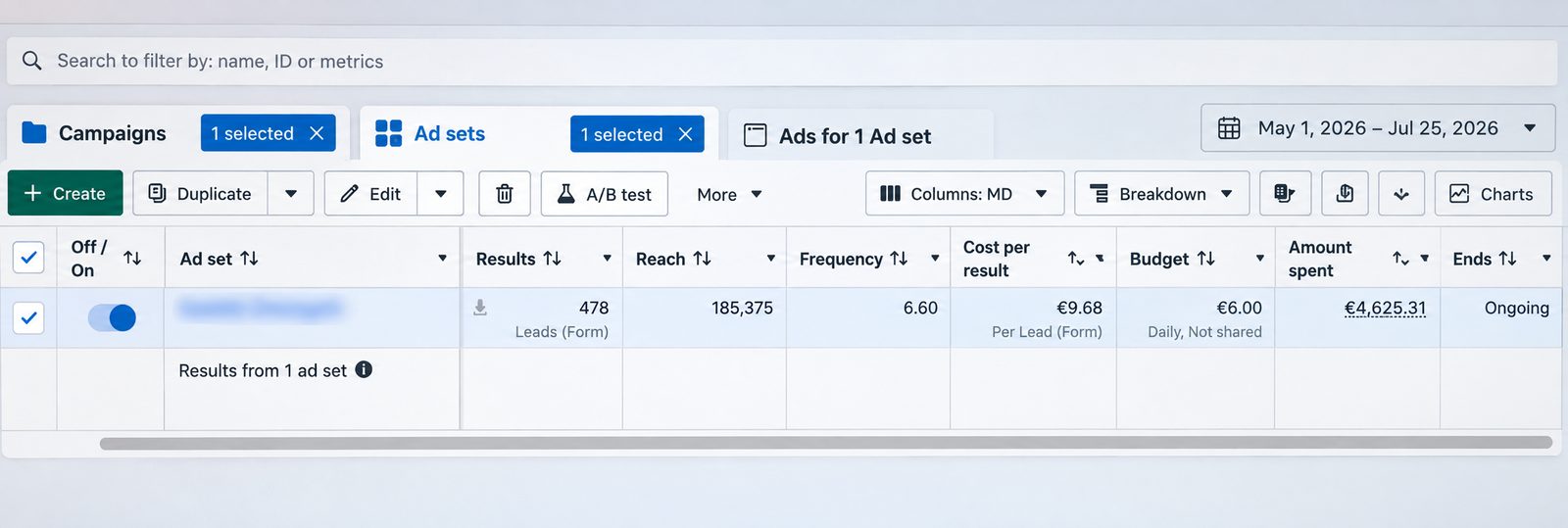
This is a lead generation campaign we ran on Facebook and Instagram from 1 May to 25 July 2026. It brought 478 form leads from €4,625.31 of ad spend, which is €9.68 per lead, on a €6.00 daily ad set budget. The screenshot is straight from Meta Ads Manager, with the ad set name blurred.
Want leads like these going straight into your CRM? Message us on WhatsApp
WhatsApp and calls
In Malta, a lot of business happens on WhatsApp and on the phone, so a CRM that only sees email misses half the story. With the WhatsApp Business Platform, messages to your business number can be logged on the customer record and replies can be sent from the CRM, so the conversation stays with the business when someone is on leave or leaves the company. Automatic messages must follow WhatsApp’s rules on templates and opt-in.
Calls work in a similar way. Most cloud phone systems can log each call against the contact, show the caller’s record when the phone rings and create a task for a missed call. Even if your phone system cannot do that, a one-tap “log call” button in the CRM is better than nothing. The goal is simple: anyone in the team can open a customer and see what was said last.
Email and calendar
Connecting Google Workspace or Microsoft 365 lets the CRM log emails to and from a customer and show them on the record. Calendar sync means a site visit, consultation or call booked in the CRM appears in the right person’s calendar, and a meeting booked in the calendar shows up on the customer. Decide early whether the sync is one way or both ways, and which system wins when the same appointment is changed in two places.
If you take bookings online, connect the booking system too, so a new booking creates or updates the customer, reminders go out from one place and no-shows are visible on the record. Our no-show cost calculator shows what missed appointments cost you, using only your own numbers.
Apply now and tell us where your enquiries arrive and which tools you use today. We’ll show you what we’d connect first, or message us on WhatsApp.
Accounting
The accounting link is where integration saves the most admin. When a deal is won, the CRM can create the customer and the invoice in your accounting software, whether that is Xero, QuickBooks, Zoho Books or a system run by your accountant, and bring the paid status back so the sales team sees who still owes money. Nobody types the same customer twice.
Agree which system owns what. The CRM usually owns the customer, the deal and the quote; the accounting software owns invoice numbers, VAT treatment and payments. In Malta, invoices and accounting records must be kept for at least six years under the VAT Act, so keep the accounting system as the official record and let the CRM link to it rather than copy it.
Choosing the method
| Method | Best for | Watch out for |
|---|---|---|
| Native | Common links your CRM already offers, such as email, calendar and big accounting tools | You get only the fields and rules the vendor built |
| Connector (Zapier, Make) | Simple “when this happens, do that” steps between two tools | A running cost per task, and errors that fail quietly unless someone is alerted |
| Custom (API and webhooks) | Your own rules, many systems, or tools with no ready link | Needs proper testing, logging and someone to look after it |
A good rule: use native links where they do what you need, connectors for simple steps, and custom code where the process is specific to your business or where several systems must agree. If your CRM itself is the problem, it may be time to compare ready-made and custom options first.
What goes wrong
Duplicates. The same person fills a form, sends a WhatsApp and calls, and you get three records. Match on phone and email before creating a new contact. Sync loops. Two systems keep updating each other forever because both are set to “two way”. Decide which system wins for each field. Silent failures. A password changes or a form field is renamed and leads stop arriving, but nobody notices for a week. Every integration needs an alert when it fails, and someone who reads it.
Data protection. Each tool that touches customer data is a processor under GDPR, so check you have a data processing agreement with each one, only send the fields you need, and record the consent the person gave on the form. If you are moving from one CRM to another at the same time, map the fields once and plan the import before you switch the integrations on.
Want your forms, ads and WhatsApp feeding one CRM? Message us on WhatsApp
Proof
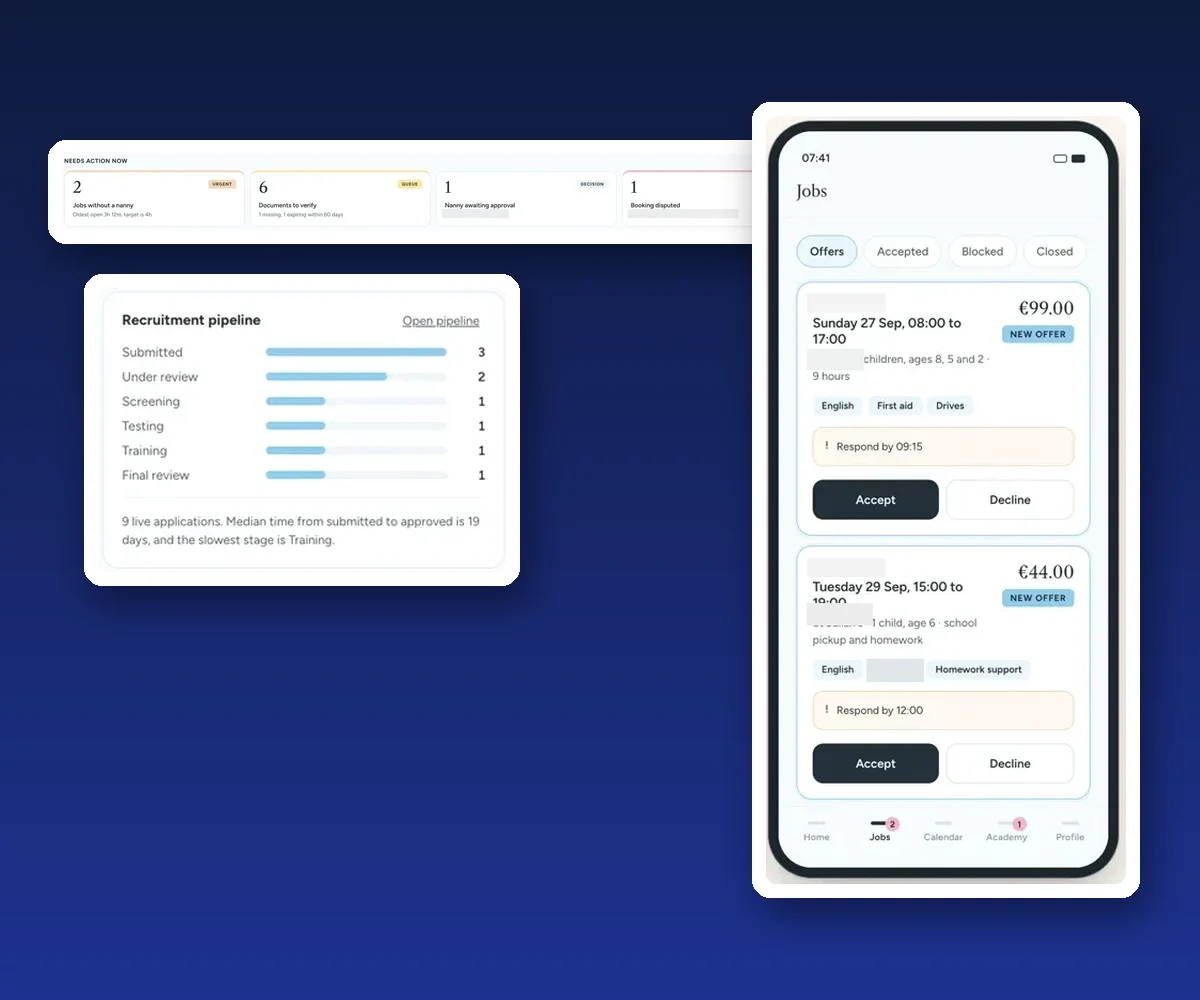
Our clearest example is a CRM and booking platform we built for a childcare agency. Requests, staff, schedules and updates used to live in separate places. The platform connects an office action queue, a recruitment pipeline and a phone app for staff, so one change shows up everywhere it is needed.
How we do it
We start by listing every place an enquiry or customer detail enters your business today, and every place it is typed again. Then we agree which system owns each piece of data, which links are native, which need a connector and which need custom work, and what should happen when something fails. We build and test each link with real test leads, add failure alerts and hand over a short guide, so your team knows where everything goes.
If your current CRM can do the job, we connect it. If it cannot, we build a custom CRM around your process with the integrations built in. Malta Digital’s custom systems start from €7,500, excluding VAT, depending on users, workflows and integrations. Not sure where to start? Take the CRM quiz, try the lost leads calculator or download the setup checklist.
A few straight answers
Connecting your CRM to the tools you already use, such as website forms, Facebook and Instagram lead ads, WhatsApp, email, calendars and accounting software, so customer data flows into one record automatically and nobody retypes it.
Start where enquiries arrive: your website forms and your lead ads. Then WhatsApp and calls, then calendar and bookings, then accounting. Each step removes typing and closes a gap where leads get lost.
In Meta Business Suite, open Instant forms and CRM setup, then choose a direct integration if your CRM is listed, a connector such as Zapier, or a custom webhook integration. Send a test lead with Meta’s Lead Ads Testing Tool before going live.
Not always. Many links are native, and custom API integrations avoid connectors entirely. Zapier or Make are useful for simple steps between two tools, but each task has a running cost and errors need alerts.
Yes. With the WhatsApp Business Platform, messages to your business number can be logged on the customer record and replies sent from the CRM, within WhatsApp’s rules on templates and opt-in.
Yes. Won deals can create the customer and invoice in your accounting software, and the paid status can come back to the CRM. Keep the accounting system as the official record for invoices and VAT.
Native links and connectors are often included or charged as a monthly subscription. Custom work depends on the number of systems and rules. Malta Digital’s custom CRM systems start from €7,500, excluding VAT.
Keep reading
Reply to every enquiry in minutes, follow up on a schedule that stops when they book, and use AI only where it helps.
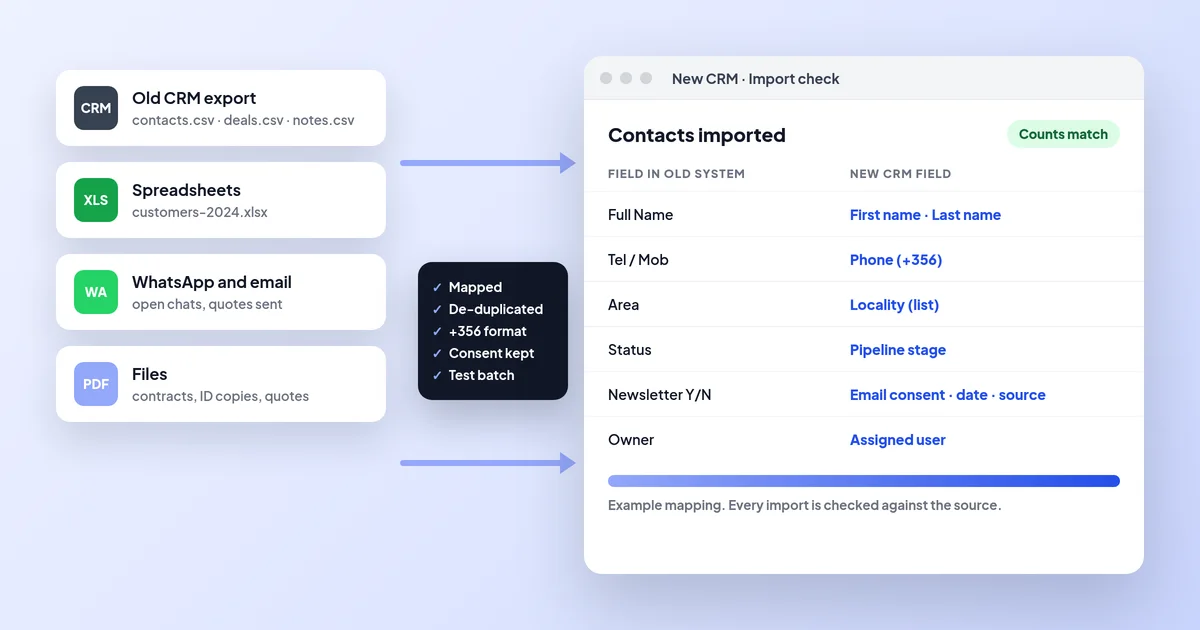
Export, field mapping, clean-up with +356 numbers and Maltese letters, consent records, test imports, cutover with automations off, and checks.
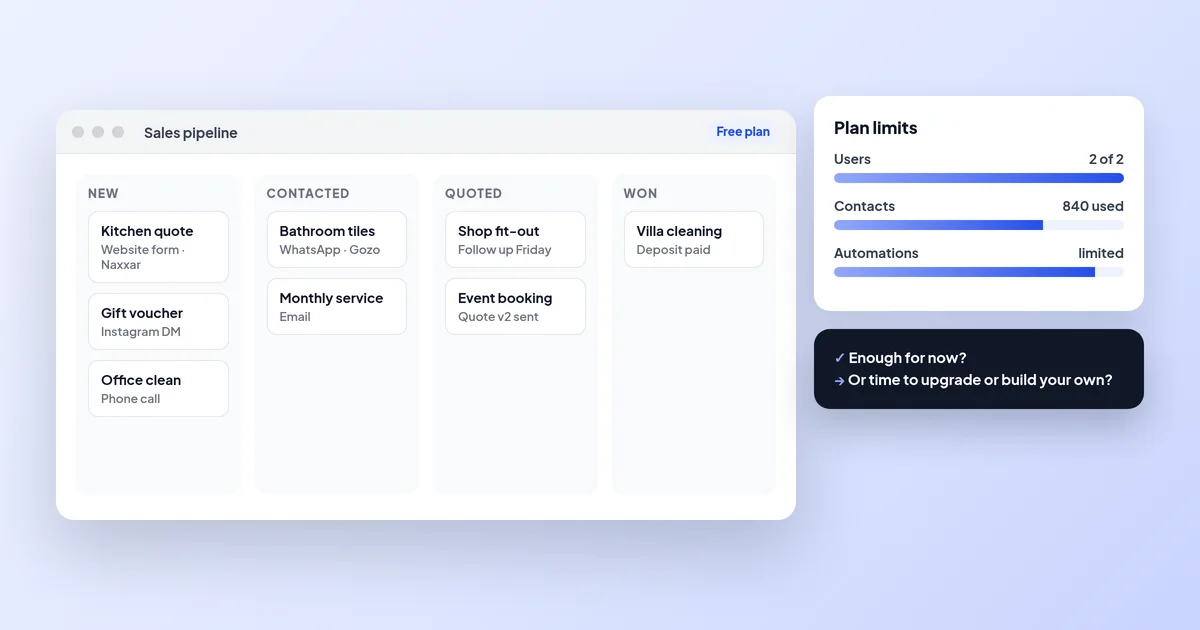
Free plans, trials and open source, the limits to check, a one-week setup and the signs you have outgrown a free CRM.
A useful first step
We connect your website forms, lead ads, WhatsApp, calendar and accounting, test every link and add failure alerts. Custom CRM systems from €7,500, excluding VAT.