
CRM Implementation Checklist for Malta Businesses (Free PDF)
A free, printable CRM setup checklist for Malta and Gozo businesses: 38 steps from choosing a CRM to data, GDPR, lead ads, launch and funding. Get the PDF.
Systems & automation · CRM adoption
Malta Digital builds and sets up CRM systems in Malta, and the hard part is rarely the software. It is getting every person to log enquiries, calls and next steps in it, every day. This guide explains why teams stop using a CRM, the fixes that work in small Maltese teams, the 90-day plan we follow and a free check to score your own.
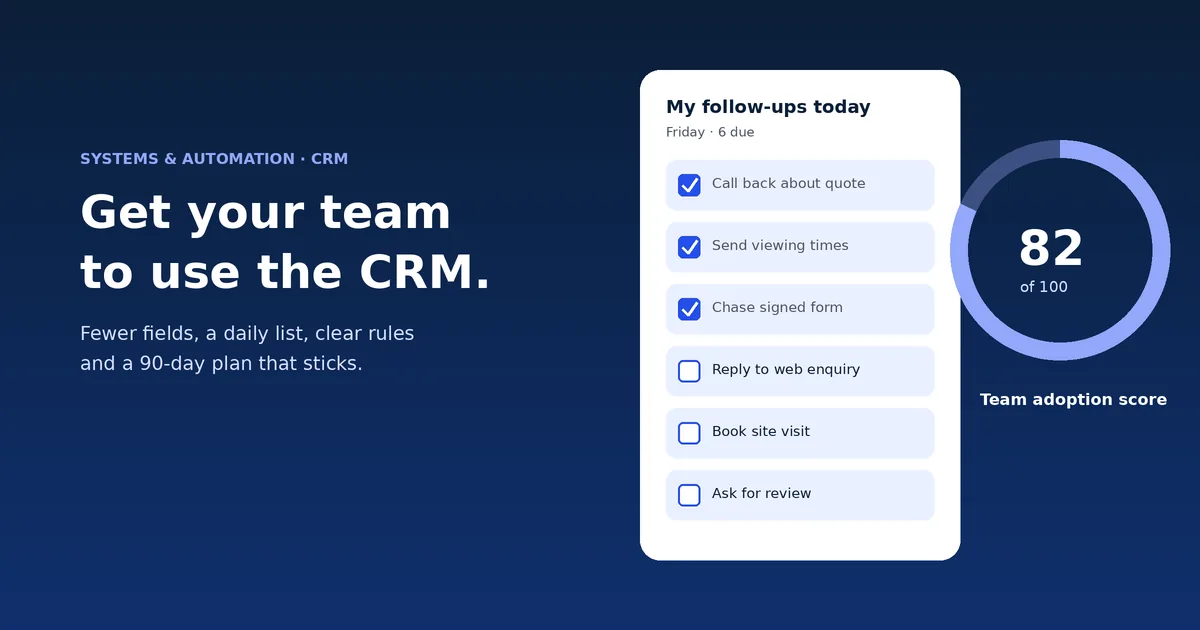
A team keeps using a CRM when it saves them time on the same day. Cut the fields to the few that drive a decision, open each person on their own list of next steps, capture enquiries automatically from forms, ads, email and WhatsApp, switch off the old spreadsheet on a set date, and check a few signs at 30, 60 and 90 days. Malta Digital builds custom CRMs around how a team already works, from €7,500.
Why it matters
A CRM, or customer relationship management system, is one shared list of every enquiry, customer and next step. It only works if everyone uses it. When half the team logs calls and the other half keeps notes on their phone, the list is wrong, the reports are wrong and the owner stops trusting it.
Then something worse happens. People go back to the spreadsheet and WhatsApp, but you keep paying for the CRM. Enquiries still slip through, and now nobody knows which list is right.
The good news is that the causes are well known and mostly fixable in a few weeks. Almost none of them are about the software brand. They are about how it was set up and what the team was asked to do.
Malta data
Eurostat asks firms with 10 or more staff which business software they use. In 2025, 39.8% of Maltese firms used CRM software, against 28.5% across the EU. In 2023 the figures were 39.2% and 25.8%.
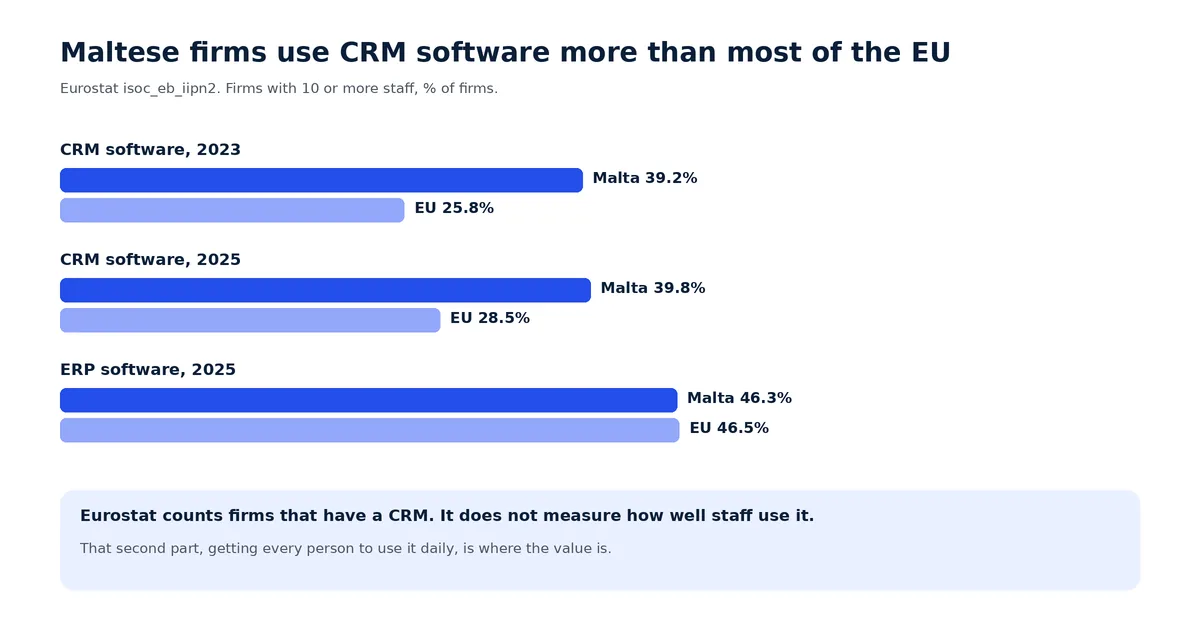
So many Maltese teams already have a CRM. Eurostat counts whether a firm has one, not whether its staff use it well. That second part is what this guide is about, and it is where most of the value sits.
The causes
Each of these shows up in a way you can see. If you recognise three or more, the fix is in the setup, not in a new brand of software.
| Reason | What you see | The fix |
|---|---|---|
| Too many required fields | Records with “n/a” and “.” in half the boxes | Keep the 5 to 8 fields that drive a decision. Make the rest optional or remove them |
| It opens on a manager’s dashboard | Staff open it, look and close it | Open each person on “my follow-ups today” and “new enquiries for me” |
| Enquiries are typed in by hand | Leads from forms, ads and WhatsApp arrive days late or never | Connect website forms, lead ads, email and WhatsApp so records create themselves |
| The old spreadsheet is still open | Two lists, and arguments about which is right | Make the spreadsheet read-only on a set date, after the data is moved |
| Nobody owns it | Small problems pile up and nobody fixes them | Name one person who owns the CRM, with an hour a week to look after it |
| Training was a feature tour | People remember how to log in and little else | Train on real enquiries, one job per short session, with a one-page cheat sheet |
| It does not fit the real work | Stages skipped, notes kept elsewhere, mobile avoided | Map the real process with the people who do it, then change the setup or the system |
Notice that most fixes take work off staff. That is the whole trick. People do not avoid a CRM because they are lazy. They avoid it because it asks them to type things twice and gives nothing back.
Apply now and tell us how enquiries reach you and who handles them. We reply with what we would change first.
Free tool
Answer eight quick questions about your CRM today. The check gives a score out of 100, tells you whether your CRM is healthy, at risk or being abandoned, and lists the three fixes that would raise the score most. Starting answers are an example. Nothing you enter leaves this page.
Use this week’s numbers from your CRM, or your best guess.
Your result appears here as you type.
House rules
Keep the rules short and the same for everyone, including the owner. When the boss asks “is it in the CRM?” in every meeting, the team follows within weeks.
The plan
This is the plan we follow when we hand over a CRM. It works the same for a ready-made CRM and for one we build.
| When | Focus | Check at the end |
|---|---|---|
| Before launch | Map the real process with staff, cut fields, move and clean the data, set each person’s home screen | Can each person do their top 3 jobs in under a minute? |
| Week 1 | Short training on real enquiries, house rules agreed, owner named | Everyone has logged in and logged at least one real enquiry |
| Days 1 to 30 | Old spreadsheet read-only, enquiries flowing in automatically, daily questions answered fast | Most open enquiries have a next step and a date |
| Days 31 to 60 | Fix the top 3 complaints, add the first useful automation, such as reminders | Reports in team meetings come from the CRM only |
| Days 61 to 90 | Review fields and stages, train new staff the same way, plan the next improvement | Run the adoption check again and compare with day 1 |
Do not add new fields, pipelines or automations in the first 30 days unless something is broken. Every change in month one feels like a new system to learn.
Measuring use
You need a few signs to know if the CRM is working: who logged in this week, how many open enquiries have a next step, and how many enquiries arrived automatically. Most CRMs show these in a report.
In Malta, tracking how staff use a system is processing their personal data, so the GDPR applies. The IDPC’s guidance for employers says staff must be told about monitoring software before it starts, with clear information about its purpose and extent. Keep it to work data, explain why you check it and use it to fix the setup, not to catch people out.
A simple way to do this: put a short note in your staff handbook or privacy notice saying which CRM reports you look at, why, and how long you keep them. Then share the team numbers in the Friday review. When people see the score go up because the CRM got easier, they stop seeing it as surveillance.
Buy or build
Sometimes the setup is not the problem. The software forces a process that does not match your business: stages that do not exist in real life, a sales pipeline when you run jobs, or a phone app your drivers or technicians cannot use with one hand. Then staff will keep working around it, however good the training.
That is when a custom CRM pays off. It opens on each role’s own screen, asks only for the fields your business uses and pulls enquiries in from every channel by itself. Compare the options in our guide to custom software vs off-the-shelf, follow the CRM implementation checklist and read how to do a CRM data migration without losing history.
Proof
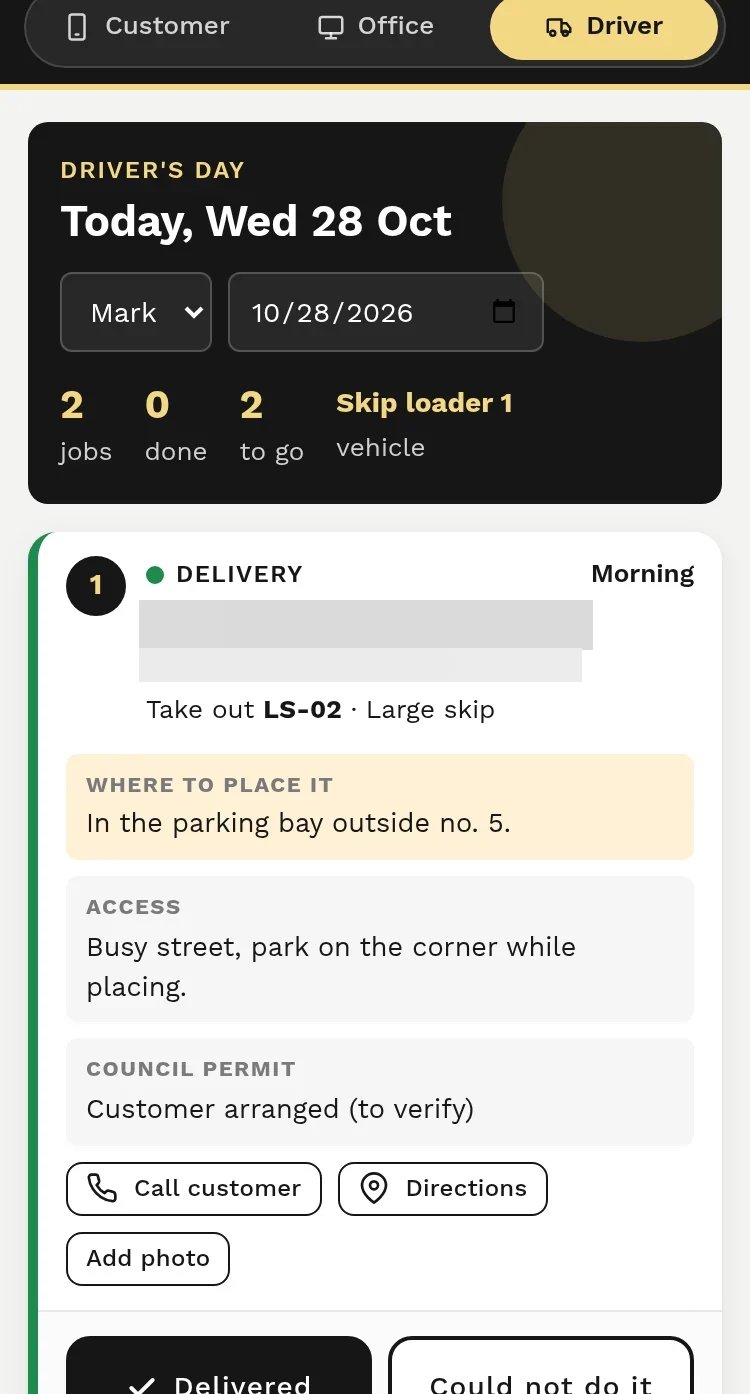
For a skip hire and waste business, we built a booking and dispatch system with a separate screen for each role. Drivers do not get a CRM full of fields. They open the app and see today’s jobs in order, then mark each one done from the road. The office sees capacity and status without phoning anyone. Building each screen around one person’s job is the single biggest thing that makes a system get used. It is being rolled out, so we do not claim results yet.
A few straight answers
Usually because it adds typing and gives nothing back. Too many fields, enquiries entered by hand, a screen built for managers and an old spreadsheet still running are the common causes.
Plan for about 90 days. The first month is about habits and fixing complaints fast. By the third month, meetings and reports should come from the CRM only.
Aim for every person who handles customers to log in on each working day, and for almost every open enquiry to have a next step and a date. Track your own trend rather than chasing a benchmark.
Yes, for the few things that matter, such as logging enquiries and next steps. Make the rule easy to follow by cutting fields and capturing enquiries automatically first.
Yes, but tell staff first. The IDPC says employees must be informed about monitoring software before it starts, including its purpose and extent. Keep it to work data.
It often does, because it fits the real process and asks for less. It is not automatic: a custom CRM still needs clear rules, training and an owner.
Malta Digital builds custom CRM systems from €7,500. The price depends on users, workflows, connections and data to move, with a written quote first.
Keep reading
A free, printable CRM setup checklist for Malta and Gozo businesses: 38 steps from choosing a CRM to data, GDPR, lead ads, launch and funding. Get the PDF.
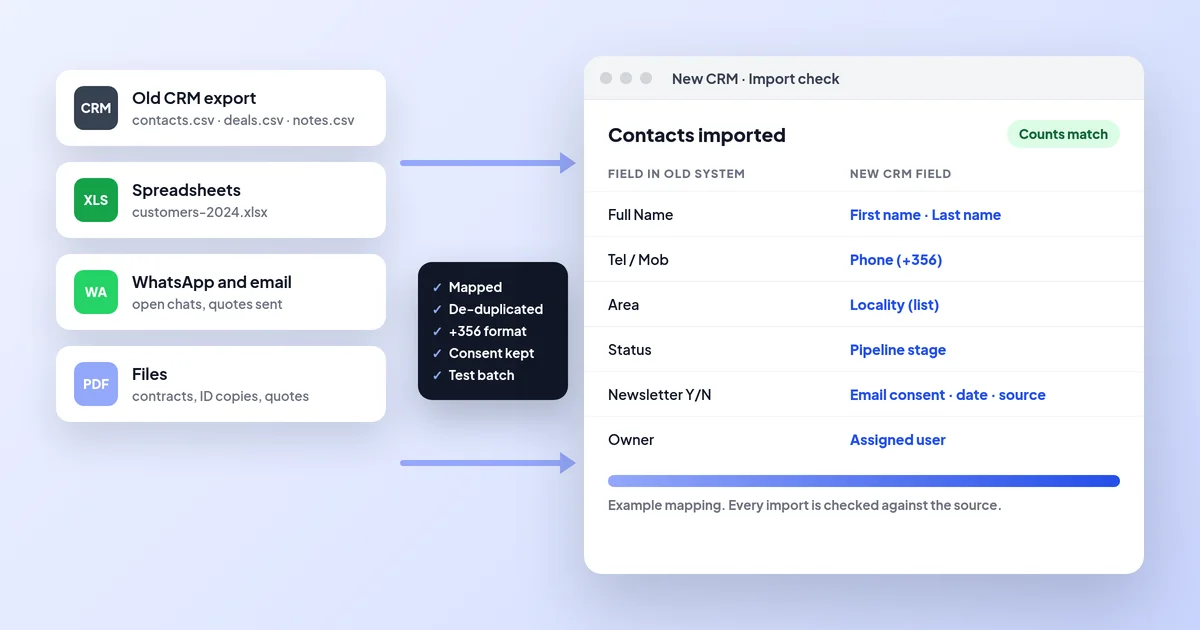
How to move from an old CRM or spreadsheets to a new CRM in Malta: export, field mapping, clean-up, consent records, test imports, cutover and checks.

CRM vs Excel for businesses in Malta: when a spreadsheet is enough, the signs it has stopped working, GDPR, and how to move to a CRM without losing data.
A useful first step
Tell us which CRM you use, or the spreadsheet you use instead, and where enquiries get lost. We reply with what we would fix first and what a CRM that fits would cost.
Step 1 of 3
A few quick questions, about a minute. We usually reply within 2–3 hours.