
CRM setup checklist
A printable checklist from choosing a CRM to launch.
Systems & automation · CRM
When several teams, branches or brands share customers, the CRM becomes the system the whole business runs on. This guide gives you the eight checks we use with larger Maltese and EU companies, a rollout plan, and the questions your finance and IT teams will ask.
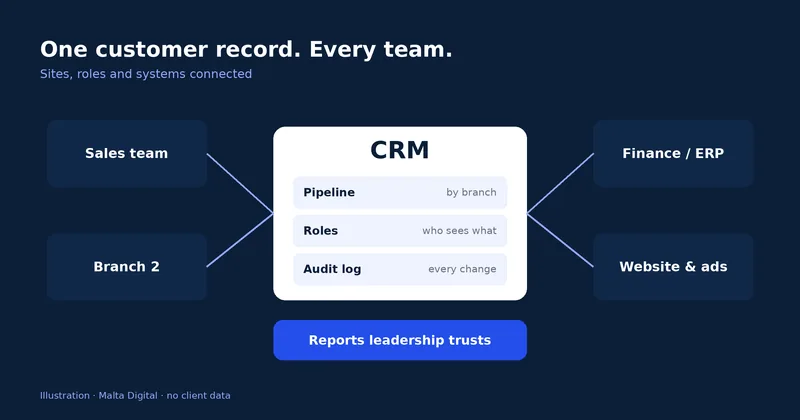
A CRM for a large company has to do four things a small one does not: share one customer record across teams and sites, control who sees and changes what, connect cleanly to finance and operations systems, and give leadership numbers it trusts. Malta Digital sets up ready-made CRM software and builds custom CRM systems for larger teams, from €7,500 for one process and phased from there. Start with the eight checks below, or see our CRM for larger companies in Malta.
Signs you have outgrown it
Small businesses buy a CRM to stop losing enquiries. Larger companies buy one for a different reason. Several teams touch the same customer, and nobody can see the full story. Sales quotes in one tool, operations books the job in another, and finance invoices from a third. The board gets three different numbers for the same month.
That is the moment a CRM becomes the system the business runs on. It has to hold one record per customer, show each team the part it needs, and feed reports that leadership trusts. Our CRM Malta page covers the full service. This guide covers what changes when the company is bigger.
A Malta example: a group with two hotels, a restaurant and an events team. A corporate client books rooms with one hotel, a dinner with the restaurant and a conference with events. Without a shared CRM, three people chase the same client, and nobody sees the total value of the account. With one, the account manager sees every booking, quote and invoice in one place.
The common mistake is buying more licences of the tool the sales team already uses, and hoping the other teams join in. They rarely do. Plan the CRM around the whole customer journey, not one department.
The eight checks
These are the checks we run with every larger client before anyone pays for a licence or a build. They work for ready-made CRM software and for a custom CRM.
| Check | What to ask | Red flag |
|---|---|---|
| 1. Data model | Can it hold your accounts, branches, brands and contacts, and the links between them? | Everything forced into “contact, company, deal” |
| 2. Integrations | Which system owns customer details, orders and invoices? How does data move between them? | “We will export a spreadsheet every week” |
| 3. Permissions | Can access be set by role, team, site and field? Is every change logged? | One admin login shared by the team |
| 4. Reporting | Can leadership see pipeline, source and revenue by branch from live data? | Reports rebuilt by hand in a spreadsheet |
| 5. Migration | How are old records mapped, tested and checked before the switch? | One big import on launch day |
| 6. Security and GDPR | Where is the data hosted? Is there a data processing agreement? How are backups restored? | No written answer on hosting or backups |
| 7. Five-year cost | Licences or hosting, setup, integrations, training and support over five years? | Only the first-year price on the table |
| 8. Support and change | How are issues reported, how fast is each priority answered, and how are changes priced? | “Just send us a message” |
Checks one to three decide whether teams will trust the system. If the data model does not match how you work, people keep side spreadsheets. If permissions are loose, managers stop putting sensitive notes in. If integrations are weak, the same details get typed twice, and errors creep in.
Checks seven and eight decide whether the project still feels good in year three. Ask every supplier for the same five-year view. Our CRM cost guide shows what to put in each line.
Ready-made, custom or both
There are three honest routes. A ready-made platform, set up properly. A custom CRM built around your process. Or a hybrid, where a ready-made platform handles standard sales and a custom layer handles the part that makes your business different.
| Question | Ready-made platform | Custom CRM | Hybrid |
|---|---|---|---|
| Best when | Your sales process is fairly standard | Your process is your advantage, or tools need many workarounds | Standard sales, plus one unusual operation |
| You pay | Licences per user, plus setup | A project price, then hosting and support | Licences plus a smaller custom build |
| Fit | Your team adapts to the software | The software follows your steps | Standard where possible, custom where it matters |
| Watch for | Add-on fees and per-user growth | Clear ownership of code and data | Which system owns which data |
We are not tied to one platform. If a ready-made CRM fits, we say so and help set it up. If it needs a spreadsheet next to it to work, that is a sign the process needs something built for it. Our guide to custom vs off-the-shelf software goes deeper on that choice.
One more point for larger teams: agree in writing who owns the code, the data and the documents, and what you receive if you ever change supplier. That answer matters more than a small difference in price.
Tell us your teams, sites and the tools that must connect. We reply with a clear first step and a price range.
Roll it out in phases
Large CRM projects fail when everything changes on one Monday. We roll out in phases instead. Each phase has its own scope, fixed quotation and sign-off, so the business sees results early and the risk stays small.
| Stage | What happens | Who signs off |
|---|---|---|
| 1. Map | Workshops with each team. Current tools, data and handovers reviewed. | Project owner and team leads |
| 2. Scope | Phase one chosen, later phases listed, fixed quotation per phase. | Managing director and finance |
| 3. Prototype | Your real stages and fields on screen, tested by key users. | Key users |
| 4. Build and test | Build, integrations, test imports and permission tests on a copy. | Team leads and IT |
| 5. Go live | Final import, training by role, old and new side by side for a short time. | Project owner |
| 6. Improve | Support plan, review after launch, next phase planned. | Project owner and operations |
Tick what you already have. Each gap becomes an item on the first workshop agenda.
Missing ticks are normal. They are what the mapping stage is for. Apply for a CRM review for your team.
For the step-by-step version, use our free CRM setup checklist, and read CRM data migration before you plan the switch.
Proof
For a childcare agency we built a CRM platform with three connected parts: a command centre for the office, a portal for nannies and a booking app for parents. Every booking, nanny and parent has one record. The office sees what needs attention first, instead of searching through chats and email.
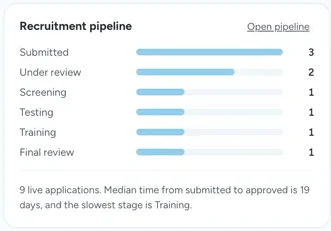
The same approach scales. More teams mean more roles and more connections, but the method stays the same: map the work, agree who owns which data, build in phases and train each team on the screens it uses.
Want one customer record across every team? Apply for a CRM review for your team.
Data, GDPR and funding
A CRM holds personal data, so GDPR applies from day one. If a supplier processes that data for you, Article 28 of the GDPR requires a written contract that sets out what they may do with it. Article 32 asks for security that fits the risk, including the ability to restore data after an incident and regular testing.
In practice, that means a data processing agreement before any data moves, a hosting location agreed in writing, role-based access, backups with a tested restore, and access removed the day someone leaves. Malta’s Information and Data Protection Commissioner (IDPC) is the authority to follow. Our guide to CRM and GDPR turns this into settings.
On funding, Digitalise your SME may part-finance eligible digitalisation projects for qualifying businesses, and its guidance names CRM among enterprise systems. Eligibility is decided by the funding body, not by us. See our Digitalise your SME guide before you plan the budget.
A few straight answers
The best CRM is the one that fits how your teams sell and serve customers, connects to your finance and operations systems, and that people actually use. Big platforms such as Salesforce, Microsoft Dynamics 365, HubSpot and Zoho suit many companies. A custom CRM makes sense when your process needs too many workarounds on them.
A focused first phase for one team usually has a working version in 2–4 weeks, and bigger systems go live within 2–3 months. Larger companies roll out in phases, team by team or site by site, so nobody stops selling during the switch.
Count licences or hosting, setup, data migration, integrations, training and support over three to five years. With Malta Digital, custom CRM projects start from €7,500 for one team and one process. Multi-team projects are usually scoped from €15,000 or €20,000, and larger projects are phased with a fixed quotation for each phase.
Yes. One customer record can be shared across branches or brands, with separate pipelines, targets and reports for each, and permissions that control who sees what.
One named internal owner, usually in sales operations or operations, with a deputy. They decide on changes, keep data quality up and are the first contact for the team. Without an owner, even good software slowly falls out of use.
Keep reading
A printable checklist from choosing a CRM to launch.
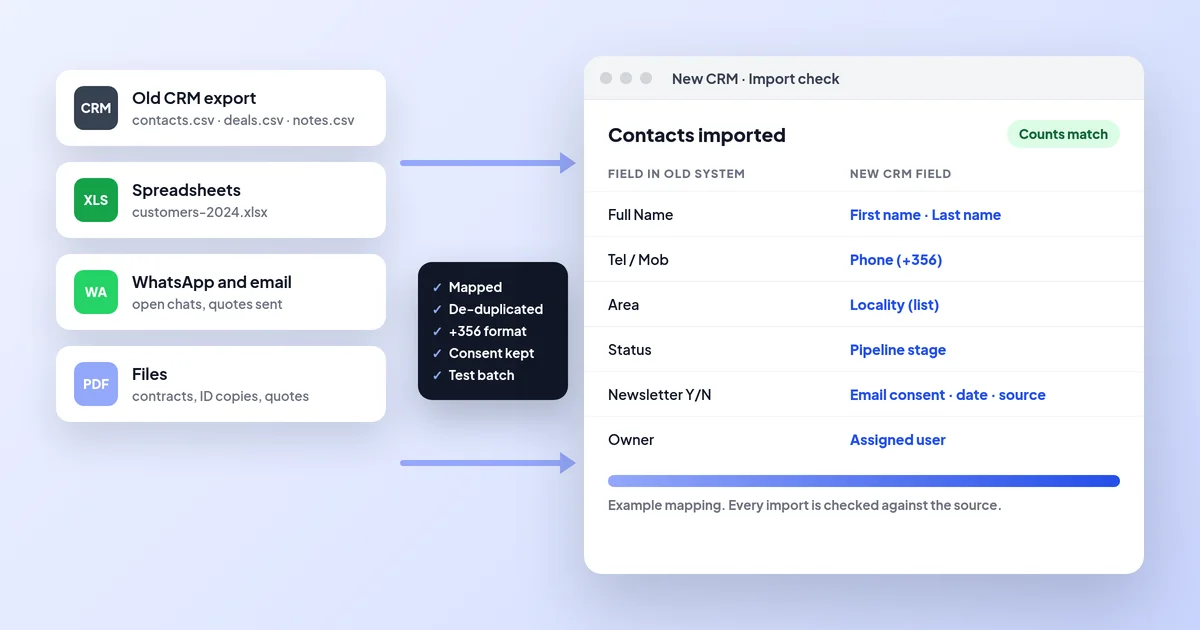
Move customers and history without losing anything.
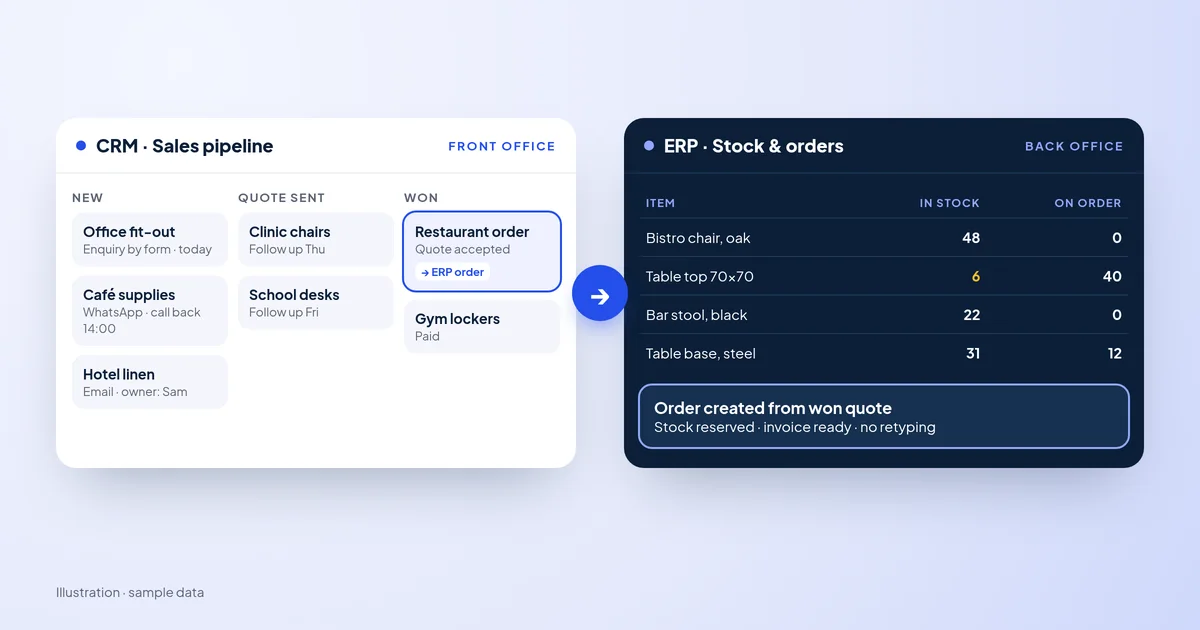
Which one your business needs first, and when you need both.
A useful first step
Describe your teams, sites, current tools and where customers get lost. We map it and reply with a phased plan.
Step 1 of 3
A few quick questions, about a minute. We usually reply within 2–3 hours.