Small business website in Malta
The pages, content and costs of a small business website in Malta, how to get found on Google and when to upgrade.
Websites · Comparison
Pick Wix for a simple site you edit yourself, WordPress for a content-heavy site someone keeps updated, and custom when you need speed, a booking or quote flow, or links to your systems. The best platform is the one you can look after for years. Below: upkeep, three-year costs, a 6-question picker and how to switch safely.

Need the website built? Our web design Malta packages: Business from €2,490, Growth from €4,490, Premium from €6,490. See real websites we built.
Choose Wix or another builder for a simple site you edit yourself. Choose WordPress for a content-heavy site with someone to keep it updated. Choose custom when you need speed, a booking or quote flow, or links to your own systems. Shops that mainly sell products usually suit Shopify or WooCommerce. For prices, see our website cost guide for Malta.
Plain terms
Wix (like Squarespace) is a website builder: you rent a platform, choose a template and edit it in your browser. Hosting, security and updates are handled for you. WordPress is free software that runs on hosting you choose, with thousands of themes and plugins. You, or your developer, are responsible for updates and security. A custom website is built for your business, using modern web code, without the weight of a general-purpose platform.
There is a fourth option if you mainly sell products online. A shop platform such as Shopify or WooCommerce is often the right base, because payments, stock and delivery are built in. Our ecommerce guide covers that choice, and our Shopify vs WooCommerce comparison puts the two side by side.
WordPress is the giant. W3Techs, which surveys millions of websites every day, finds WordPress on 38.7% of all websites. Wix runs 4.2% and Squarespace 2.4%. Another 32.9% use none of the platforms W3Techs tracks, and most custom-built sites sit in that group.
Popular does not mean right for you. A big platform has many themes and helpers, but it is also the first target for hackers. Pick on fit, not on fame.
Compared
In short: builders win on ease, WordPress on flexibility and content, custom on speed and fit. The table below sums it up.
| Wix / builders | WordPress | Custom | |
|---|---|---|---|
| Speed | Can be fast; apps can slow it | Can be fast; themes and plugins often slow it | Usually fastest |
| Editing yourself | Easiest | Moderate | Simple editing for the parts that change |
| Maintenance | Platform handles it | Regular updates needed | Very little |
| Ownership | You rent the platform | You own the files | You own the files |
| Moving later | Usually means rebuilding | Possible to any host | Possible to any host |
| Special features | Limited to the apps on offer | Plugins for most needs | Built exactly for your flow |
| Cost pattern | Low start, ongoing monthly plan | Hosting, themes, plugins and upkeep | Higher upfront, little to run |
Builders
If you need a few pages, you want to edit them yourself, and you do not need anything unusual, a builder is a sensible, low-maintenance choice. The trade-offs are real. You depend on the platform and pay a fee for as long as the site exists. Moving away later usually means a rebuild, because builder sites cannot be copied to another host.
Read the plan rules before you start. Wix says building a site is free, but you need a paid Premium plan to connect your own domain and remove Wix branding. Most Premium plans include a domain voucher for the first year only. It works only for a new domain bought from Wix, not to renew one you already own. So budget for the domain from year two.
WordPress
WordPress suits sites that publish a lot of content, such as blogs, news and large catalogues, and businesses that want a big choice of plugins. It is powerful, but each plugin (an add-on that adds a feature) is one more thing to update. An outdated WordPress site is a common target for hackers. Budget for ongoing maintenance, not just the build, and agree who does the updates before launch.
Hosting matters too. WordPress.org recommends PHP 8.3 or newer and MySQL 8.4 or MariaDB 10.11 or newer. PHP is the language WordPress runs on, and MySQL is the database that stores your pages. WordPress still runs on older versions, but warns they have reached end of life and may leave your site open to attack. So ask your host which versions you get.
| Job | Wix / builders | WordPress | Custom |
|---|---|---|---|
| Software updates | Done by the platform | You or your developer: WordPress, theme and every plugin | Few parts, so little to update |
| Hosting versions | Done by the platform | Check PHP and database versions with your host | Set up once by the developer |
| Backups | Check what your plan includes | Set up and test them yourself or with a care plan | Your files can be copied anywhere |
| Renewals | Plan and domain every year | Hosting, domain and any paid plugins | Hosting and domain |
| If it breaks | Platform support | Whoever looks after the site | The developer who built it |
Custom
Choose custom when speed matters, for example when you run ads to the site. Choose it when you need a booking, quote or ordering flow that templates handle badly. Or when the site must talk to your CRM (the system that tracks your customers). A well-built custom site has fewer moving parts to break, and you own the code.
See it working
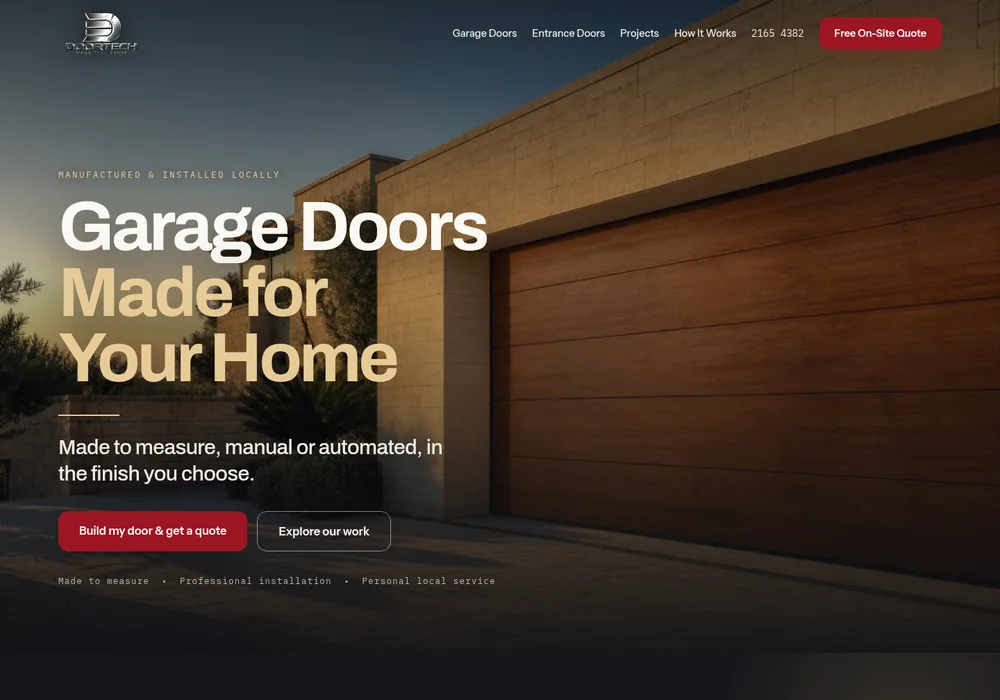
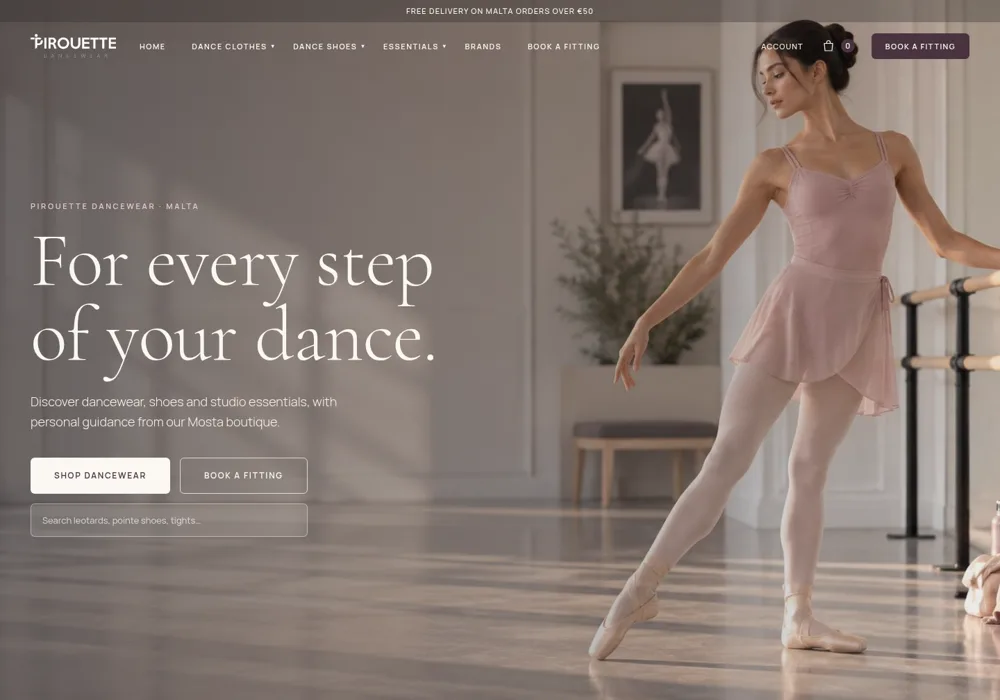
A made-to-measure product site with a project gallery and a quote builder, and a boutique online store with brands and fitting bookings. Both are flows that would be hard to do well with a template.
Not sure which platform suits you? Apply now for a website
Apply now and tell us who will update the site and what it needs to do. We’ll give you a straight recommendation.
Decide
| If this sounds like you | Usually the best fit |
|---|---|
| A few pages, you want to edit everything yourself, nothing unusual | A website builder such as Wix |
| You publish a lot of articles or have a big catalogue, and someone will keep it updated | WordPress |
| You run ads, need a booking or quote flow, or want it connected to your systems | Custom |
| You mainly sell products online, with stock, payments and delivery | A shop platform such as Shopify or WooCommerce |
If two answers fit, ask yourself who will look after the site in two years’ time. The platform that matches the person who maintains it is usually the right one. Our guide to choosing a web designer, an agency or a DIY builder helps you decide who that should be.
Cost
Builders cost little to start, then charge a monthly fee for as long as the site lives. WordPress costs depend on the theme, plugins, hosting and upkeep. Custom costs more up front, but often less to run. So compare the total over three years, not the first bill.
Say a café owner in Sliema has three quotes. A builder plan at €20 a month comes to €720 over three years, plus the evenings spent building it. A WordPress site at €1,500 with a €30 monthly care plan comes to €2,580. A custom site at €1,200 with €15 a month for hosting comes to €1,740. The cheapest start is not always the cheapest site.
| Quote | Build | Monthly | Total over 3 years |
|---|---|---|---|
| Builder, built by you | €0 (your time) | €20 | €720 |
| WordPress with a care plan | €1,500 | €30 | €2,580 |
| Custom with hosting | €1,200 | €15 | €1,740 |
Add the same domain and email to every quote, and the order stays the same. Our website cost guide for Malta lists every yearly cost, from a .mt domain to business email. The website cost calculator does the sums with your own quotes. Our own websites start from €2,490, €4,490 and €6,490. See web design in Malta for what each package includes.
Security and SEO
Any of the three can rank well on Google if the content is good, the pages are fast and each service has its own page. Security differs: builders handle it for you, WordPress needs regular updates and backups, and custom sites have a smaller attack surface when built well. Whatever you choose, make sure you own the domain and have a backup.
Accessibility depends far more on how the site is built than on the platform. Any of the three can be accessible or not, depending on the theme, the content and the checkout. If you sell online, check whether the European Accessibility Act applies to you.
Switching
Keep your domain and keep the same page addresses where you can. Redirect each old address to its new page, so you keep your Google rankings. Move your best content across, update your Google Business Profile, and test every form after launch. Our website redesign guide has a full checklist, and our SEO team in Malta can track your rankings before and after the move.
Google’s own guide is clear. Use permanent redirects (301 or 308, the codes that tell Google a page has moved for good). Keep them for at least a year. Expect a small or medium site to take a few weeks before Google shows most of the new addresses.
Proof
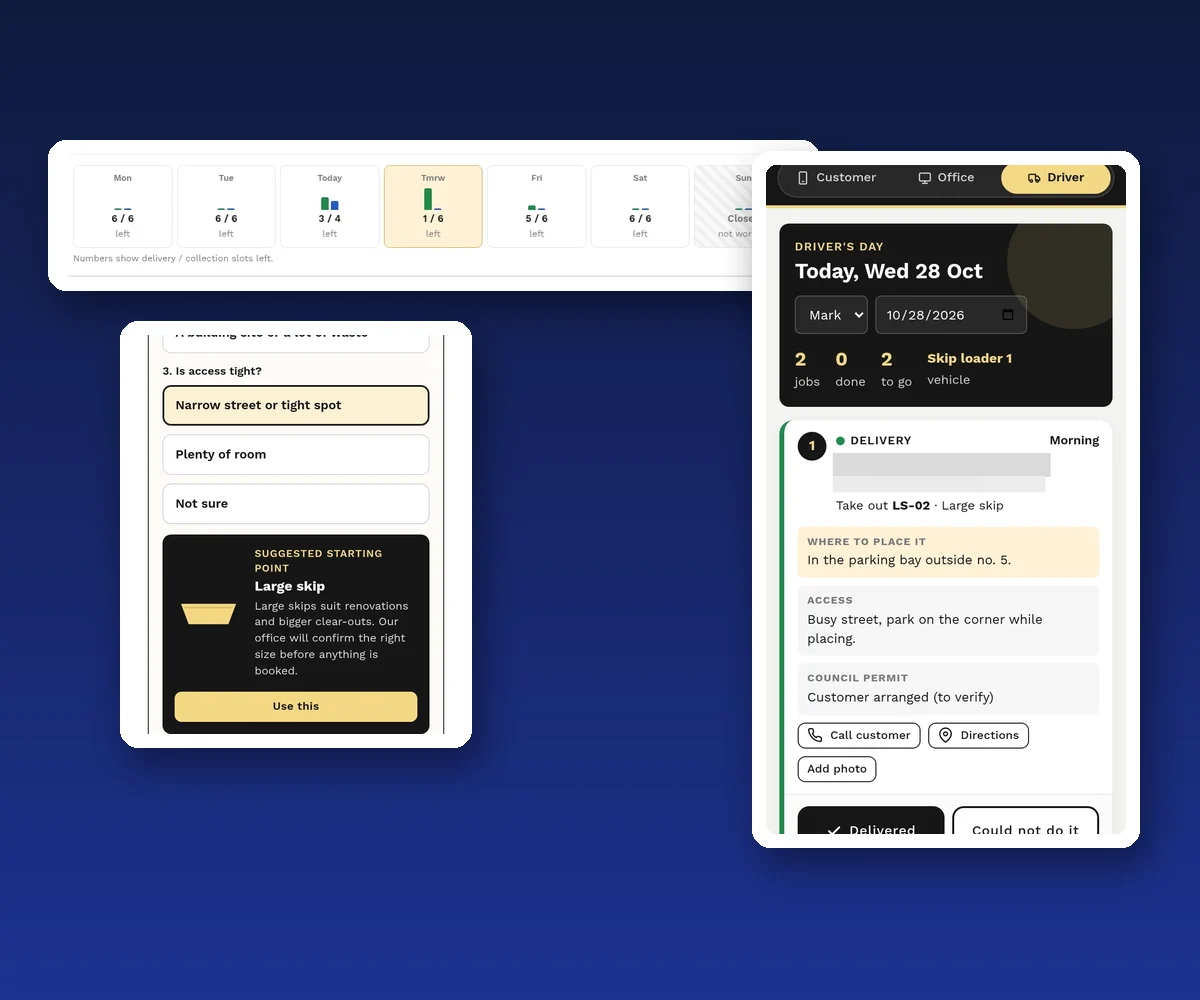
A skip hire business took bookings by phone, Messenger and a contact form. Customers did not know which skip to choose, and nobody could see how many vans were free each day. No builder template checks daily van capacity or reminds people about road permits.
So we built a custom system. Customers book on their phone in seven steps, with a three-question skip size helper. The office sees the slots left each day and is warned before overbooking. Drivers see their jobs in order and mark each one done. It is being rolled out now, so there are no results to share yet.
Need a flow your template cannot handle? Apply now for a website
A few straight answers
WordPress is more flexible and better for content-heavy sites; Wix is easier to run yourself. Neither is better for every business.
Yes, when you need speed, a specific booking or quote flow, or connections to your systems.
Any of them can rank well. Content, speed and a page per service matter more than the platform.
Not by copying it. Builder sites usually have to be rebuilt elsewhere, though you can keep your domain and move your text and images. Redirect old page addresses to keep your Google rankings.
For a shop that mainly sells products, a dedicated shop platform such as Shopify or WooCommerce on WordPress is usually the best base, because payments, stock and delivery are built in.
With a builder you own your content but rent the platform. With WordPress or a custom site you own the files. In every case, register the domain in your business’s name.
With us, the Business Website (from €2,490) is built once your content is ready. Business, Growth and Premium Websites are built on a date agreed in writing, and the 24-Hour Premium Website takes 24 hours. Many agencies take that long just to answer an email.
Yes, if it is kept up to date. Update WordPress, the theme and every plugin, ask your host for PHP 8.3 or newer, and keep tested backups. Outdated WordPress sites are a common target for hackers.
Our websites start from €2,490 for a Business Website, €4,490 for a Growth Website and €6,490 for a Premium Website. Use our website cost calculator to add your own hosting and tool costs.
Keep reading
The pages, content and costs of a small business website in Malta, how to get found on Google and when to upgrade.

When your site needs a redesign, what to keep, how redirects protect your Google rankings, and what it costs.
What a good business website in Malta needs, what it costs and how to choose a web designer.
A useful first step
Tell us about your website. We’ll recommend the platform that fits, quote it clearly and make sure you own the domain. Websites from €2,490.
Step 1 of 2
A few quick questions, about a minute. We usually reply within 2–3 hours.