
Job scheduling software
One board for jobs and technicians, a phone app with job sheets and photos, on-the-way messages, recurring jobs and invoices from finished work.
Systems & automation · Contractor CRM
A CRM for contractors in Malta keeps every enquiry, site visit, quote, project and payment in one place, so nothing depends on one person’s phone or memory. It catches requests from calls, WhatsApp, your website and ads, books the site visit, tracks each quote and its revisions, and follows up the ones that go quiet. Once a job is won, it holds the stages, the payments due at each one, the subcontractors and the snags, then reminds you about servicing and warranty visits years later. This guide explains what to look for, how it differs from job scheduling software, and when a custom system is worth it.
Quote follow-up · today
Bathroom renovation
Site visit done · quote v2 sentNo reply for 4 daysCall clientA CRM for contractors in Malta keeps every enquiry, site visit, quote version, project stage and payment in one place. It catches requests from calls, WhatsApp, your website and ads, follows up open quotes, tracks stage payments and variations, and reminds you about snags, servicing and warranty visits. Malta Digital builds contractor CRMs that connect to your scheduling and invoicing.
The short answer
Most contracting businesses in Malta run on three things: the owner’s phone, a WhatsApp chat per client and a quotes folder on a laptop. That works while the owner is on every call and every site. It stops working when there are two or three teams out at once, a few large projects running for months, and twenty smaller enquiries a week that each need a visit and a price.
A CRM is the sales and client side of the business. It answers questions like: who asked us for a price this month and have we been to see them, which quotes are still open and who is chasing them, which projects are at which stage and what has been invoiced, and which past clients are due a service. It is different from job scheduling software, which runs the day: who goes where, at what time, with what parts. Many contractors need both, connected, and our guide to job scheduling software covers the field side.
The mistake we see most is buying a tool built for selling software or insurance and trying to run a building business on it. A contractor’s sales process has a site visit in the middle, a quote that changes three times and a project that lasts months after the “win”. The CRM has to be set up around that, or the team will quietly go back to WhatsApp.
Enquiries
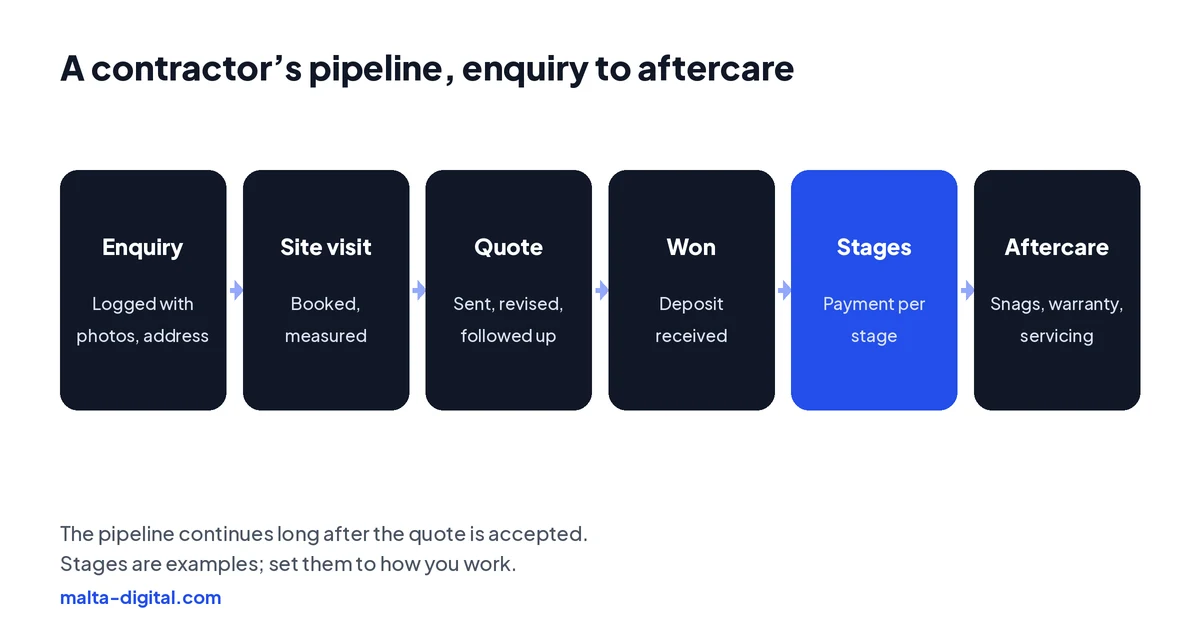
Requests reach a Maltese contractor from everywhere: a call while you are on site, a WhatsApp voice note with three photos of a damp wall, a Facebook or Instagram lead form, a message through your website, an email from a perit with drawings attached, and the neighbour who stopped your van in the street. If each one lives where it arrived, some will be forgotten, and the forgotten ones are often the good ones.
A CRM gives every request one record with the basics a contractor actually needs: name and number, the locality and full address, the type of work, the size of the job, any photos or drawings, how urgent it is and where the enquiry came from. A short web form or a WhatsApp reply with the right questions (what needs doing, where, and a couple of photos) means most requests arrive ready to price or ready to book a visit.
Then it gives each request an owner and a next step with a date. If nobody has replied in a set time, the CRM reminds them. Speed matters in a small market: a homeowner in Naxxar who asks three firms for a price usually goes with the one who calls back first and turns up when they said they would. Our guide to lead follow-up automation shows how to automate the first reply without sounding like a robot.
Site visits
For most contractors the site visit is the real sales meeting. It is also where the most time is lost: driving from Gozo to the south for a job that was never going to happen, or arriving without knowing the client had already sent photos and measurements.
In a CRM, a visit is booked straight from the enquiry into the right person’s calendar, grouped by area where possible, with a confirmation and a reminder to the client that includes the time window. On site, the estimator opens the record on a phone, sees everything sent so far, adds measurements, photos and notes, and ticks a short checklist for that type of work: access for a crane or a hoist, parking, whether a perit is involved, whether the client is the owner or a tenant, and in apartments, whether the common parts or neighbours are affected.
Those notes are what make the quote fast and accurate. They also protect you later. When a client says “that was included”, the photos and notes from the first visit, with dates, settle most arguments before they start.
Quotes
A contractor’s quote is rarely one document. There is the first price, a revised one when the client changes the tiles, a third when the perit’s drawings arrive, and often an “option B” with a different finish. When those live as PDFs in email, nobody is sure which version the client accepted.
A CRM keeps every version on the client’s record, with what changed and when, and shows which one was accepted. It can build quotes from your own price list and templates so a standard job takes minutes, not an evening. When a quote has been open for a few days, it reminds you to call or sends a short, friendly message asking if there are any questions. Many quotes are not lost on price at all; nobody followed them up.
Track why you lose quotes too. A dropdown with four or five reasons (price, timing, went with someone they know, project postponed, no reply) takes two seconds to fill in and, after a few months, tells you more about your business than any report. Our quote and invoice automation guide covers building and sending quotes in detail.
Projects
Here a contractor’s CRM differs most from a normal sales CRM. Winning the job is the start. A bathroom renovation, a full finish on a shell apartment or an aluminium and glazing package for a new block runs for weeks or months, with stages, deposits and payments tied to each stage.
Set up properly, each won quote becomes a project with its stages (for example strip-out, plumbing and electrics, plastering, tiling, fit-out, handover), the amount due at each one and who is responsible. When a stage is marked complete, the CRM prompts the invoice or payment request, and shows what is outstanding across all projects on one screen. That single view of “money we are owed, by project and stage” is what most contractors are missing.
Variations need the same discipline. When a client asks for an extra socket or a different shower screen on site, log it on the project with the agreed price before the work is done, and get it confirmed in writing, by email or WhatsApp. At the end, the final account is a list, not a negotiation.
Partners
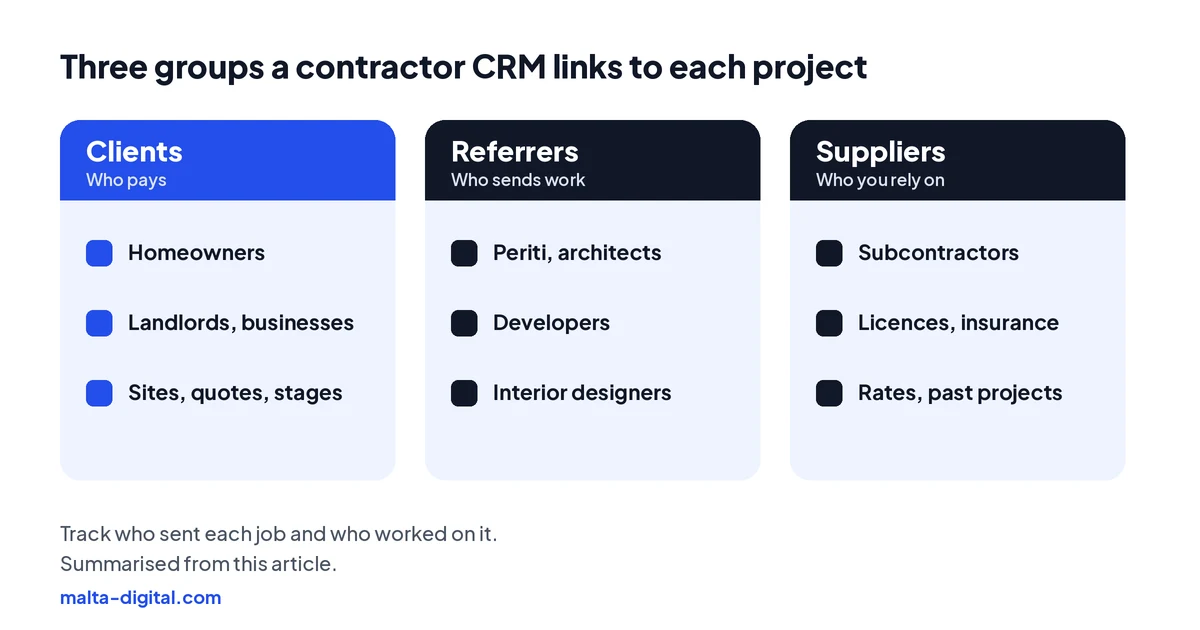
In Malta, a lot of contracting work comes through people who are not the end client: periti and architects who recommend a firm, developers with a block to finish, interior designers who need reliable trades, and property managers. These relationships are worth more than any single job, and a CRM should treat them as such: who has sent you work, what came of it and when you last spoke.
On the other side are the people you rely on. A CRM can hold your subcontractors and suppliers with their trades, rates, insurance details and, where it applies, their licences. Since the Construction Industry Licensing Regulations (S.L. 623.09), contractors carrying out demolition, excavation and piling, or construction in Malta need a licence from the Building and Construction Authority, valid for two years and renewed at least 90 days before it expires. Keeping your own licence date and those of the firms you subcontract to in the CRM, with a reminder well ahead, is a simple way to avoid surprises.
It also gives you a record of which subcontractor was on which project, which matters if a problem shows up a year later.
Apply now and tell us what trades you cover, how many teams you run and how enquiries and quotes are handled today. We’ll show you what a CRM would take off your plate, or message us on WhatsApp.
Aftercare
The end of a project is where many contractors leave money on the table. A short snag list in the CRM, with photos and a date to come back, closes the job cleanly and stops the final payment being held over small things. Ask for a review at that point, the same way for every client, with a direct link to your Google profile.
Then think in years, not weeks. Air conditioning needs servicing, solar systems and water heaters need checks, waterproofing has a guarantee period, and a family who had their kitchen done often comes back for the bathroom. A CRM can remind you, or message the client, at the right time: before summer for AC, after the first winter for waterproofing. Repeat work and referrals from past clients cost almost nothing to win; the only thing they need is a system that remembers.
Keep client data tidy while you do this. Use personal logins, keep marketing messages to people who agreed to them, and delete old leads who never became clients after a set period. Our guide to CRM and GDPR in Malta covers the settings.
Ready-made or custom
There are three routes. Field service and job management apps are strong on scheduling, job sheets and invoicing, and usually lighter on long sales cycles and project stages. General CRMs such as HubSpot, Zoho or Pipedrive are strong on enquiries and pipelines, and need setup for site visits, quote versions and stage payments. A custom system is built around your trades, your stages, your price list and your accounting.
A ready-made tool is usually right for a small trade business with one or two vans and short jobs. Custom becomes worth it when you run several teams and trades, mix small call-outs with long projects, quote from your own price lists and want quotes, projects, payments and scheduling in one place rather than three apps that do not talk to each other. At Malta Digital, custom CRM systems start from €7,500, excluding VAT. Our CRM quiz gives an honest first answer in two minutes, and the lost leads calculator shows what slow follow-up may be costing you.
| Job management app | General CRM | Custom system | |
|---|---|---|---|
| Best for | Small trade teams with short jobs | Firms that mainly need sales follow-up | Several teams and trades, long projects |
| Site visits and quotes | Good for simple quotes | Needs setup for visits and versions | Built around your visit and quote steps |
| Project stages and payments | Often basic | Set up as custom stages | Built in, with your stages and rules |
| Watch out for | Weak sales follow-up | Paying per user as the team grows | A rushed scope; skipping mapping and testing |
Proof
Our closest example is a booking and dispatch system we built for a skip hire and waste business. Requests used to come in by phone, Messenger and a contact form, and the day was planned in people’s heads. The system gives customers a mobile booking flow, gives the office a view of daily capacity, vehicles and drivers, and gives drivers a simple list of jobs to mark done. It is now being rolled out, so there are no results to share yet; the case study shows what we built and how it works.
The same building blocks (one record per request, the office seeing capacity before saying yes, crews reporting back from the road) are what a contractor CRM is made of. Our case studies also include a furniture installer whose new website and ads send customers straight to WhatsApp, which is where a contractor CRM picks up the enquiry.
Read the skip hire booking and dispatch case study
Want every enquiry, quote and stage payment in one place? Message us on WhatsApp
How we do it
We start on your side of the table: a session with the owner, whoever answers the phone and one of the people who prices jobs, to map how an enquiry becomes a visit, a quote, a project and a final payment today. We note where things get stuck and what you would like the system to do for you. Then we propose the route that fits, either setting up a ready-made tool or building a custom system, with the scope, price and timeline in writing before work starts.
The build follows the map. We import your contacts, open quotes and live projects from spreadsheets or your old software and check them against the source, connect your website, ads and WhatsApp, set roles for office, estimators and site leads, and train the team on real jobs. Our free CRM setup checklist lists every step, and the CRM page explains what is included.
A few straight answers
The one that fits how your jobs run. Small trade teams with short jobs often do well with a job management app. Firms with several teams, long projects, stage payments and their own price lists often need a custom CRM. Take the free CRM quiz for a quick first answer.
A CRM handles the client and sales side: enquiries, site visits, quotes, follow-up, projects and payments. Job scheduling software runs the day: who goes where and when, job sheets and photos. Many contractors need both, connected.
Yes, if it is set up for projects. Each project gets stages with the amount due at each one, and every variation is logged with its price and the client’s confirmation before the work is done.
Yes. Subcontractors and suppliers can have their own records with trades, rates, insurance and licence expiry dates, and the CRM reminds you before anything runs out.
Yes. WhatsApp chats can be logged against the client or a WhatsApp Business number connected to the CRM, so photos and agreements stay with the business, not on one person’s phone.
It helps you reply faster, follow up every open quote and see why you lose the ones you lose. It cannot make a price competitive, but it stops good quotes being forgotten.
Ready-made tools charge a subscription, usually per user. Malta Digital’s custom CRM systems start from €7,500, excluding VAT, depending on users, workflows and integrations.
Keep reading
One board for jobs and technicians, a phone app with job sheets and photos, on-the-way messages, recurring jobs and invoices from finished work.

Quotes from your price list in minutes, follow-ups on open quotes, invoices on acceptance, payment reminders, VAT and e-invoicing.

Portal and WhatsApp leads, buyer matching, viewings, konvenju dates, lettings and FIAU checks in one system, and when custom is worth it.
A useful first step
We map how your jobs really run, then connect calls, WhatsApp, your website and ads, quotes, stages and payments. Custom CRM systems from €7,500, excluding VAT.